Appliance & electronics support
Find your model numberAbout our sources
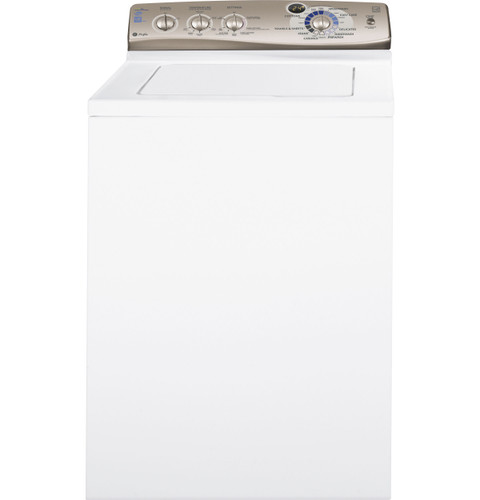
GE Profile PTWN6250M washer — manufacturer product image
Photo: PTWN6250MWT white variant. Shared source photo. Photo source
Manufacturer sources

GE Profile PTWN6250M

Power on, cycle not starting

Washing machine · US market · 48 owner topics

GE Profile PTWN6250M / PTWN6250MWT HydroWave Infusor washer

Covers PTWN6250M and the manufacturer-listed models in this family.

GE Profile PTWN6250M / PTWN6250MWT HydroWave Infusor washer

PTWN6250M / PTWN6250MWT: when the control lights but the cycle will not start

When the display is active, check the start conditions rather than treating the symptom as loss of power. This washer uses a rotary Cycle Selector and START/STOP-PAUSE button; status messages include Lid, Fill and Pause. Each points to a different owner check.

The lid is a safety interlock. The manual says the washer will not fill, spin or agitate with the lid open. Do not bypass the lid magnet or reach into a moving basket.

Read status before changing settings

“Lid” means the lid is open; close it. “Pause” means press START to resume. “Fill” means the basket is filling, and time may update. Load sensing can be quiet. EcoFill specifically requires a closed lid while the basket turns to sense load size.

Use selector and START correctly

Turn the selector to the desired cycle and press START. Press START again to pause, then again to resume. If the selector is turned after a cycle started, the washer stops and resets to the newly chosen cycle; press START to begin.

Check both supplies

The no-operation chart includes closed faucets. Confirm hot and cold supply valves are open and hoses are visibly unkinked. If Fill appears but water does not come in, inlet screens may be obstructed; the owner manual procedure begins by shutting off water and disconnecting hoses. Use service if the valves cannot be shut off safely.

After a long pause or cancellation

A pause longer than 24 hours cancels the cycle. Select the desired cycle again. If water remains, use Drain & Spin. The manual also says holding the button for three seconds stops a cycle; avoid repeated knob changes because each can reset the chosen cycle.

Know when it needs service

If the closed lid, open faucets, correct cycle and START do not begin operation, note the message and whether water entered. A missing lid magnet is listed as a service condition. If the problem continues after the documented checks, arrange service rather than opening the control console.

Use the status display as a sequence

A normal start proceeds from a selected cycle and closed lid to load sensing and fill. The manual says sensing may not make noise at the beginning; the basket may move in EcoFill while the lid remains closed. Wait for the “Fill” message or other progress rather than changing the selector.

If a cycle was paused, press START again. If the machine was paused longer than 24 hours, select a fresh cycle. Turning the selector after start resets to the new cycle; hold the documented stop action only when intentionally cancelling. This prevents an accidental selector change from being mistaken for a control failure. If a lid warning remains with lid shut, the owner manual lists the lid magnet as a service condition.

Remember that lid opening does not pause the cycle

The Owner Manual states that raising the lid stops fill, agitation and spin but does not pause the timer. That distinction matters if the user lifted the lid to add clothing and later sees no expected action: close it and check the display, but do not assume the cycle clock paused. If the lid was open for a long interval and the cycle was paused more than 24 hours, it has cancelled and needs a fresh selection.

“Pause” appears

Cycle is paused

Press START to continue.

“Lid” persists with lid closed

Lid detection may have a fault

Contact service; do not bypass.

“Fill” without water

Supply flow or screen may be restricted

Check valves/visible hoses and follow safe manual procedure.

Specifications & model details

PTWN6250M: model-specific checks

Start with this washer’s layout

GE Profile PTWN6250M is listed as Top-Loading high-efficiency. For this recorded top-loading GE Profile design, place the first inspection at the lid, basket rim, fitted dispenser and the visible fill/drain connections. For a spin complaint, separate retained water from an uneven load, then check the selected cycle and lid state. Keep clothing loose enough to move; an agitator, impeller or automatic-fill procedure needs its own feature match.

The source’s control description

GE Profile PTWN6250M has controls described as Automatic with a vertical axis. This identifies the recorded operating design. Use the printed cycle and control labels on the machine to distinguish a paused selection, a lid condition and a completed cycle before looking for a diagnostic-code sequence.

Recorded model facts

Model details relevant to this topic

SpecificationRecorded valueEvidence
DOE capacity3.6 cu ft
Manufacturer
GE Profile PTWN6250M — specs

Exact-model manufacturer resource; Specification 260192, revised 4/11, pp. 1–2; explicit base and finish listing

GE specification 260192, revised 4/11, titles the base PTWN6250M and explicitly lists finish model PTWN6250MWT. Base/retail relationship is documented here; no other suffix or serial range is inferred. Specification 260192, revised 4/11, pp. 1–2; explicit base and finish listing

Observed Oct 27, 2026

Other observations retained:

3.7 cu ft — California Energy Commission — Washing machines archive; cec-washers.xlsx; sheet ClothesWashers_12022025; row 4128

Cancel cycleHold Start for 3 seconds
Manufacturer
GE Profile PTWN6250M — owner

Exact-model manufacturer resource; Owner manual 49-90400-1, 07/06/10; pp. 1, 4–7, 9

GE specification 260192, revised 4/11, titles the base PTWN6250M and explicitly lists finish model PTWN6250MWT. Base/retail relationship is documented here; no other suffix or serial range is inferred. Owner manual 49-90400-1, 07/06/10; pp. 1, 4–7, 9

Observed Oct 27, 2026
Electronics restart wait2 minutes
Manufacturer
GE Profile PTWN6250M — owner

Exact-model manufacturer resource; Owner manual 49-90400-1, 07/06/10; pp. 1, 4–7, 9

GE specification 260192, revised 4/11, titles the base PTWN6250M and explicitly lists finish model PTWN6250MWT. Base/retail relationship is documented here; no other suffix or serial range is inferred. Owner manual 49-90400-1, 07/06/10; pp. 1, 4–7, 9

Observed Oct 27, 2026
Maximum spin speed700 RPM
Manufacturer
GE Profile PTWN6250M — specs

Exact-model manufacturer resource; Specification 260192, revised 4/11, pp. 1–2; explicit base and finish listing

GE specification 260192, revised 4/11, titles the base PTWN6250M and explicitly lists finish model PTWN6250MWT. Base/retail relationship is documented here; no other suffix or serial range is inferred. Specification 260192, revised 4/11, pp. 1–2; explicit base and finish listing

Observed Oct 27, 2026
Suds-saving capability in archiveFalse
Archive
California Energy Commission — Washing machines archive

cec-washers.xlsx; sheet ClothesWashers_12022025; row 4128

Regulatory archive observation; test standard and measurement context follow the original record.

Observed Oct 27, 2026
Temperature systemPerfecTemp; Tap Cold bypasses temperature regulation
Manufacturer
GE Profile PTWN6250M — owner

Exact-model manufacturer resource; Owner manual 49-90400-1, 07/06/10; pp. 1, 4–7, 9

GE specification 260192, revised 4/11, titles the base PTWN6250M and explicitly lists finish model PTWN6250MWT. Base/retail relationship is documented here; no other suffix or serial range is inferred. Owner manual 49-90400-1, 07/06/10; pp. 1, 4–7, 9

Observed Oct 27, 2026
Unheated rinse option in archiveTrue
Archive
California Energy Commission — Washing machines archive

cec-washers.xlsx; sheet ClothesWashers_12022025; row 4128

Regulatory archive observation; test standard and measurement context follow the original record.

Observed Oct 27, 2026
Wash mechanismInfusor
Manufacturer
GE Profile PTWN6250M — specs

Exact-model manufacturer resource; Specification 260192, revised 4/11, pp. 1–2; explicit base and finish listing

GE specification 260192, revised 4/11, titles the base PTWN6250M and explicitly lists finish model PTWN6250MWT. Base/retail relationship is documented here; no other suffix or serial range is inferred. Specification 260192, revised 4/11, pp. 1–2; explicit base and finish listing

Observed Oct 27, 2026
Wash programsCottons, Prewash, Casuals, Easy Care, Delicates, Hand Wash, Speed, Drain & Spin, Towels & Sheets, Jeans, Quick Rinse
Manufacturer
GE Profile PTWN6250M — owner

Exact-model manufacturer resource; Owner manual 49-90400-1, 07/06/10; pp. 1, 4–7, 9

GE specification 260192, revised 4/11, titles the base PTWN6250M and explicitly lists finish model PTWN6250MWT. Base/retail relationship is documented here; no other suffix or serial range is inferred. Owner manual 49-90400-1, 07/06/10; pp. 1, 4–7, 9

Observed Oct 27, 2026
Wash systemHydroWave with Infusor
Manufacturer
GE Profile PTWN6250M — specs

Exact-model manufacturer resource; Specification 260192, revised 4/11, pp. 1–2; explicit base and finish listing

GE specification 260192, revised 4/11, titles the base PTWN6250M and explicitly lists finish model PTWN6250MWT. Base/retail relationship is documented here; no other suffix or serial range is inferred. Specification 260192, revised 4/11, pp. 1–2; explicit base and finish listing

Observed Oct 27, 2026
Washer controlsAutomatic
Archive
California Energy Commission — Washing machines archive

cec-washers.xlsx; sheet ClothesWashers_12022025; row 4128

Regulatory archive observation; test standard and measurement context follow the original record.

Observed Oct 27, 2026
Water fillPreciseFill automatic load sensing
Manufacturer
GE Profile PTWN6250M — specs

Exact-model manufacturer resource; Specification 260192, revised 4/11, pp. 1–2; explicit base and finish listing

GE specification 260192, revised 4/11, titles the base PTWN6250M and explicitly lists finish model PTWN6250MWT. Base/retail relationship is documented here; no other suffix or serial range is inferred. Specification 260192, revised 4/11, pp. 1–2; explicit base and finish listing

Observed Oct 27, 2026
More background: Power on, cycle not starting

Category & symptom guidance

Power on, cycle not starting

Read the panel before pressing again

Identify whether the washer shows a selected cycle, a pause message, a lock symbol, or an error. If the display is blank, use the no-power checks instead. If it is lit, repeated pressing can change selections or cancel a cycle, so first note the current state.

Some washers spend time sensing before obvious movement or water appears. A quiet pause at startup can be part of normal operation, particularly on sensing designs. Wait for the behavior described by the exact model rather than assuming the washer failed to start after a few seconds.

Confirm closure and cycle selection

Check that the washer door or lid is fully closed and that laundry is not caught in a front-loader door seal or protruding over a top-loader rim. Select a valid cycle and options, then use the normal Start control once. On a top-loader, an open lid may prevent filling or agitation; on a front-loader, the door must be latched before operation.

The GE PTWN6250M manual states that its lid must be closed for filling and starting. This is a specific example, not a universal control sequence. Some washers have different start buttons, delayed-start settings, or door-lock indicators.

Check pause, delay, and control lock

Look for a delay-start selection, a paused-cycle indicator, or a control-lock symbol. Use only the labeled control or the exact model’s owner instructions to change that state. If a control lock is active, the manual should identify the release method; do not try combinations from another washer or a generic web video.

If the cycle was paused, use the documented resume action. Some top-load models stop when the lid is raised but continue the timer; others show a distinct pause state. The GE example’s owner manual describes its Start control and lid behavior, but those details must not be transferred to other designs.

Know when the start failure needs service

If the display indicates a closed door or lid but the washer repeatedly will not proceed, note whether it locks, clicks, fills, or shows a code. A click without a cycle may indicate an unresolved start condition, but it does not identify a failed part by itself. Check visible closure and selection once, then follow the fault-specific instructions for the model.

Stop if the door or lid is damaged, the washer leaks, or the controls behave erratically. If the same symptom returns on an ordinary cycle after documented checks, contact support with the displayed state and the precise point where progress stops.

Check for a delayed start selection

A dryer with power may be waiting because a delayed-start option is selected. Look at the display for a delay indicator or a future start time before changing settings. If the panel shows a delay, cancel or change it only using the exact model’s labeled controls and instructions; pressing Start repeatedly may leave the selection unchanged or alter another setting.

After clearing a documented delay, select a simple cycle and make one start attempt. If no delay is shown, do not assume this is the cause: return to the door, control-lock, and cycle checks. A remote-start feature may also affect which local action is required on some models, so use the status shown on the dryer and its matching guide. If the display acknowledges the selection but the drum does not begin, stop and contact support rather than bypassing a door or control.

What to do with what you find

Panel is lit and a lock or delay indicator is shown.

A selected control state may be holding the cycle.

Follow the exact model’s instructions for that indicator.

Cycle selection is valid but lid or door is not fully closed.

The washer may be waiting for its closure condition.

Clear caught laundry and close it fully before starting.

The washer repeatedly stops at the same point with no visible start condition issue.

A persistent control or latch issue may need diagnosis.

Capture the display and cycle sequence and contact support.

Have these details ready

  • Panel display and indicator symbols
  • Door or lid closure and any trapped laundry
  • Selected cycle, delay, pause, or lock state
  • Whether the washer clicks, locks, fills, or remains silent

Common questions

The washer is quiet after I press Start. Is it broken?

Not always. Some sensing washers pause before filling or moving. Check the exact model’s startup description and whether a status message is displayed.

How do I turn off control lock?

Use the labeled lock control or the exact owner manual’s instructions. Release methods vary, so avoid guessed button combinations.

General background sources

These sources support the shared guide. Exact model specifications and matched family procedures have their own sources above.

  1. images.salsify.com/image/upload/s--4zVee-ir--/44e1044e71329cd6678e18edc3950e53c5694077.pdf
  2. media.us.lg.com/m/6d5d734b0871fbdf/original/WM4000_Owners-Manual.pdf
  3. producthelp.whirlpool.com/Laundry/Washers/Product_Info/Washer_Product_Assistance/Auto_Sensing_in_a_Top_Load_HE_Washer
  4. gscs-b2c.lge.com/downloadFile?fileId=2yGdcTa7P2CJgWmTA

Owner guidance by Specs & Parts, drafted with GPT-6 Luna. Sources and scope.

Sources for PTWN6250M

GE Profile PTWN6250M — owner Observed Oct 27, 2026
GE Profile PTWN6250M — specs Observed Oct 27, 2026
Suggest a correction