Appliance & electronics support
Find your model numberAbout our sources
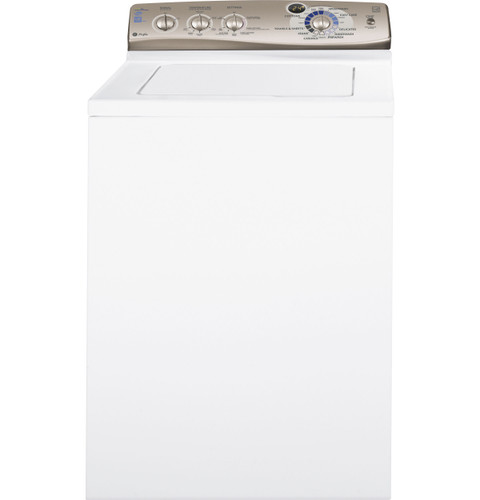
GE Profile PTWN6250MWT washer — manufacturer product image
Photo: PTWN6250MWT. Shared source photo. Photo source
Manufacturer sources

GE Profile PTWN6250MWT

No power & starting

Washing machine · US market · 48 owner topics

GE Profile PTWN6250M / PTWN6250MWT HydroWave Infusor washer

Covers PTWN6250MWT and the manufacturer-listed models in this family.

GE Profile PTWN6250M / PTWN6250MWT HydroWave Infusor washer

PTWN6250M / PTWN6250MWT: diagnose a blank or inactive washer

A dark control panel differs from a powered washer that will not begin a cycle. GE’s chart lists unplugged power, control setup, open lid, supply faucets, household circuit protection and an electronics reset as checks. Work only with dry, visible connections; do not open electrical panels or handle a wet plug.

The quick spec identifies 120V/60Hz and installation requires a grounded individual circuit. The installation guide prohibits extension cords and adapters.

Check display and plug safely

If the control is dark, check whether the cord is visibly seated in a dry, accessible outlet. Do not pull the washer forward or touch the plug when water is nearby. The installation sheet calls for a grounded three-prong receptacle and a 15- or 20-amp circuit.

Confirm operating conditions

The chart names both water supply turned off and lid open among no-operation causes. Turn both faucets fully on if safely accessible; close the lid and select a cycle. The washer must have the lid closed to fill and start. A persistent “Lid” message when closed is a service issue; do not bypass the lid magnet.

Set cycle and press START

Select a cycle and press START. Pressing START again pauses or resumes. Turning the selector after start stops the washer and resets it to the new selection, so check the knob before concluding that the controls are dead.

Use the specific reset only if safe

The manual’s operation chart says unplug the washer, wait two minutes, reconnect and press START when electronics need resetting. Do this only if the plug and floor are dry and accessible. If the breaker trips again, stop and use qualified electrical/appliance service; do not repeatedly reset it.

Escalate

A damaged cord, warm or loose outlet, repeated trip, blank panel at a known working outlet, or unrecognized display warrants professional attention. Record whether lights appeared, whether the lid message cleared, and whether power returned after the documented reset.

Separate appliance power from a start condition

If any light or status message appears, the washer has power and the next check is lid, cycle selection or START. The manual says the closed lid is necessary for operation; a raised lid stops fill, agitation and spin while the timer continues. If control is entirely blank, follow the dry-access plug and outlet check rather than pressing START repeatedly.

The rating/spec sheet lists 120V, 60Hz, 10A and the installation instructions specify a dedicated grounded branch circuit protected by a 15- or 20-amp breaker or time-delay fuse. These are identification requirements for a qualified electrician, not an invitation to inspect the panel. Never substitute an extension cord or adapter.

Check for a household circuit issue without opening it

If the washer is plugged in but unresponsive, the owner chart lists a tripped breaker or blown fuse. Check only whether other household equipment has power and whether the breaker appears tripped; the installation sheet specifies that the washer should have a separate outlet. If the breaker trips again, do not reset repeatedly. A qualified electrician can check the circuit and grounding.

Washer/outlet area is wet

Power access is unsafe

Keep clear and wait for qualified help.

Lid message persists while shut

Lid sensing may need service

Do not defeat interlock.

Breaker trips repeatedly

Electrical fault may exist

Stop using the washer and call qualified service.

Specifications & model details

PTWN6250MWT: model-specific checks

Start with this washer’s layout

GE Profile PTWN6250MWT is listed as Top-Loading high-efficiency. For this recorded top-loading GE Profile design, place the first inspection at the lid, basket rim, fitted dispenser and the visible fill/drain connections. For a spin complaint, separate retained water from an uneven load, then check the selected cycle and lid state. Keep clothing loose enough to move; an agitator, impeller or automatic-fill procedure needs its own feature match.

Recorded model facts

Model details relevant to this topic

SpecificationRecorded valueEvidence
DOE capacity3.6 cu ft
Manufacturer
GE Profile PTWN6250M — specs

Exact-model manufacturer resource; Specification 260192, revised 4/11, pp. 1–2; explicit base and finish listing

GE specification 260192, revised 4/11, titles the base PTWN6250M and explicitly lists finish model PTWN6250MWT. Base/retail relationship is documented here; no other suffix or serial range is inferred. Specification 260192, revised 4/11, pp. 1–2; explicit base and finish listing

Observed Oct 27, 2026
Wash Basket TypeStainless Steel
Manufacturer
GE — PTWN6250MWT

Exact-model manufacturer resource; specification fields

Exact SKU PTWN6250MWT; manufacturer specification label: Wash Basket Type.

Observed Oct 27, 2026
Adaptive CapabilitiesAdaptive Fill
Manufacturer
GE — PTWN6250MWT

Exact-model manufacturer resource; specification fields

Exact SKU PTWN6250MWT; manufacturer specification label: Adaptive Capabilities.

Observed Oct 27, 2026
Additional Washer Features_1Auto Balance Suspension System
Manufacturer
GE — PTWN6250MWT

Exact-model manufacturer resource; specification fields

Exact SKU PTWN6250MWT; manufacturer specification label: Additional Washer Features_1.

Observed Oct 27, 2026
Additional Washer Features_2Front Serviceable
Manufacturer
GE — PTWN6250MWT

Exact-model manufacturer resource; specification fields

Exact SKU PTWN6250MWT; manufacturer specification label: Additional Washer Features_2.

Observed Oct 27, 2026
Additional Washer Features_3Galvanized Steel Cabinet
Manufacturer
GE — PTWN6250MWT

Exact-model manufacturer resource; specification fields

Exact SKU PTWN6250MWT; manufacturer specification label: Additional Washer Features_3.

Observed Oct 27, 2026
Cancel cycleHold Start for 3 seconds
Manufacturer
GE Profile PTWN6250M — owner

Exact-model manufacturer resource; Owner manual 49-90400-1, 07/06/10; pp. 1, 4–7, 9

GE specification 260192, revised 4/11, titles the base PTWN6250M and explicitly lists finish model PTWN6250MWT. Base/retail relationship is documented here; no other suffix or serial range is inferred. Owner manual 49-90400-1, 07/06/10; pp. 1, 4–7, 9

Observed Oct 27, 2026
Casuals Cycle_1Medium Soil
Manufacturer
GE — PTWN6250MWT

Exact-model manufacturer resource; specification fields

Exact SKU PTWN6250MWT; manufacturer specification label: Casuals Cycle_1.

Observed Oct 27, 2026
Casuals Cycle_2Light Soil
Manufacturer
GE — PTWN6250MWT

Exact-model manufacturer resource; specification fields

Exact SKU PTWN6250MWT; manufacturer specification label: Casuals Cycle_2.

Observed Oct 27, 2026
Control TypeRotary-Electronic
Manufacturer
GE — PTWN6250MWT

Exact-model manufacturer resource; specification fields

Exact SKU PTWN6250MWT; manufacturer specification label: Control Type.

Observed Oct 27, 2026
Cottons CycleHeavy Soil/Medium Soil/ Light Soil
Manufacturer
GE — PTWN6250MWT

Exact-model manufacturer resource; specification fields

Exact SKU PTWN6250MWT; manufacturer specification label: Cottons Cycle.

Observed Oct 27, 2026
Delicates CycleYes
Manufacturer
GE — PTWN6250MWT

Exact-model manufacturer resource; specification fields

Exact SKU PTWN6250MWT; manufacturer specification label: Delicates Cycle.

Observed Oct 27, 2026
More background: No power & starting

Category & symptom guidance

No power & starting

Separate no power from no response

Look at the display, indicator lights, and any audible response when you use the normal power control. A completely dark panel differs from a lit panel that ignores a cycle selection. Also note whether the washer stopped during a cycle, whether a breaker tripped, and whether another device on the same household circuit has lost power.

Do not repeatedly reset a breaker that trips again. A recurring trip can indicate an electrical fault or overloaded circuit. If there is a burning smell, smoke, a hot plug, or visible cord damage, stop and keep the washer unplugged if that can be done safely.

Check the ordinary power path

Confirm that the plug appears fully seated and that the outlet is not controlled by a switched circuit, if applicable. If the outlet is visibly damaged, warm, wet, or loose, do not use it. A homeowner may check the appropriate breaker once if the panel is dry and accessible; if it trips again, leave it off and contact an electrician.

Do not use an extension cord or adapter to test the washer. Installation requirements differ across models. For example, GE PTWN6250M installation instructions specify a properly grounded individual branch circuit; the LG WM4000H*A manual also calls for a grounded outlet and prohibits an extension cord. These examples do not substitute for the exact washer’s electrical rating.

Check for a control response

If the panel lights, inspect for a displayed status, selected cycle, or lock indicator. Some washers require a control lock to be released using the labeled control or the model’s documented instruction. Do not guess a multi-button combination: controls and lock behavior vary. If the panel is lit but does not respond, use the owner documentation for the exact model to distinguish a lock, paused cycle, or control problem.

If the washer stopped after a pause or interruption, use its normal documented resume or cancel action. Avoid disconnecting power as a general reset unless the manual specifically instructs it; that can leave a cycle state unclear.

Choose the next call based on evidence

If the outlet works for another appropriate device but the washer remains dark, the appliance may need service. Do not open the cabinet, inspect wiring, bypass switches, or probe internal parts. If the outlet itself appears dead and other devices also fail, an electrician or household circuit diagnosis is the better path.

When contacting support, distinguish “no lights at all” from “lights on but controls unresponsive.” Include whether a breaker tripped, any display text, and whether power failed during a cycle. This directs troubleshooting without assuming a failed board or motor.

Check whether a household outlet reset is needed

If the washer is dark but the plug and outlet look intact, check whether the home has a tripped circuit breaker or a tripped ground-fault outlet that serves the laundry area. A protected outlet may have a reset control; use it only if the outlet is dry, undamaged, and its controls are plainly accessible. If another device has also lost power, that points toward the household supply rather than a washer control setting.

Do not remove an outlet cover or test wiring. If a reset control will not stay set, trips again, or the outlet is warm, wet, loose, or discolored, leave it alone and contact an electrician. If household power is restored but the washer remains dark, the appliance needs model-specific support. This check complements the breaker check: some laundry circuits use a protective outlet whose status is not obvious from the washer’s display.

What to do with what you find

Panel is dark and the breaker trips again after one reset.

Repeated energizing may be unsafe and the cause is not a routine control setting.

Leave the breaker off and contact an electrician or appliance support.

Panel lights but does not accept input.

A control lock, pause state, or appliance control issue may be involved.

Check the exact model’s labeled lock and resume guidance.

Outlet appears damaged, wet, warm, or loose.

The power source itself needs attention.

Do not plug in the washer; have the outlet assessed.

Have these details ready

  • Whether display and indicators are completely dark
  • Breaker behavior and other devices affected
  • Outlet or cord visible condition
  • Any status or lock indicator on the panel

Common questions

Can I use an extension cord to see if the washer powers on?

No. manufacturer washer manuals advise against extension cords, and a cord does not establish that the circuit is appropriate for the appliance.

The display is on but Start does nothing. Is that a power failure?

Not necessarily. Check for a control lock, paused cycle, or required selection using the exact model’s owner instructions.

General background sources

These sources support the shared guide. Exact model specifications and matched family procedures have their own sources above.

  1. images.salsify.com/image/upload/s--dBhUJ9s5--/3f58f84eaa9d207a6fdadfa3a955c70b28005ee2.pdf
  2. media.us.lg.com/m/6d5d734b0871fbdf/original/WM4000_Owners-Manual.pdf
  3. images.salsify.com/image/upload/s--4zVee-ir--/44e1044e71329cd6678e18edc3950e53c5694077.pdf

Owner guidance by Specs & Parts, drafted with GPT-6 Luna. Sources and scope.

Sources for PTWN6250MWT

GE — PTWN6250MWT Observed Oct 27, 2026
GE Profile PTWN6250M — owner Observed Oct 27, 2026
GE Profile PTWN6250M — specs Observed Oct 27, 2026
Suggest a correction