Appliance & electronics support
Find your model numberAbout our sources
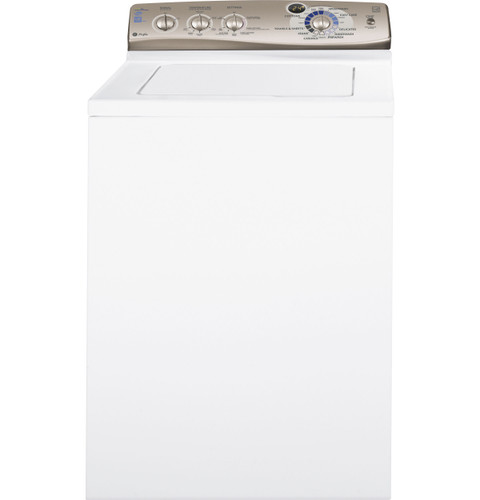
GE Profile PTWN6250MWT washer — manufacturer product image
Photo: PTWN6250MWT. Shared source photo. Photo source
Manufacturer sources

GE Profile PTWN6250MWT

Manuals & documents

Washing machine · US market · 48 owner topics

GE Profile PTWN6250M / PTWN6250MWT HydroWave Infusor washer

Covers PTWN6250MWT and the manufacturer-listed models in this family.

GE Profile PTWN6250M / PTWN6250MWT HydroWave Infusor washer

Use the right PTWN6250M operating or installation manual

The GE product record includes two distinct owner documents: Use and Care Manual and Installation Instructions. Use the owner manual for cycle selection, temperature, settings, loading, care, the two-minute control reset and troubleshooting. Use the install sheet for water, drain, grounding, floor, leveling and shipping-bar work.

These older documents identify a HydroWave/Infusor washer and a particular dial/button layout. Follow the labels shown on this washer; modern GE motor-reset, lid-lock, app or service procedures do not apply unless a matching source says so.

  1. Use owner manual for use/care and installation sheet for hookups/clearances.
  2. Check physical panel before applying any “on some models” option.
  3. Match label code before parts lookup.

Choose the document by the task

For operation, the Use and Care Manual shows Signal, Temperature, Settings, estimated-time display, Cycle Selector and Start/Stop-Pause. It defines Cottons, Prewash, Casuals, Easy Care, Delicates, Hand Wash, Speed, Drain & Spin, Towels & Sheets, Jeans and Quick Rinse. Its troubleshooting section covers fill, drain, spin, temperature and control behavior.

For hookups, use the separate Installation Instructions titled “Installation Instructions for Your New Washer.” It specifies pressure, hot-water delivery, shutoff valves, standpipe/set-tub drain, grounded circuit, hose connections and the shipping bar. Do not substitute a generic current GE drawing.

Use the quick reference for normal HE behavior

The quick-reference guide explains HydroWave/Infusor expectations: a low visible water level, quiet periods, pauses during initial sensing, and a swoosh/zip as the motor changes direction. Compare these observations with the guide before interpreting them as a fault.

It also describes fabric softener through the Infusor dispenser. The owner manual contains the detailed care steps and says the dispenser appears only on some models. Look at the physical dispenser before applying that procedure.

Check panel presence for optional controls

The owner manual marks AutoSoak, 2nd Rinse, Extended Spin and fabric-softener dispenser as “on some models.” It also says AutoSoak may be on the Cycle Selector rather than Settings. Compare your panel and document illustration instead of expecting every option to appear.

The cycle selector instructions say turning it after cycle start stops the washer and resets selection to the new cycle; press Start to begin it. This is a defined way to change cycles, not a general factory reset. Apply it only for the documented purpose.

Use the matching guide for service questions

The manuals place the model label under the lid. Use that exact code when searching GE support so parts and instructions align with the PTWN6250M/PTWN6250MWT scope. Save the document set with the washer for a future owner.

If a feature described in the manual is absent from the physical controls, the “on some models” qualifier may explain the difference. Confirm the exact code and control panel with GE before ordering a switch, dispenser or control.

Question concerns hose, drain height, outlet or shipping bar.

These are installation details, not cycle controls.

Use the matching installation instructions.

Settings control lacks an option shown in manual.

Several options are explicitly model-dependent.

Confirm physical model and panel before seeking a replacement part.

A current GE page gives a different reset routine.

The PTWN6250M manual does not establish that newer procedure.

Use only the reset and control steps printed in this family’s manual.

Common questions

Does every washer have AutoSoak?

No. The manual says it is on some models and may be on the Cycle Selector.

Where is the model label?

Under the washer lid; use that code to find matching documents.

Specifications & model details

PTWN6250MWT: model-specific checks

Official documents

Energy guide

EnergyGuide — PTWN6250M0WT revision

GE specification 260192, revised 4/11, titles the base PTWN6250M and explicitly lists finish model PTWN6250MWT. Base/retail relationship is documented here; no other suffix or serial range is inferred. Linked by the exact PTWN6250MWT manufacturer page. EnergyGuide explicitly names PTWN6250M0WT; its test-era figures are not confirmed for every production revision.

Link checked Nov 05, 2026
Open original
Installation guide

GE washer installation instructions

GE specification 260192, revised 4/11, titles the base PTWN6250M and explicitly lists finish model PTWN6250MWT. Base/retail relationship is documented here; no other suffix or serial range is inferred. Linked by the exact PTWN6250MWT manufacturer page. Match the controls and any optional-feature qualifications inside the original document.

Link checked Nov 05, 2026
Open original
Owner manual

PTWN6250M / PTWN6250MWT owner manual

Linked by the exact PTWN6250MWT manufacturer page. Check any model or production-revision notes inside the document.

Link checked Nov 05, 2026
Open original
Quick reference guide

GE washer quick reference guide

GE specification 260192, revised 4/11, titles the base PTWN6250M and explicitly lists finish model PTWN6250MWT. Base/retail relationship is documented here; no other suffix or serial range is inferred. Linked by the exact PTWN6250MWT manufacturer page. Match the controls and any optional-feature qualifications inside the original document.

Link checked Nov 05, 2026
Open original
Specification sheet

PTWN6250M dimensions and specifications

GE specification 260192, revised 4/11, titles the base PTWN6250M and explicitly lists finish model PTWN6250MWT. Base/retail relationship is documented here; no other suffix or serial range is inferred. Linked by the exact PTWN6250MWT manufacturer page. Match the controls and any optional-feature qualifications inside the original document.

Link checked Nov 05, 2026
Open original
GE manuals

Recorded model facts

Model details relevant to this topic

SpecificationRecorded valueEvidence
DOE capacity3.6 cu ft
Manufacturer
GE Profile PTWN6250M — specs

Exact-model manufacturer resource; Specification 260192, revised 4/11, pp. 1–2; explicit base and finish listing

GE specification 260192, revised 4/11, titles the base PTWN6250M and explicitly lists finish model PTWN6250MWT. Base/retail relationship is documented here; no other suffix or serial range is inferred. Specification 260192, revised 4/11, pp. 1–2; explicit base and finish listing

Observed Oct 27, 2026
Wash Basket TypeStainless Steel
Manufacturer
GE — PTWN6250MWT

Exact-model manufacturer resource; specification fields

Exact SKU PTWN6250MWT; manufacturer specification label: Wash Basket Type.

Observed Oct 27, 2026
Adaptive CapabilitiesAdaptive Fill
Manufacturer
GE — PTWN6250MWT

Exact-model manufacturer resource; specification fields

Exact SKU PTWN6250MWT; manufacturer specification label: Adaptive Capabilities.

Observed Oct 27, 2026
Additional Washer Features_1Auto Balance Suspension System
Manufacturer
GE — PTWN6250MWT

Exact-model manufacturer resource; specification fields

Exact SKU PTWN6250MWT; manufacturer specification label: Additional Washer Features_1.

Observed Oct 27, 2026
Additional Washer Features_2Front Serviceable
Manufacturer
GE — PTWN6250MWT

Exact-model manufacturer resource; specification fields

Exact SKU PTWN6250MWT; manufacturer specification label: Additional Washer Features_2.

Observed Oct 27, 2026
Additional Washer Features_3Galvanized Steel Cabinet
Manufacturer
GE — PTWN6250MWT

Exact-model manufacturer resource; specification fields

Exact SKU PTWN6250MWT; manufacturer specification label: Additional Washer Features_3.

Observed Oct 27, 2026
Cancel cycleHold Start for 3 seconds
Manufacturer
GE Profile PTWN6250M — owner

Exact-model manufacturer resource; Owner manual 49-90400-1, 07/06/10; pp. 1, 4–7, 9

GE specification 260192, revised 4/11, titles the base PTWN6250M and explicitly lists finish model PTWN6250MWT. Base/retail relationship is documented here; no other suffix or serial range is inferred. Owner manual 49-90400-1, 07/06/10; pp. 1, 4–7, 9

Observed Oct 27, 2026
Casuals Cycle_1Medium Soil
Manufacturer
GE — PTWN6250MWT

Exact-model manufacturer resource; specification fields

Exact SKU PTWN6250MWT; manufacturer specification label: Casuals Cycle_1.

Observed Oct 27, 2026
Casuals Cycle_2Light Soil
Manufacturer
GE — PTWN6250MWT

Exact-model manufacturer resource; specification fields

Exact SKU PTWN6250MWT; manufacturer specification label: Casuals Cycle_2.

Observed Oct 27, 2026
Control TypeRotary-Electronic
Manufacturer
GE — PTWN6250MWT

Exact-model manufacturer resource; specification fields

Exact SKU PTWN6250MWT; manufacturer specification label: Control Type.

Observed Oct 27, 2026
Cottons CycleHeavy Soil/Medium Soil/ Light Soil
Manufacturer
GE — PTWN6250MWT

Exact-model manufacturer resource; specification fields

Exact SKU PTWN6250MWT; manufacturer specification label: Cottons Cycle.

Observed Oct 27, 2026
Delicates CycleYes
Manufacturer
GE — PTWN6250MWT

Exact-model manufacturer resource; specification fields

Exact SKU PTWN6250MWT; manufacturer specification label: Delicates Cycle.

Observed Oct 27, 2026
More background: Find and use washer manuals

Category & symptom guidance

Find and use washer manuals

Choose the document for the question

An owner’s manual explains operation, care, laundry handling, and some troubleshooting. Installation instructions cover location, transport materials, hookups, leveling, and an initial check. A specification sheet summarizes selected dimensions and ratings. If a question concerns installation, do not rely only on a retailer’s quick reference or an owner manual’s brief overview.

Use manufacturer support or the paperwork supplied with the washer to locate documents. Search by the complete model number, then confirm the document’s title and model coverage. A document that covers an exact family may still include options limited to some models; look for those qualifiers before expecting a feature or following a procedure.

Check that the manual fits your washer

Compare the model printed on the appliance label with the model names or family coverage in the document. Pay attention to suffixes and revisions. Similar controls or cabinet styling do not prove that a procedure applies. If the document’s coverage is vague, ask manufacturer support to confirm the match before using a model-specific setting, measurement, part reference, or hookup instruction.

As a clearly named example, the LG WM4000H*A manual identifies that family and includes front-load installation and operating details. It is not a general LG washer manual. GE’s PTWN6250M owner manual is also specific to the named product family, even where it describes familiar top-load behavior.

Read warnings and conditional features

Warnings are practical boundaries: they identify conditions that can cause injury, damage, leaks, or unsafe operation. Read the steps around a warning, not just the heading. Pay particular attention to limits on household supply conditions, transport restraints, prohibited modifications, and situations that call for qualified service.

A statement such as “on some models” means the feature is not universal. Check the controls or product feature list for the exact washer before following that option’s directions. Do not borrow button sequences, numerical limits, or parts from an example manual. A front-load washer and a top-load washer may differ in loading, drain access, sensing, and control behavior.

Keep documents useful over time

Save a digital copy with the appliance paperwork and note which model it covers. Keep installation instructions accessible for a future move, service appointment, or hose replacement. If you download a newer document, compare its stated model coverage and date rather than assuming newer always means applicable to every revision.

When a manual does not answer the question, use its manufacturer support route and give the model and serial information requested. For fitment or safety questions, seek an explicit manufacturer answer. A search result, video, or forum post may describe another revision and should not override the product’s current official instructions.

Use the table of contents to narrow a question

Once you have a matching manual, use its contents or search terms to find the whole topic, then read the surrounding pages. A troubleshooting entry may point to a separate maintenance procedure, safety note, or installation requirement that changes what is appropriate for an owner to do. For a question about a displayed message, search both the exact wording and the troubleshooting heading; for a setup question, check installation as well as operation.

If the document is a scan and text search misses a term, browse the index or contents and inspect the likely page visually. Confirm that a result belongs to your model’s section, especially when a manual covers a family. A useful answer should describe the condition you actually see and the action you can safely take. If it only names a possible cause, keep looking for the prescribed owner check or service direction.

What to do with what you find

The document’s stated model coverage matches the washer and the relevant section addresses the task.

It is an appropriate source for the next owner check.

Follow the instructions and their warnings in context.

The document is for a similar model or marks the feature as available only on some models.

The procedure or feature may not apply.

Confirm coverage and feature availability with the exact manual or manufacturer support.

Have these details ready

  • Exact model number and document coverage
  • Relevant warning and model-feature qualifiers

Common questions

Which document should I use to check drain hookup?

Use the exact model’s installation instructions, supplemented by its owner manual where needed.

Can a manual for the same brand be treated as compatible?

No. Confirm exact model or family coverage and check any ‘some models’ qualifications.

General background sources

These sources support the shared guide. Exact model specifications and matched family procedures have their own sources above.

  1. media.us.lg.com/m/6d5d734b0871fbdf/original/WM4000_Owners-Manual.pdf
  2. images.salsify.com/image/upload/s--dBhUJ9s5--/3f58f84eaa9d207a6fdadfa3a955c70b28005ee2.pdf
  3. images.salsify.com/image/upload/s--4zVee-ir--/44e1044e71329cd6678e18edc3950e53c5694077.pdf

Owner guidance by Specs & Parts, drafted with GPT-6 Luna. Sources and scope.

Sources for PTWN6250MWT

GE — PTWN6250MWT Observed Oct 27, 2026
GE Profile PTWN6250M — owner Observed Oct 27, 2026
GE Profile PTWN6250M — specs Observed Oct 27, 2026
Suggest a correction