Appliance & electronics support
Find your model numberAbout our sources
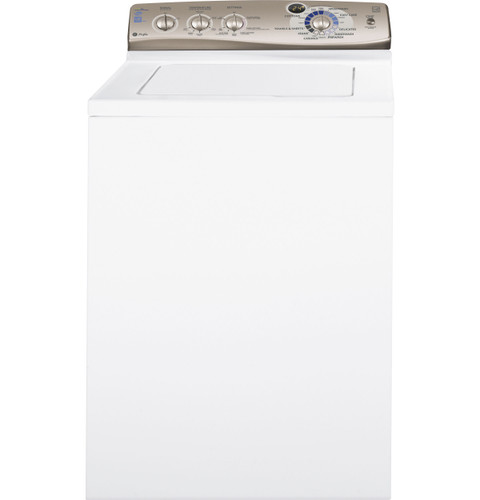
GE Profile PTWN6250MWT washer — manufacturer product image
Photo: PTWN6250MWT. Shared source photo. Photo source
Manufacturer sources

GE Profile PTWN6250MWT

Model number & identification

Washing machine · US market · 48 owner topics

GE Profile PTWN6250M / PTWN6250MWT HydroWave Infusor washer

Covers PTWN6250MWT and the manufacturer-listed models in this family.

GE Profile PTWN6250M / PTWN6250MWT HydroWave Infusor washer

Find the PTWN6250M washer identity and matching documents

The GE Profile specification sheet is titled PTWN6250M and identifies the white retail model PTWN6250MWT. The owner manual describes this PTWN6250M control and Infusor washer family. For this profile, those are the supported identities; the Energy Guide prints PTWN6250M0WT, so do not silently treat that different string as an exact suffix match.

The model and serial label is under the washer lid. Read it before ordering parts or choosing a document. A receipt title, broad “Profile” name, or similar-looking PTWN model does not establish the same panel or installation details.

  1. Read model/serial label under lid.
  2. Use the owner manual for operation and install sheet for hookups/clearances.
  3. Keep PTWN6250M0WT on Energy Guide distinct from the PTWN6250M/PTWN6250MWT family scope.

Read the lid label carefully

Open the lid and find the model/serial label underneath, as the owner manual directs. Copy every character, including its ending, instead of relying on the name printed on a receipt or control panel. The serial identifies the individual unit; the model identifies its design and documentation.

The specification sheet names PTWN6250M and says Model PTWN6250MWT – White. If the label has another suffix or prefix, keep the label available and locate that exact product’s manual before using cycle, parts or installation instructions.

  1. Copy the complete model code from the label under the lid.
  2. Save the serial separately for service.

Choose the document for the question

Use the Use and Care Manual for operation, cycle definitions, temperature, settings, care and owner troubleshooting. Use the separate Installation Instructions for water, drain, electrical grounding, floor, leveling and shipping-bar work. The quick reference explains why HydroWave/Infusor washing may look and sound different from a conventional top-loader.

The energy label is less useful for establishing exact suffix identity: it prints PTWN6250M0WT and estimates use under stated assumptions. Because that code is not literally PTWN6250MWT, this profile does not use it to expand the model scope or promise current household costs.

When the label is hard to read

Use a flashlight and photograph the label without moving or tilting the washer. Wipe only the visible area with a dry cloth. If the label is damaged, provide GE support with the serial, purchase paperwork and a clear control-panel photo; ask them to confirm the model before buying model-specific parts.

Do not infer a model from “Infusor,” “HydroWave” or “Profile” wording alone. Those identify a wash design, not every accessory or option. The owner manual marks some settings and dispenser features “on some models,” so check the actual panel before relying on those instructions.

Keep a reference set with the washer

Store the owner manual and install sheet together. This washer’s operating guide shows its cycle selector, Temperature button, Settings control, estimated-time display and Start/Stop-Pause behavior. Its installation document describes its own hose, drain, leveling and shipping-bar instructions.

For service, provide the label code, serial, selected cycle/settings, display message and whether water remained in the tub. That helps support select the right guide without assuming a motor, valve or pump failed.

Label reads PTWN6250MWT.

This is the white retail model explicitly listed on the PTWN6250M sheet.

Use PTWN6250M family documents and verify exact code before ordering parts.

Label has another PTWN code.

The shared Profile name does not prove identical controls or parts.

Search the exact code or ask GE support to identify its documents.

Label is unreadable.

The exact family cannot be confirmed by appearance alone.

Have support identify it from serial and purchase details.

Common questions

Where is the model number?

The owner manual places the model and serial label under the washer lid. Record the complete model characters.

Does the Energy Guide code belong to this scope?

Its printed PTWN6250M0WT string differs from PTWN6250MWT, so confirm exact identity rather than treating it as an equivalent suffix.

Specifications & model details

PTWN6250MWT: model-specific checks

Recorded model facts

Model details relevant to this topic

SpecificationRecorded valueEvidence
DOE capacity3.6 cu ft
Manufacturer
GE Profile PTWN6250M — specs

Exact-model manufacturer resource; Specification 260192, revised 4/11, pp. 1–2; explicit base and finish listing

GE specification 260192, revised 4/11, titles the base PTWN6250M and explicitly lists finish model PTWN6250MWT. Base/retail relationship is documented here; no other suffix or serial range is inferred. Specification 260192, revised 4/11, pp. 1–2; explicit base and finish listing

Observed Oct 27, 2026
Wash Basket TypeStainless Steel
Manufacturer
GE — PTWN6250MWT

Exact-model manufacturer resource; specification fields

Exact SKU PTWN6250MWT; manufacturer specification label: Wash Basket Type.

Observed Oct 27, 2026
Adaptive CapabilitiesAdaptive Fill
Manufacturer
GE — PTWN6250MWT

Exact-model manufacturer resource; specification fields

Exact SKU PTWN6250MWT; manufacturer specification label: Adaptive Capabilities.

Observed Oct 27, 2026
Additional Washer Features_1Auto Balance Suspension System
Manufacturer
GE — PTWN6250MWT

Exact-model manufacturer resource; specification fields

Exact SKU PTWN6250MWT; manufacturer specification label: Additional Washer Features_1.

Observed Oct 27, 2026
Additional Washer Features_2Front Serviceable
Manufacturer
GE — PTWN6250MWT

Exact-model manufacturer resource; specification fields

Exact SKU PTWN6250MWT; manufacturer specification label: Additional Washer Features_2.

Observed Oct 27, 2026
Additional Washer Features_3Galvanized Steel Cabinet
Manufacturer
GE — PTWN6250MWT

Exact-model manufacturer resource; specification fields

Exact SKU PTWN6250MWT; manufacturer specification label: Additional Washer Features_3.

Observed Oct 27, 2026
Cancel cycleHold Start for 3 seconds
Manufacturer
GE Profile PTWN6250M — owner

Exact-model manufacturer resource; Owner manual 49-90400-1, 07/06/10; pp. 1, 4–7, 9

GE specification 260192, revised 4/11, titles the base PTWN6250M and explicitly lists finish model PTWN6250MWT. Base/retail relationship is documented here; no other suffix or serial range is inferred. Owner manual 49-90400-1, 07/06/10; pp. 1, 4–7, 9

Observed Oct 27, 2026
Casuals Cycle_1Medium Soil
Manufacturer
GE — PTWN6250MWT

Exact-model manufacturer resource; specification fields

Exact SKU PTWN6250MWT; manufacturer specification label: Casuals Cycle_1.

Observed Oct 27, 2026
Casuals Cycle_2Light Soil
Manufacturer
GE — PTWN6250MWT

Exact-model manufacturer resource; specification fields

Exact SKU PTWN6250MWT; manufacturer specification label: Casuals Cycle_2.

Observed Oct 27, 2026
Control TypeRotary-Electronic
Manufacturer
GE — PTWN6250MWT

Exact-model manufacturer resource; specification fields

Exact SKU PTWN6250MWT; manufacturer specification label: Control Type.

Observed Oct 27, 2026
Cottons CycleHeavy Soil/Medium Soil/ Light Soil
Manufacturer
GE — PTWN6250MWT

Exact-model manufacturer resource; specification fields

Exact SKU PTWN6250MWT; manufacturer specification label: Cottons Cycle.

Observed Oct 27, 2026
Delicates CycleYes
Manufacturer
GE — PTWN6250MWT

Exact-model manufacturer resource; specification fields

Exact SKU PTWN6250MWT; manufacturer specification label: Delicates Cycle.

Observed Oct 27, 2026
More background: Find and use your washer’s model number

Category & symptom guidance

Find and use your washer’s model number

Why the model matters

A washer’s model number identifies a product family and its configuration. It is the best starting point for finding the correct owner’s manual, installation instructions, parts information, and dimensions. Washers that look alike can differ in controls, dispensers, installation requirements, or available cycles, so do not assume another unit’s instructions apply.

The serial number is a separate identifier for an individual appliance. Retail listings may also use a shortened model name, a color suffix, or a sales number. Match the full designation shown on the washer with documents that explicitly cover it or its exact family. If a document says that a feature is available only on some models, confirm that your particular washer includes it.

Where to look

Check the product label attached to the washer. Its location varies by design and product: a top-load washer may place identification under the lid, while a front-load model may have it on a frame area visible around the door opening or elsewhere on the cabinet. Consult the manual if the label is not readily visible. Avoid pulling the washer away from the wall or dismantling anything just to search for a label.

Read the complete model designation carefully, including letters, numbers, and suffixes. A character can distinguish finish or a product revision. If the label is hard to read, use a flashlight and take a close, glare-free photo; compare it against the retailer invoice or delivery paperwork as a secondary check, not a replacement for the appliance label.

Match documents before acting

Search the manufacturer’s support site using the complete model number. Confirm the document title, model coverage, language, and publication details before relying on a measurement, installation step, or control instruction. Owner manuals explain normal use; installation instructions address hookup and clearances; specification sheets summarize selected product facts. One document may not include every requirement.

As a clearly named example, the GE Profile PTWN6250M manual says its model and serial labels are under the lid. That location is specific to the named example and should not be generalized to other GE washers or brands. The LG WM4000H*A manual is likewise an exact-family document; its information should not be applied to another LG model simply because the controls or cabinet look similar.

When the label or match is uncertain

If a label is missing, damaged, or obscured, contact the manufacturer or retailer with the purchase record and clear photos of the washer. Ask them to identify the product before ordering a part or following a model-specific procedure. Do not infer a model from a control panel alone.

Once you have a confirmed match, keep the manual and installation guide with the appliance paperwork. Use the model number when asking about a replacement hose, pedestal, part, or service visit, and have the serial number available when requested. Stop before a purchase or installation if the seller cannot confirm the exact product compatibility.

What to do with what you find

The appliance label and the support document show the same complete model designation.

The document is a reasonable basis for model-specific use or installation guidance.

Use that document and confirm any suffix or feature qualifier before acting.

The label is unreadable or the document lists a different family or suffix.

The match is uncertain and may lead to wrong parts or setup.

Ask manufacturer support or the retailer to identify the washer from its records and photos.

Have these details ready

  • Readable appliance model label
  • Manual or installation document that confirms model coverage

Common questions

Is a serial number the same as a model number?

No. The model identifies the product design or family; the serial identifies an individual unit.

Can I use a manual for a similar looking washer?

Only when the manufacturer confirms that the manual covers your exact model or family. Similar appearance does not establish compatible controls or installation requirements.

General background sources

These sources support the shared guide. Exact model specifications and matched family procedures have their own sources above.

  1. images.salsify.com/image/upload/s--4zVee-ir--/44e1044e71329cd6678e18edc3950e53c5694077.pdf
  2. media.us.lg.com/m/6d5d734b0871fbdf/original/WM4000_Owners-Manual.pdf
  3. images.salsify.com/image/upload/s--dBhUJ9s5--/3f58f84eaa9d207a6fdadfa3a955c70b28005ee2.pdf

Owner guidance by Specs & Parts, drafted with GPT-6 Luna. Sources and scope.

Sources for PTWN6250MWT

GE — PTWN6250MWT Observed Oct 27, 2026
GE Profile PTWN6250M — owner Observed Oct 27, 2026
GE Profile PTWN6250M — specs Observed Oct 27, 2026
Suggest a correction