Appliance & electronics support
Find your model numberAbout our sources
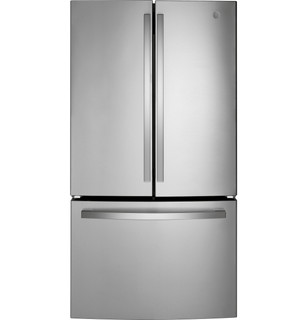
GE GNE27JYMFS product photo
Photo: GNE27JYMFS. Shared source photo. Photo source
Manufacturer sources

GE GNE27JYMFS

All topics for your model

Refrigerator · US market · 45 owner topics

Owner help

Help with your GNE27JYMFS

The GNE27JYMFS manual documents a French-door refrigerator with a bottom freezer and model-specific water/ice and temperature controls. Owner checks here center on compartment symptoms, airflow, door closure, water observations, and matching accessories by full code. Other GNE27 suffixes have separate manuals and are excluded.

Capacity Total Capacity Cubic Feet
27.00 cu ft
Features Configuration
French Door,Bottom Freezer
Energy Consumption (kWh/year)
633 kWh/year
Weights Dimensions Overall Width
35.75 in
1 detailed family article26 short family notes44 detailed owner guides

Detailed articles use sources for the named brand and product family. Short notes add family details to shared guidance. Owner guides cover the product category and recorded design, with this model’s measurements and brand details shown separately. Exact controls and part fitment require a matching manufacturer source.

Product & documents

Detailed owner guide

Specifications

Compare refrigerator capacity, layout, energy information, and features against household routines, recognizing that published capacity and practical storage are not the same thing.

  • Translate capacity into household use
  • Read the configuration as a storage map
  • Compare energy information carefully
Read specifications
Detailed owner guide

Manuals & documents

Use the full refrigerator model and serial information to find documentation, then choose the document that matches the job. Check applicability and revision before using instructions, especially for installation or service.

  • Record model and serial information
  • Choose the document for the task
  • Confirm the document applies
Read manuals & documents

Installation & connections

Detailed owner guide

Dimensions & fit

Survey the delivery route and kitchen opening before purchase, including turns, handles, door swing, and manufacturer-specific clearance requirements.

  • Start at the curb and trace the route
  • Measure the kitchen opening and cabinet space
  • Account for doors, handles, and drawers
Read dimensions & fit
Detailed owner guide

Installation planning

Plan the refrigerator’s location, support, leveling, access, exposure, and required connections using the exact model instructions and qualified help where work exceeds owner capability.

  • Choose a location before delivery
  • Check the floor and support
  • Plan leveling and door access
Read installation planning
Detailed owner guide

Electrical requirements

Compare the refrigerator’s own electrical rating with the receptacle and the information your installer or electrician can verify. The nameplate describes the appliance; it does not certify the wiring in your home.

  • Read the refrigerator’s rating
  • Inspect the outlet markings from outside
  • Compare information, not assumptions
Read electrical requirements
Detailed owner guide

Water supply & connections

First establish whether the refrigerator has a plumbed ice or water feature. For an installed feature, identify the shutoff and route, follow the exact model’s connection instructions, and inspect for visible leaks after connection.

  • Decide whether a water line is needed
  • Locate the shutoff and trace the route
  • Follow the exact connection instructions
Read water supply & connections
Detailed owner guide

Delivery & moving

Plan a refrigerator move around food safety, removable interior parts, the route and lifting method, and any connected water line. Follow the exact model’s transport and restoration instructions, then verify food-safe temperatures...

  • Move food before the appliance
  • Empty and secure the interior
  • Measure the route and protect surfaces
Read delivery & moving

Controls & operation

Detailed owner guide

First use & setup

Set up the refrigerator from its exact model instructions: remove only identified transport materials, clean permitted surfaces, confirm level and door closure, connect specified features, and verify temperatures with thermometers...

  • Unpack identified transport materials
  • Clean only permitted surfaces
  • Level the cabinet and check door closure
Read first use & setup
Detailed owner guide + family notes

Controls & settings

GE support documents several legacy schemes: single or dual knobs, numbered/lettered controls, and later electronic pads. On older side-by-side models the freezer setting can control compressor run time while the fresh-food setting...

  • Read the labels before changing anything
  • Compare the target with measured temperature
  • Change one setting and track the result
Read controls & settings
Detailed owner guide + family notes

Temperature settings

The GNE27JYMFS manual recommends 37°F for the fresh-food section and 0°F for the freezer, then allows 24 hours for temperatures to stabilize after an adjustment. Record both current settings and which compartment is affected before...

  • Use thermometer readings as the reference
  • Check more than one shelf
  • Interpret readings after ordinary use
Read temperature settings
Detailed owner guide

Restart & reset

Distinguish a temporary power restart from a settings reset, preserve food, and document the current state before taking action.

  • Identify what you mean by reset
  • Protect food before interrupting power
  • Use only an accessible disconnect
Read restart & reset
Detailed owner guide + family notes

Special modes

The GNE27 manual describes Sabbath Mode on some refrigerator models; it can turn off or dim interior lighting and disable temperature controls and advanced features while cooling continues on a timed defrost pattern. Do not assume the...

  • Identify the mode from the exact manual
  • Check temperatures before relying on food
  • Understand vacation or away settings
Read special modes

Care & consumables

Detailed owner guide + family notes

Cleaning & odor

For the GNE27JYMFS, use a soft cloth and mild detergent for the refrigerator interior and removable storage surfaces. Wipe spills promptly and keep the door gasket surfaces free of food residue so you can see whether the doors close...

  • Prepare the refrigerator and protect the food
  • Wash removable shelves, bins, and drawers
  • Clean fixed walls and interior surfaces
Read cleaning & odor
Detailed owner guide + family notes

Preventive maintenance

The GNE27J manual calls out compartment airflow and door closure as practical cooling checks. Keep packages from covering visible air outlets, check that the freezer drawer and fresh-food doors close fully, and wipe debris from the...

  • Inspect door seals and closure
  • Keep interior airflow paths clear
  • Use a thermometer and condition-based checks
Read preventive maintenance
Detailed owner guide + family notes

Filters & consumables

GE’s product record names XWFE for the GNE27JYMFS, and the manual warns that XWFE and XWF are not interchangeable on the documented filter system. Check the installed cartridge label before ordering and do not choose by the GNE27 family...

  • Inventory the filter systems on your model
  • Confirm exact accessory identity before ordering
  • Evaluate third-party claims by evidence
Read filters & consumables
Detailed owner guide

Consumable replacement

Replace a refrigerator filter only after confirming the exact model and filter code, then follow the model-specific removal, installation, flushing, and leak checks.

  • Match the filter to the refrigerator first
  • Prepare for the documented removal method
  • Install using the exact instructions
Read consumable replacement
Detailed owner guide + family notes

Storage & seasonal care

For a long vacation, GE’s GNE27J manual says to remove food, unplug the refrigerator, clean the interior, empty the ice bucket, and turn off the water supply. If the icemaker has a manual switch, use its own labeled position rather than...

  • Separate an outage from planned unplugging
  • Empty and clean before long storage
  • Protect the door seal and prevent entrapment
Read storage & seasonal care

Troubleshooting

Detailed family article

Troubleshooting & repair

GNE27JYMFS is a French-door refrigerator with a bottom freezer, internal water dispenser, factory ice maker, and internal temperature controls. If cooling, water, or ice changes, report which compartment is affected and whether...

  • Measure both compartments before changing temperature settings
  • Use the internal water dispenser location as a clue
  • Replace XWFE on the schedule and interpret its status carefully
Read troubleshooting & repair
Detailed owner guide + family notes

Not cooling

GNE27JYMFS control defaults are 37°F in the fresh-food section and 0°F in the freezer; the manual says allow 24 hours for the settings to stabilize. Check both compartment readings and the current display before changing a control. This...

  • Measure before deciding what is warm
  • Freezer cold, refrigerator warm
  • Both compartments warm
Read not cooling
Detailed owner guide + family notes

Water dispenser not working

GNE27JYMFS control defaults are 37°F in the fresh-food section and 0°F in the freezer; the manual says allow 24 hours for the settings to stabilize. Check both compartment readings and the current display before changing a control. This...

  • Confirm the dispenser and compare water flow
  • Inspect the filter and its housing
  • Check accessible supply and visible leaks
Read water dispenser not working
Detailed owner guide + family notes

Error codes & indicators

This manual identifies XWFE for the filter-equipped configurations and says the filter-status indicator can be checked from the control panel. If the dispenser reports a filter error, verify the cartridge label is XWFE rather than XWF;...

  • Capture the display before changing anything
  • Separate alarms from numeric codes
  • Check door and temperature messages
Read error codes & indicators
Detailed owner guide + family notes

Noise & vibration

During TurboCool, the GNE27J manual says fans may continue to run when the refrigerator door is opened if they have already cycled on; this behavior alone is not evidence of a failed fan. Note whether TurboCool is active and whether the...

  • Describe the sound and its timing
  • Check for loose items and contact
  • Relate hums and airflow sounds to operation
Read noise & vibration
Detailed owner guide + family notes

Frost & ice buildup

Check whether moisture is inside the fresh-food section, under the freezer drawer, at the external water connection, or only on the floor. Dry the area, inspect visible tubing and the door seals without pulling the refrigerator out,...

  • Map the frost before changing the load
  • Thin frost after a door opening
  • Frost concentrated at an edge or chute
Read frost & ice buildup
Detailed owner guide + family notes

Leaks, moisture & condensation

Check whether moisture is inside the fresh-food section, under the freezer drawer, at the external water connection, or only on the floor. Dry the area, inspect visible tubing and the door seals without pulling the refrigerator out,...

  • Map where the water first appears
  • Compare feature-related timing
  • Separate condensation from a leak
Read leaks, moisture & condensation
Detailed owner guide + family notes

No power & starting

On the GNE27J top-control layout, holding the Freezer and Fridge controls together for three seconds puts the refrigerator control in OFF; the manual says this does not disconnect power. If lights/display work but there is no cooling,...

  • Tell a dark refrigerator from an unresponsive control
  • Inspect the plug and cord from a safe position
  • Check the household outlet without improvising
Read no power & starting
Detailed owner guide + family notes

Poor performance

For a large warm grocery load or warm leftovers, the GNE27J top-control manual describes TurboCool: press and hold the Turbo Cool pad until “tc” appears. It cools the fresh-food compartment faster; freezer temperature is not changed by...

  • Measure before changing the setup
  • Look for an uneven load or blocked air path
  • Account for door openings and new groceries
Read poor performance

Parts & accessories

Detailed owner guide + family notes

Parts & components

The GNE27JYMFS product page identifies XWFE as its filter family. The owner manual warns that XWFE and XWF are not interchangeable for the documented filter system; its troubleshooting associates XWF with filter-not-detected behavior....

  • Start with the complete model identity
  • Use the diagram to identify the position
  • Separate owner-removable items from internal parts
Read parts & components
Detailed owner guide + family notes

Component replacement planning

The owner manual identifies removable storage pieces and care tasks, but that does not make electrical, refrigerant, or water-valve components owner replacements. For a cracked bin, compare the model-code part diagram. For an internal...

  • Define the task before buying anything
  • Verify part number and revision
  • Plan power and water safely
Read component replacement planning
Detailed owner guide + family notes

Accessories & installation kits

Before buying a filter or storage accessory, check the exact model listing and the owner manual’s named accessory. The GNE27JYMFS documentation identifies the filter family for that exact configuration; a product name that looks close...

  • List what you need the accessory to do
  • Separate included equipment from optional kits
  • Check installation dependencies before ordering
Read accessories & installation kits
Detailed owner guide + family notes

Compatibility & substitutions

For a replacement shelf, bin, water filter, or ice/water accessory, compare the suffix and the documented connection or dimensions against the official parts listing. This profile does not establish that parts interchange with PFE28...

  • Begin with the refrigerator’s complete identity
  • Compare more than dimensions
  • Treat substitutions as a documented claim
Read compatibility & substitutions
Detailed owner guide + family notes

Diagrams & wiring references

The owner manual’s parts illustration helps identify shelves, bins, drawers, and controls for this family. It is not a wiring diagram or permission to remove a sealed panel. Use the full-code GE parts view when ordering; if the...

  • Choose the drawing that answers your question
  • Match the diagram to the exact model
  • Read an exploded view and its legend
Read diagrams & wiring references

Ownership decisions

Detailed owner guide + family notes

Repair cost & service quotes

When requesting a refrigerator estimate, report whether both sections are warm, whether lights and display work, visible frost or water, and any recent move or outage. Ask the shop to separate diagnostic fee, labor, parts, trip charge,...

  • Ask for a complete written scope
  • Separate parts, labor, and visit charges
  • Ask carefully about sealed-system work
Read repair cost & service quotes
Detailed owner guide + family notes

Repair or replace?

Wait for a written diagnosis and itemized quote before comparing repair with replacement. Include delivery, installation, old-unit removal, and any water-line work in a replacement estimate. If food safety is affected, protect...

  • Describe the decision in household terms
  • Build the repair side of the worksheet
  • Build the replacement side fairly
Read repair or replace?
Detailed owner guide + family notes

Energy, water & efficiency

Keep vents clear, close doors promptly, and avoid placing the cabinet against a heat source or in a location outside the manual’s approved conditions. These owner habits reduce unnecessary cooling demand, but they cannot correct a...

  • Read the annual energy estimate in context
  • Compare capacity and configuration together
  • Look at loading and door routines
Read energy, water & efficiency
Detailed owner guide + family notes

Running cost calculator

For an annual-use estimate, use the exact model’s EnergyGuide consumption and multiply its kWh/year by your utility’s price per kWh. A household meter comparison can vary with room temperature, door openings, and ice/water use, so it is...

  • Use the label and rate in one formula
  • Keep label estimate separate from actual bills
  • Handle billing days instead of assuming a month
Read running cost calculator
Detailed owner guide + family notes

Warranty & official support

Find the rating label and proof of purchase before contacting GE. Ask whether the reported symptom, labor, and any water-system part are covered, and request the answer in writing. A manual-family match identifies operating guidance; it...

  • Identify the exact refrigerator and purchase date
  • Read parts, labor, and sealed-system terms separately
  • Check exclusions and ownership rules
Read warranty & official support
Detailed owner guide

Recalls & safety notices

Search official recall information using the exact model and serial details, then follow the notice’s stop-use and remedy instructions. Distinguish a formal recall from a general support alert and preserve evidence of the product identity.

  • Find the model and serial before searching
  • Tell a recall from a support alert
  • Follow stop-use instructions first
Read recalls & safety notices
Detailed owner guide

Model age & history

Establish a refrigerator’s history from its label, dated purchase records, and official brand support. Serial formats vary, so decode a manufacture date only when the brand provides a reliable official method.

  • Start with the product label and records
  • Decode a serial only with official guidance
  • Do not infer age from a discontinued listing
Read model age & history
Detailed owner guide

Specification review

Read a refrigerator listing by separating its published specifications from your own assessment of layout, operating cost, fit, features and support.

  • Start with the space the refrigerator must serve
  • Judge capacity through the actual layout
  • Separate energy facts from cost estimates
Read specification review
Detailed owner guide

Compare similar models

Build a fair comparison of two or three exact refrigerator configurations using consistent capacity, energy, feature, fit and warranty evidence.

  • Choose the candidates and comparison basis
  • Compare compartment capacity and storage layout
  • Put energy figures on equal footing
Read compare similar models
Detailed owner guide

Replacement appliances & fit

Plan a refrigerator replacement by measuring the opening and route, checking the exact model drawing, and matching configuration and utility needs.

  • Measure the kitchen opening at several points
  • Check doors, drawers and depth in use
  • Walk the delivery route before ordering
Read replacement appliances & fit
Detailed owner guide

Price & availability

Compare refrigerator quotes by usable capacity, included features, delivery and installation charges, and condition to see the actual total.

  • Compare configuration and usable capacity
  • Put included features and accessories on the same basis
  • Add delivery, fit, haul-away, and installation charges
Read price & availability
Detailed owner guide + family notes

Professional service

Share the full code and serial number, which compartment is warm, visible ice or water, display messages, and whether the unit was recently moved or lost power. Leave the refrigerator connected if it is safe to do so, but do not remove...

  • Find a qualified provider for your exact brand
  • Ask what the diagnostic visit includes
  • Keep sealed-system and electrical work professional
Read professional service
Detailed owner guide

Recycling & disposal

Arrange a refrigerator’s removal through a retailer, municipal program or appliance recycler that can handle refrigerant and secure the appliance safely.
  • Choose a documented pickup path
  • Confirm refrigerant handling and service scope
  • Make the appliance safe while you wait
Read recycling & disposal

Topics that need a feature match

Some topics apply to other categories or need a feature that this record has not established.

Drainage & water removal

Outside this product category.

Venting & exhaust

Outside this product category.

Cycles & programs

Outside this product category.

Control lock & access

A control-lock feature has not been established.

Wi-Fi & connectivity

Connected capability is absent or has not been established.

Software, drivers & firmware

Outside this product category.

Water quality & scale

Outside this product category.

Sources for GNE27JYMFS

GE GNE27JYMFS owner’s manual Observed Oct 27, 2026
GE GNE27JYMFS product page Observed Oct 27, 2026
GE — GNE27JYMFS Observed Oct 26, 2026
Suggest a correction