Appliance & electronics support
Find your model numberAbout our sources
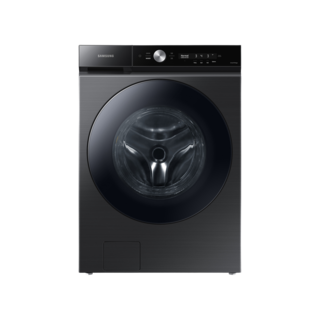
Samsung WF53BB8700AVUS product photo
Photo: WF53BB8700AVUS. Photo source
Manufacturer sources

Samsung WF53BB8700AVUS

All topics for your model

Washing machine · US market · 49 owner topics

Owner help

Help with your WF53BB8700AVUS

Samsung’s washer catalog spans front-load, top-load, combos, and integrated laundry systems. Automatic sensing, auto-dispense, vibration reduction, and Wi-Fi features vary by model; use the exact panel and cycle chart.

Total Capacity (cu. ft.)
5.3 cu. ft.
Manufacturer width (decimal specification)
27
0 detailed family articles9 short family notes49 detailed owner guides

Detailed articles use sources for the named brand and product family. Short notes add family details to shared guidance. Owner guides cover the product category and recorded design, with this model’s measurements and brand details shown separately. Exact controls and part fitment require a matching manufacturer source.

Product & documents

Detailed owner guide

Specifications

Read capacity, electrical, water, and performance information in context, and use the exact model’s documents for decisions that affect purchase or hookup.

  • Start with what the listing actually measures
  • Use performance claims carefully
  • Verify hookup requirements separately
Read specifications
Detailed owner guide

Manuals & documents

Choose the right document for the task, confirm its model coverage and revision, and use warnings and model qualifiers to guide owner decisions.

  • Choose the document for the question
  • Check that the manual fits your washer
  • Read warnings and conditional features
Read manuals & documents

Installation & connections

Detailed owner guide

Dimensions & fit

Plan for the washer cabinet, delivery path, hookups, door or lid movement, and service access before committing to a location.

  • Measure the room and route
  • Account for loading and opening
  • Use the exact document dimensions
Read dimensions & fit
Detailed owner guide + family notes

Installation planning

Samsung offers top-load and front-load washers, stacked pairs, and laundry hubs with different dimensions and controls. Before stacking or ordering a pedestal/kit, match both washer and dryer model codes to the official accessory...

  • Prepare the location
  • Coordinate the delivery and setup
  • Confirm water and drain arrangements
Read installation planning
Detailed owner guide

Electrical requirements

Use the washer’s rating and installation documents to confirm a grounded supply, outlet access, and circuit suitability; refer electrical changes to a qualified electrician.

  • Read the exact product rating
  • Inspect the outlet from the outside
  • Consider the branch circuit and location
Read electrical requirements
Detailed owner guide

Water supply & connections

Confirm the required hot and cold connections, use suitable new hoses, route them safely, and check for leaks using the washer’s installation guide.

  • Identify the required supplies
  • Choose and route hoses
  • Flush and check connections
Read water supply & connections
Detailed owner guide

Drainage & water removal

Route and secure the drain hose to the exact product’s requirements, prevent siphoning and kinks, and recognize when plumbing help is needed.

  • Choose a compatible drain point
  • Secure the hose without sealing it
  • Test discharge and look for leaks
Read drainage & water removal
Detailed owner guide

Delivery & moving

Prepare the washer for transport with the product-specific restraint, water and drain precautions, adequate help, and careful protection of hoses and cord.

  • Plan the move before disconnecting
  • Prepare water and power safely
  • Install transport protection
Read delivery & moving

Controls & operation

Detailed owner guide

First use & setup

Remove model-specific transport materials, prepare laundry products and supplies, and make a supervised first check for leaks, stability, and drainage.

  • Complete installation before loading
  • Prepare a suitable first load
  • Run the prescribed first check
Read first use & setup
Detailed owner guide + family notes

Controls & settings

Samsung’s AI OptiWash feature is described for select Bespoke washers and senses fabric, load size, and soil to adjust settings. Flex Auto Dispense is present on some washers only. If your washer has an automatic feature, compare its...

  • Begin with the garment and washer instructions
  • Understand temperature and water behavior
  • Use options with a clear purpose
Read controls & settings
Detailed owner guide + family notes

Cycles & programs

Samsung laundry ranges include front-load, top-load, combo, and stacked products. Its current lineup highlights features such as Super Speed, Pet Care Wash, and AI OptiWash only on selected machines. Check the model’s own cycle chart...

  • Sort before choosing a program
  • Account for washer design
  • Use quick and specialty cycles thoughtfully
Read cycles & programs
Detailed owner guide

Temperature settings

Choose wash temperature by balancing the garment care label, soil, detergent directions, and the washer’s temperature controls. A selected setting may describe a target or mix rather than water straight from the tap.

  • Start with the fabric and soil
  • What a washer setting can mean
  • Cold water and detergent results
Read temperature settings
Detailed owner guide

Restart & reset

A washer’s pause, cancel, cycle change, and power interruption can have different effects. Use the control behavior documented for the exact model, protect wet laundry, and avoid treating a reset as a repair.

  • Choose the action that matches the state
  • When a cycle is paused
  • Power interruption or unresponsive controls
Read restart & reset
Detailed owner guide + family notes

Control lock & access

Samsung’s guide notes Child Lock may lock the door on some front-load washers, while water detected in the washer can also keep the door locked. Record the indicator and whether water remains. Do not force the door or use an emergency...

  • Tell panel lock from door lock
  • Use the documented control-lock method
  • If the door or lid remains locked
Read control lock & access

Care & consumables

Detailed owner guide

Cleaning & odor

Reduce washer odor by removing damp residue, keeping water and detergent from lingering, and using only cleaning steps supported by the exact washer’s instructions.

  • Start with moisture and residue
  • Clean without mixing products
  • Adjust habits to washer design
Read cleaning & odor
Detailed owner guide + family notes

Preventive maintenance

Samsung washer designs differ in drawer, drain filter, and control layouts. Find the exact owner guide before removing an accessible filter or starting a tub-clean program. Record an odor, suds, or drain symptom before cleaning, and...

  • After a wash: let moisture escape
  • Use products and loads that suit the washer
  • Inspect water connections without disturbing them
Read preventive maintenance
Detailed owner guide

Filters & consumables

Identify which washer items are actually replaceable consumables, and use model-specific evidence before buying filters, hoses, or cleaning products.

  • Start with what the washer actually contains
  • Choose supply hoses by connection and instructions
  • Detergent, additives, and cleaning products
Read filters & consumables
Detailed owner guide

Consumable replacement

Replace washer hoses and owner-serviceable items using the instructions for the exact model, and stop when the task crosses into internal repair.

  • Decide whether replacement is due
  • Plan the hose change around fit and water control
  • Follow the exact installation sequence
Read consumable replacement
Detailed owner guide

Water quality & scale

Separate mineral scale from detergent residue and washer odor, then choose a treatment only when the washer and product instructions support it.

  • Recognize the likely residue
  • Use water-quality evidence before adding treatment
  • Correct detergent-related buildup first
Read water quality & scale
Detailed owner guide

Storage & seasonal care

Prepare a washer for an absence, freezing weather, or a move by following its specific drain, protection, and transport instructions.

  • Leaving the washer unused
  • Protect against freezing conditions
  • Prepare for a move or storage
Read storage & seasonal care

Troubleshooting

Detailed owner guide

Troubleshooting & repair

Use the laundry load, cycle stage, and visible symptoms to narrow common washer problems while keeping diagnosis within owner-safe limits.

  • Cycle will not start or pauses
  • Poor cleaning, suds, or residue
  • Washer shakes, bangs, or leaves clothes wet
Read troubleshooting & repair
Detailed owner guide

Not draining

Check whether the washer is paused, still completing a cycle, or leaving standing water. Begin with accessible hose and household drain conditions; internal pump work is not an owner task.

  • Confirm what remains in the washer
  • Inspect the visible drain route
  • Check household drainage and cycle selection
Read not draining
Detailed owner guide + family notes

Not filling

Samsung’s start/fill guide treats door lock, Child Lock, water supply, and startup behavior as separate checks. Record whether the display responds, whether the door is locked, and whether any water enters. Look only at accessible...

  • Decide whether it is low fill or no fill
  • Check the cycle and lid or door
  • Verify the household water supply
Read not filling
Detailed owner guide + family notes

Not spinning

Samsung’s spin guidance distinguishes a washer that begins spinning but stops, slows, or leaves clothes wet from one that never starts a spin. For the former, Samsung emphasizes load size, distribution, and matching the cycle to the...

  • First identify what the cycle did
  • Redistribute an uneven load
  • Check selection and remaining water
Read not spinning
Detailed owner guide + family notes

Error codes & indicators

Samsung washer guides use indicators for supply, draining, imbalance, locks, and other conditions; exact code meanings are model-dependent. Photograph the complete code before power interruption and note whether the washer was filling,...

  • Capture the message before clearing it
  • Separate normal status from an alert
  • Use only the matching owner guidance
Read error codes & indicators
Detailed owner guide + family notes

Noise & vibration

Samsung describes Vibration Reduction Technology+ on selected washers as a vibration/noise reduction design. Its presence does not mean any shaking is normal or that another model shares VRT+. Record load balance, floor stability, and...

  • Describe the sound in context
  • Rule out load and floor causes
  • Consider normal design sounds
Read noise & vibration
Detailed owner guide

Leaks, moisture & condensation

Locate when water appears and whether it returns during fill, wash, or drain. Safe visible checks can distinguish hose and drain issues from condensation or a spill.

  • Contain water and locate its path
  • Inspect visible supply connections
  • Trace water during draining
Read leaks, moisture & condensation
Detailed owner guide

Power on, cycle not starting

When the panel lights but the cycle does not begin, check the selection, door or lid closure, pause state, and any lock indicator using the washer’s own controls.

  • Read the panel before pressing again
  • Confirm closure and cycle selection
  • Check pause, delay, and control lock
Read power on, cycle not starting
Detailed owner guide

No power & starting

Determine whether the washer is completely dark or has power but will not accept input. Check the visible supply and outlet situation without opening the appliance.

  • Separate no power from no response
  • Check the ordinary power path
  • Check for a control response
Read no power & starting
Detailed owner guide

Poor performance

Poor cleaning, residue, odor, and excess suds often respond to changes in loading, detergent, cycle, and maintenance. Diagnose the actual symptom before changing several things at once.

  • Name the performance problem
  • Tune loading and detergent
  • Match cycle and water expectations
Read poor performance

Parts & accessories

Detailed owner guide

Parts & components

Use symptoms and installation details to identify the washer part involved, then verify the exact replacement before ordering.

  • Start with what the washer is doing
  • Identify the washer and the component
  • Sort owner items from internal parts
Read parts & components
Detailed owner guide

Accessories & installation kits

Choose installation accessories by washer design and the actual laundry-room connection, then verify the exact model instructions.

  • List the connection or clearance you need to solve
  • Inlet hoses: verify ends, routing, and condition
  • Drain accessories must fit the route
Read accessories & installation kits
Detailed owner guide

Compatibility & substitutions

Evaluate washer part and accessory substitutions by exact application, interfaces, and installation requirements rather than appearance or brand.

  • Define what must be compatible
  • Compare interfaces and use conditions
  • Account for washer design differences
Read compatibility & substitutions
Detailed owner guide

Diagrams & wiring references

Use washer diagrams to identify documented parts and relationships, while keeping owner troubleshooting separate from internal electrical service.

  • Choose a reference for the exact washer
  • Read a parts illustration without overreading it
  • Know the boundary of a wiring reference
Read diagrams & wiring references

Ownership decisions

Detailed owner guide

Repair or replace?

Compare a washer repair with replacement using the same load needs, a written diagnosis, and full quote totals. The decision depends on the actual fault, parts and labor, installation, and what a replacement would change for your household.

  • Start with the symptom and its impact
  • Get a diagnosis that can be compared
  • Compare the actual costs
Read repair or replace?
Detailed owner guide

Energy, water & efficiency

Understand washer energy and water figures, then connect them to household use. Compare equivalent official information and consider cycle choices, load size, and drying effects without assuming a universal bill saving.

  • Read comparable efficiency information
  • Estimate your own energy cost
  • Water level depends on design and load
Read energy, water & efficiency
Detailed owner guide

Running cost calculator

Calculate a household-specific washer cost from actual utility rates, usage, and comparable model data. Keep assumptions visible and separate washer electricity, water charges, and any household water-heating estimate.

  • Choose a calculation period
  • Calculate electricity from a documented figure
  • Add water charges with care
Read running cost calculator
Detailed owner guide

Warranty & official support

Find the warranty that applies to your exact washer and prepare a useful support request. Separate general warranty language, model-specific written terms, and service decisions; coverage depends on the applicable documentation and facts.

  • Locate the applicable written warranty
  • Separate a parts promise from a complete repair
  • Prepare a clear support request
Read warranty & official support
Detailed owner guide

Recalls & safety notices

Check official recall and safety notice sources using the washer's complete model and serial information. A search result is a lead; confirm applicability, follow the stated remedy, and report a hazard with specific evidence.

  • Identify the washer before searching
  • Search the official recall source
  • Respond to a confirmed match
Read recalls & safety notices
Detailed owner guide

Model age & history

Establish a washer's age and product history from identifiers and records. Separate manufacture date, purchase date, installation history, and service events; avoid treating any one of them as a reliability forecast.

  • Start with the full model identity
  • Separate the dates that matter
  • Build a practical service timeline
Read model age & history
Detailed owner guide

Specification review

Review a washer’s published specifications against the laundry, installation, and ownership needs that matter in your home. Treat figures as model-specific claims and verify the exact variant before relying on them.

  • Confirm the exact washer
  • Check the opening, route, and hookups
  • Match capacity and wash design to your laundry
Read specification review
Detailed owner guide

Compare similar models

Build a fair washer comparison around your loads, room, utility setup, and ownership priorities. Verify each candidate’s exact variant and compare equivalent manufacturer information.

  • Set comparable candidates first
  • Compare designs by laundry habits
  • Account for sensing and water-level expectations
Read compare similar models
Detailed owner guide

Replacement appliances & fit

Plan a washer replacement around the physical route, opening, connections, floor, and chosen washer design. Confirm fit and installation conditions for the exact model before arranging delivery.

  • Measure the delivery route and final space
  • Choose a design that suits the room and routine
  • Compare hookups and floor requirements
Read replacement appliances & fit
Detailed owner guide

Price & availability

Compare washer offers using current seller quotes, exact model identifiers, itemized delivery and installation terms, and verified stock status. Build an owner-specific total rather than relying on generic price averages.

  • Confirm the item being priced
  • Build a household quote total
  • Compare discounts and payment terms
Read price & availability
Detailed owner guide

Professional service

Prepare for washer service by describing the symptom, its timing, and the conditions that reproduce it. Decide whether routine owner checks apply or the problem needs a service visit, then confirm coverage and charges in writing.

  • Describe the symptom
  • Try only model-approved owner checks
  • Know when to stop using the washer
Read professional service
Detailed owner guide

Recycling & disposal

Arrange washer removal through a local recycler, waste program, retailer, or donation route that confirms it accepts the appliance and can handle pickup. Prepare the unit for safe transport and verify local requirements.
  • Choose a local disposition route
  • Consider reuse when the washer is serviceable
  • Prepare the washer for collection
Read recycling & disposal

Topics that need a feature match

Some topics apply to other categories or need a feature that this record has not established.

Venting & exhaust

Outside this product category.

Special modes

A special operating mode has not been established.

Wi-Fi & connectivity

Connected capability is absent or has not been established.

Software, drivers & firmware

Outside this product category.

Sources for WF53BB8700AVUS

Suggest a correction