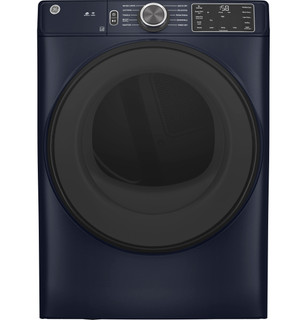
The two listed electric models share the cited GFD55 owner manual. GE’s product information identifies the family’s smart front-load format, Vent Sensing, and up-front lint filter; exact control/options may vary by suffix. GFD55ESPNDG has a distinct manual and is intentionally excluded, as is the simpler GTD42 family.
Capacity Total Capacity Cubic Feet
7.8 cu ft
Weights Dimensions Overall Width
28 in
1 detailed family article23 short family notes44 detailed owner guides
Detailed articles use sources for the named brand and product family. Short notes add family details to shared guidance. Owner guides cover the product category and recorded design, with this model’s measurements and brand details shown separately. Exact controls and part fitment require a matching manufacturer source.
Find and record the dryer’s full model and serial labels, then use them to distinguish look-alike gas and electric versions and locate the correct support information.
Use the exact dryer model’s specification document to compare capacity, fuel, power, venting, dimensions, and features against the home’s requirements.
Use the full model identifier to find the correct dryer instructions, then keep installation, care, warranty, and purchase records together for the questions they can answer.
Prepare the location by confirming dryer type, utilities, exhaust or condensation handling, clearances, delivery access, and any model-specific accessories.
For a vented dryer, plan a clear duct route outdoors, maintain airflow, and distinguish exhaust maintenance from the different moisture systems in condenser and heat-pump dryers.
Plan a dryer move around its fuel type, vent route, access dimensions, and manufacturer handling requirements. After delivery, verify connections and operation before relying on the appliance.
On the GFD55, Dryness Level is for Sensor cycles; Timed Dry uses its selected duration. The manual also distinguishes the No Heat temperature setting and explains that cycle options differ by model. When clothes remain damp, record...
The GFD55 manual distinguishes Sensor cycles, which determine fabric dryness, from Timed cycles, which run for the selected time. For the listed GFD55ESSNWW and GFD55ESPRRS, the product records show Timed Dry and a No Heat temperature...
Choose heat according to fabric care instructions and the selected program; understand that temperature choices may be limited by cycle and dryer design.
Use a restart to clear a temporary interruption, then use the dryer’s response to decide whether the cause is power, airflow, settings, or a fault needing service.
The GFD55 product records list Control Lock, and the manual explains that locking prevents control selections while Power remains usable. If a pad press is ignored, check whether the lock icon or blinking Controls indication appears and...
GE’s GFD55 manual says to clean the lint screen before or after each load and not to operate the dryer without it installed. Remove lint from the accessible up-front filter and seat it fully before starting. The exact GFD55 product...
On the GFD55, the Check Vent indicator means airflow may be restricted; it does not locate the restriction. After cleaning the lint filter, look for a crushed or disconnected visible connector and whether the outdoor hood opens during...
Decide whether a dryer part is actually worn out, gather the details needed to identify a replacement, and avoid substituting parts by appearance alone.
The GFD55 electric family uses electronic controls and GE’s product documentation lists Vent Sensing on the cited variants. That status can alert to restricted exhaust, but it does not measure every part of a home duct or prove which...
Clean the screen and determine whether residue is invisible
Read Vent Sensing as an exhaust warning, not a part diagnosis
Inspect the duct and hood without opening the dryer
Check that the door closes, the selected cycle is appropriate, and the display responds. For a running-but-damp load, compare load size, lint-screen condition, and outside airflow; for a dead display or repeated stop, record the state...
The GFD55 manual defines Check Vent as reduced airflow from a potentially blocked or restricted vent. Clean the lint filter and inspect the visible connector and outside hood; the indicator does not locate the restriction. If it...
Record whether a thump occurs only with bulky items or a scraping/buzzing sound persists when the drum turns. Check for objects in pockets and that the dryer stands stable. A new repeated metal scrape, burning odor, or smoke warrants...
GFD55 Start requires a closed door; pressing Start again pauses the cycle and shows Pause. A Controls icon that blinks when a pad is pressed means the controls are locked, while Check Vent refers to airflow. Note which state appears...
GFD55 Start requires a closed door; pressing Start again pauses the cycle and shows Pause. A Controls icon that blinks when a pad is pressed means the controls are locked, while Check Vent refers to airflow. Note which state appears...
GFD55 offers Sensor cycles that determine dryness and Timed cycles that run for the selected time. The owner guide maps AIR FLUFF to ten minutes of no-heat tumbling; on models without that cycle, select Timed Dry and No Heat. If clothes...
GFD55 offers Sensor cycles that determine dryness and Timed cycles that run for the selected time. The owner guide maps AIR FLUFF to ten minutes of no-heat tumbling; on models without that cycle, select Timed Dry and No Heat. If clothes...
GFD55 manuals cover listed electric variants only. Confirm the complete model code and electric connection before buying a lint filter, door part, or stacking accessory. The separate GFD55 gas model has a different manual and fuel...
Owner tasks include lint-filter care and accessible vent observations. Heating elements, sensors, wiring, and door switches are internal parts and need qualified repair. Never defeat the door switch or run the dryer with a panel...
Check GE’s exact accessory listing for both the GFD55 code and companion washer before buying a stack kit or pedestal. Also confirm the installation instructions allow the proposed vent material, route, and exit. A dryer vent accessory...
GFD55ESSNWW and GFD55ESPRRS share a documented electric-family manual; GFD55ESPNDG has a distinct manual. GTD42 is another dryer design. Verify fuel, control layout, and exact suffix before selecting a component or cycle instruction. Do...
The owner guide identifies the GFD55 control interface and up-front lint-filter location. It is not a service wiring diagram. If the physical filter or panel layout differs, stop and verify the full code. Use installation drawings only...
Choose the right kind of diagram
Owner-safe installation diagrams
Reading a wiring reference without doing electrical work
Report the exact code, indicator, cycle, load size, lint-screen condition, and whether airflow is present at the outdoor hood. Ask whether the estimate covers only appliance diagnosis or also cleaning the full house duct. Request...
Before replacing the dryer for long dry times, have the vent route checked; a new dryer will not correct a crushed or obstructed duct. Compare a repair quote with a replacement that matches the electrical supply, vent exit, pair/stack...
A clean lint filter, clear exhaust path, and appropriately sized load help the dryer move moist air. GFD55’s product material identifies Vent Sensing and sensor cycles; use a cycle suited to the fabric and avoid repeatedly extending...
Use the precise model’s energy label or certification data and your local electricity rate. Estimate separately if you use timed heat, high-temperature options, or multiple cycles because household loads differ from test conditions. Do...
Have the model/serial label, purchase record, exact indicator, and vent-cleaning history ready. Ask whether an appliance fault or an external vent restriction is being assessed and what labor is covered. Warranty terms do not...
Check official recall databases using the appliance’s complete identity, then follow the notice’s exact remedy and discontinue use when its instructions require it.
Establish a dryer’s identity and timeline from labels and documents, then use official model records to understand what is known without guessing age from styling.
Review a dryer listing by separating measurable specifications, installation constraints, and features that need confirmation for the exact model and household.
Compare dryer designs and individual models by matching the way they heat, vent, fit, and handle the loads you dry. A feature list matters only when the installation and household needs line up.
Plan a dryer replacement around the existing fuel, venting, access route, and room dimensions. Confirm the proposed unit's exact installation requirements before arranging delivery or removal.
Build a reliable dryer budget from current seller quotes for the exact model and installation. Compare total delivered cost and confirm stock and service scope before committing.
Give service the exact code, indicator, whether the drum runs, and the path from dryer outlet to exterior hood. If the accessible connector is clear but airflow remains poor, arrange qualified vent cleaning or appliance diagnosis rather...
Plan dryer removal by separating appliance haul-away from material recycling, confirming local acceptance, and protecting the delivery route. Electric, gas, and ventless models have different disconnection and handling needs.