Appliance & electronics support
Find your model numberAbout our sources
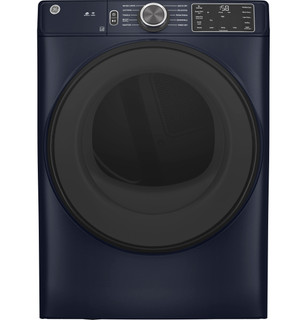
GE GFD55ESPRRS product photo
Photo: GFD55ESPRRS. Shared source photo. Photo source
Manufacturer sources

GE GFD55ESPRRS

Troubleshooting & repair

Clothes dryer · US market · 45 owner topics

GE GFD55 electric dryer manual family

Covers GFD55ESPRRS and the manufacturer-listed models in this family.

GE GFD55 electric dryer manual family

GFD55: use the Check Vent light to assess exhaust airflow

The GFD55 electric family uses electronic controls and GE’s product documentation lists Vent Sensing on the cited variants. That status can alert to restricted exhaust, but it does not measure every part of a home duct or prove which elbow, hood, or dryer component is blocked.

When the dryer runs hot but needs repeated cycles, start with lint-screen condition, load size, selected cycle, and the exterior hood. If the display reports a vent condition, preserve the message before clearing it and compare it with airflow at the hood. Keep the model suffix in view because accessory and control details can vary.

Clean the screen and determine whether residue is invisible

The GFD55 manual says to clean the lint filter before each use, pulling it straight up and removing lint with your fingers. If softener sheets leave a waxy film, wash the screen in warm soapy water, dry it fully, and reinstall. GE also says to vacuum the accessible filter area if performance changes; never run the dryer without the filter.

If the load remains warm but damp, note the selected cycle and inspect visible venting. A clean screen is one check; it does not establish that the duct through the house is clear.

Read Vent Sensing as an exhaust warning, not a part diagnosis

The GFD55 owner manual names the indicator “Check Vent” and says it signals reduced airflow from a possibly blocked or restricted vent. It recommends checking and/or cleaning the vent system. The same manual’s troubleshooting page says to make sure ducting is clean, free of kinks, unobstructed, and that the outside wall damper moves easily; then dry a load on an automatic cycle and verify the light turns off.

That message identifies an airflow condition, not a failed sensor or a specific obstruction. If the light remains after the listed checks and a repeat automatic cycle, arrange a full exhaust inspection. Do not repeatedly clear the warning while leaving a crushed or blocked duct in place.

Inspect the duct and hood without opening the dryer

With the dryer off, look behind it only if the route is visible and there is safe clearance. A crushed flex duct, tight bend, or dryer pushed hard against the wall can restrict exhaust. GE recommends metal duct rather than plastic. At the outside hood, check that the flap can move freely and that lint, leaves, or nesting material are not blocking it.

If the route disappears into walls or ceilings, do not dismantle it based on an alert. A vent professional can inspect the full path. Tell them the dryer code, alert text, approximate duct route, and whether the outside flap opens during a cycle. Keep the air path separate from internal dryer repair: strong hood flow with a recurring alert may justify service diagnosis.

Use cycle and load choices that match what is being dried

GFD55 listings include automatic moisture-sensing cycles and timed choices; use the cycle guide for fabric and load. A small quick-dry load, bulky bedding, and towels have different airflow demands. Overloading can prevent tumbling, while mixing heavy cottons with light synthetics can leave the thick pieces damp after the light items feel dry.

If the load is warm but damp, restricted airflow or excess load density is more likely than a cycle that produced no heat. If it remains cool on a heated setting, stop and report the control choice. Do not repeatedly extend timed drying while a vent alert is active; that can mask the symptom and adds heat without fixing the exhaust.

Check location and installation after moving the machine

After a move or installation, verify the dryer is level, the rear duct is not pinched, and the exhaust connection is secure. GE notes that long, bent, or restricted venting can slow drying and hold heat and humidity in the drum. The exact allowable equivalent length depends on the installation guide for the model and duct configuration; do not assume the largest advertised length applies to every elbow and hood.

If the laundry room is unusually humid or the cabinet feels hot, include that observation. A cooler, unheated location can also affect condensation and cycle behavior. The fix may be at the installation or home duct rather than inside the dryer.

Escalate recurring alerts and electrical symptoms

Arrange service if the Vent Sensing message persists after the accessible screen and hood checks, the dryer trips power, the cord is damaged, or the drum stops. A vent professional is appropriate when the full duct path is inaccessible or the exterior airflow remains weak. Do not remove the back panel or test a live dryer.

Before booking, note the code, alert wording, cycle, load size, elapsed time, outside flap movement, and when the alert returns. This information helps distinguish a house exhaust restriction from an appliance control or sensor problem.

Specifications & model details

GFD55ESPRRS: model-specific checks

Use the recorded energy source

GE GFD55ESPRRS is listed as Electric. Record power-on, tumbling and heat as three separate observations. Start a slow-drying check with the selected program, load and owner-accessible lint path. The supply rating and any burner or heating-circuit diagnosis require the original requirements for this model.

Start with the symptom

Recorded model facts

Model details relevant to this topic

SpecificationRecorded valueEvidence
Capacity Total Capacity Cubic Feet7.8 cu ft
Manufacturer
GE Appliances and LG current manufacturer product records

Exact primary manufacturer SKU GFD55ESPRRS; https://www.geappliances.com/appliance/GE-ENERGY-STAR-7-8-cu-ft-Capacity-Smart-Front-Load-Electric-Dryer-with-Sanitize-Cycle-GFD55ESPRRS

Manufacturer storefront primary SKU GFD55ESPRRS; exact source field: spec_capacity_total_capacity_cubic_feet Primary source: https://www.geappliances.com/appliance/GE-ENERGY-STAR-7-8-cu-ft-Capacity-Smart-Front-Load-Electric-Dryer-with-Sanitize-Cycle-GFD55ESPRRS

Observed Oct 30, 2026
Additional Cycles_1My Settings
Manufacturer
GE — GFD55ESPRRS

Exact-model manufacturer resource; specification fields

Exact SKU GFD55ESPRRS; manufacturer specification label: Additional Cycles_1.

Observed Oct 26, 2026
Additional Cycles_2Sanitize
Manufacturer
GE — GFD55ESPRRS

Exact-model manufacturer resource; specification fields

Exact SKU GFD55ESPRRS; manufacturer specification label: Additional Cycles_2.

Observed Oct 26, 2026
Additional Cycles_3Delay Dry - up to 24 hours
Manufacturer
GE — GFD55ESPRRS

Exact-model manufacturer resource; specification fields

Exact SKU GFD55ESPRRS; manufacturer specification label: Additional Cycles_3.

Observed Oct 26, 2026
Additional Cycles_4Small Load
Manufacturer
GE — GFD55ESPRRS

Exact-model manufacturer resource; specification fields

Exact SKU GFD55ESPRRS; manufacturer specification label: Additional Cycles_4.

Observed Oct 26, 2026
Additional Cycles_5EcoDry
Manufacturer
GE — GFD55ESPRRS

Exact-model manufacturer resource; specification fields

Exact SKU GFD55ESPRRS; manufacturer specification label: Additional Cycles_5.

Observed Oct 26, 2026
Additional Dryer Features_1LED Interior Light
Manufacturer
GE — GFD55ESPRRS

Exact-model manufacturer resource; specification fields

Exact SKU GFD55ESPRRS; manufacturer specification label: Additional Dryer Features_1.

Observed Oct 26, 2026
Additional Dryer Features_2Vent Sensing
Manufacturer
GE — GFD55ESPRRS

Exact-model manufacturer resource; specification fields

Exact SKU GFD55ESPRRS; manufacturer specification label: Additional Dryer Features_2.

Observed Oct 26, 2026
Additional Dryer Features_3Front Serviceable
Manufacturer
GE — GFD55ESPRRS

Exact-model manufacturer resource; specification fields

Exact SKU GFD55ESPRRS; manufacturer specification label: Additional Dryer Features_3.

Observed Oct 26, 2026
Additional Dryer Features_4Removable Up-Front Lint Filter
Manufacturer
GE — GFD55ESPRRS

Exact-model manufacturer resource; specification fields

Exact SKU GFD55ESPRRS; manufacturer specification label: Additional Dryer Features_4.

Observed Oct 26, 2026
Additional Dryer Features_5Damp Alert
Manufacturer
GE — GFD55ESPRRS

Exact-model manufacturer resource; specification fields

Exact SKU GFD55ESPRRS; manufacturer specification label: Additional Dryer Features_5.

Observed Oct 26, 2026
Additional Dryer Features_6ecoDry
Manufacturer
GE — GFD55ESPRRS

Exact-model manufacturer resource; specification fields

Exact SKU GFD55ESPRRS; manufacturer specification label: Additional Dryer Features_6.

Observed Oct 26, 2026
More background: Troubleshooting & repair

Category & symptom guidance

Troubleshooting & repair

Describe the failure precisely

Start with the specific result: no start, drum turns without heat, stops mid-cycle, takes multiple cycles, makes a new sound, or shows an alert. Note whether it began suddenly or developed over several loads, and whether it occurs with every fabric type or only bulky items. A short, repeatable description is more useful than saying the dryer is broken.

Check whether the display is blank or the appliance responds but refuses to start. Confirm the door is fully closed and the cycle has actually been started using the normal controls. If the unit has a control lock, check the display or model instructions for its status; do not try an undocumented button sequence. Avoid repeatedly restarting a unit that trips a breaker or produces an odor.

  1. Write down the cycle and options used, the load type, and the exact result.
  2. Photograph any displayed message or indicator before clearing it.
  3. Note recent moves, installation changes, or changes to the home's power or gas service.

Rule out load and airflow causes

A packed drum, one heavy item, or mixed fabrics can dry unevenly and extend the cycle. Try a smaller, similar-fabric load and remove items that are already dry. For sensor cycles, garments must tumble so the machine can assess moisture; a very small load or a single bulky item may not behave like a balanced load. Compare with a timed cycle only if the owner's instructions provide one and the fabric permits it.

Clean the lint screen and inspect the accessible airflow route. On vented dryers, check that the duct is not visibly crushed and that the outdoor outlet is clear. On condenser and heat-pump designs, follow the specified tank and filter care instead of looking for an outdoor vent. A clean screen alone does not prove the full vent path is clear.

Separate power symptoms from appliance symptoms

If there is no response, observe whether lights or other controls work and whether the home's breaker appears tripped. Do not remove an electrical panel or probe the outlet. A gas dryer also needs electrical power for controls and drum operation, so a gas supply does not explain a completely blank display. If a breaker trips again after a reset or the outlet, cord, or plug is hot or damaged, stop and contact an electrician or appliance service provider.

For a gas dryer, if the drum runs but there is no heat, note whether other gas appliances work only if that can be observed safely; do not open the dryer or manipulate its gas fittings. A gas odor requires immediate attention: avoid operating switches, leave the area, and contact the gas utility or emergency service from a safe location.

Use alerts as clues, not diagnoses

An airflow or filter indicator points toward a condition the machine monitors; it does not name the failed part. Clean only owner-accessible filters, confirm they are seated, and check the accessible vent termination if the dryer is vented. If the alert returns, capture it and note whether drying time changed. Do not buy a sensor or control board based solely on an indicator.

As a scoped example, LG's DLEX4000/DLGX4001 specification identifies FlowSense duct-clogging and lint-filter indicators. That does not establish the behavior or meaning of alerts on other families. For any dryer, use the exact model's owner information to identify what an alert means and what maintenance is permitted.

Prepare for a repair decision

Before scheduling a diagnosis, collect the full model number, serial number if available, power type, approximate age if known, and a short symptom timeline. Include any alert, cycle and options, load size, cleaning already done, and whether the unit was recently moved. If the issue is intermittent, record the conditions that reproduce it rather than running repeated cycles to force a failure.

Ask the service provider what diagnostic visit covers, whether labor or parts are quoted separately, and what evidence they need before arrival. Warranty terms and coverage depend on the appliance, purchase details, and the written warranty. Keep the receipt and warranty document; a product specification sheet is not a promise that a particular repair will be covered.

What to do with what you find

A smaller load dries more evenly and no warning remains.

Load size or fabric mix likely contributed.

Use a suitable load size and cycle for the garments.

The dryer runs but repeatedly takes much longer than before.

Airflow, filters, or a component issue may be involved.

Clean permitted filters, check the applicable airflow path, and document the result.

A breaker trips again, a cord is damaged, there is burning odor, or gas is smelled.

Continued operation could be unsafe.

Stop using the dryer and contact the appropriate utility or qualified service.

Have these details ready

  • Full model number and gas/electric type.
  • Exact alert or indicator and when it appears.
  • Cycle, load size, symptom timeline, and recent installation changes.
  • Owner-accessible cleaning completed and its effect.

Common questions

Does an alert identify the part I should replace?

Usually it identifies a monitored condition, not a failed component. Use the exact model instructions and gather the alert and symptom details before diagnosis.

What should I tell the repair provider?

Give the full model, gas or electric type, exact symptom, alert, cycle and load conditions, recent installation changes, and what owner cleaning you completed.

General background sources

These sources support the shared guide. Exact model specifications and matched family procedures have their own sources above.

  1. gscs-b2c.lge.com/downloadFile?fileId=2yGdcTa7P2CJgWmTA
  2. www.lg.com/us/support/product/lg-DLEX4000W.ABWETUS?tab=1
  3. www.lg.com/us/support/products/documents/DLEX4000_%20DLGX4001_%20Spec%20Sheet.pdf
  4. www.energy.gov/cmei/buildings/consumer-clothes-dryers
  5. www.energy.gov/sites/prod/files/2022-08/energy-saver-guide-2022.pdf
  6. www.cpsc.gov/Safety-Education/Safety-Guides/Home-Fire-Electronics-and-Electrical/Overheated-Clothes-Dryers-Can-Cause-Fires
  7. consumer.ftc.gov/articles/warranties
  8. www.ftc.gov/business-guidance/resources/businesspersons-guide-federal-warranty-law

Owner guidance by Specs & Parts, drafted with GPT-6 Luna. Sources and scope.

Sources for GFD55ESPRRS

GE GFD55 owner’s manual Observed Oct 27, 2026
GE — GFD55ESPRRS Observed Oct 26, 2026
Suggest a correction