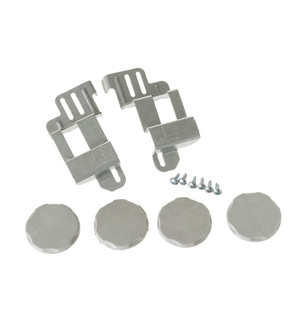
Specifications for GE24STACK with owner checks for this product design. Use the matching manual for control sequences and replacement parts.
Specifications & model details
GE24STACK: model-specific checks
Start with the source identity
GE GE24STACK is the exact code in this catalog record. This topic should be evaluated for that code and dryers category. The original source record is linked below; unrecorded settings, dates and compatibility remain unknown.
When the panel lights but the cycle will not begin, check closure, lock state, selected settings, and remote controls in sequence.
Owner guide: Power on, cycle not starting
Category & symptom guidance
Power on, cycle not starting
4 minute read · Shared guidance for clothes dryers
Observe the panel response
Choose a cycle and watch what the display does when Start is pressed once. Does it beep, show a lock symbol, flash an error, count down, or remain unchanged? Record the exact response and whether the drum light behaves normally. A lit panel confirms some power is present but does not prove every control or supply condition is normal.
If the machine was recently paused, note whether the door was opened or the selection changed. Some models require a fresh start action after an interruption; follow the specific manual rather than trying repeated button combinations.
Check the door and load position
Open the door and make sure a garment is not caught across the opening. Remove an item that presses against the door, then close it firmly and select the cycle again. Do not slam the door or hold its switch in place. A door that will not align, latch, or stay closed needs attention before more start attempts.
If the drum is overloaded, remove enough laundry to let it move freely. A tightly wedged item can interfere with closure or rotation. Record whether the door closes normally after reducing the load.
Look for a control lock or remote condition
Check the exact panel for a lock icon, “Control Lock” indication, or remote-start status. Use only the model’s documented release method. Button combinations differ, and a control-lock listing on one LG family does not prove every dryer has the same control or sequence.
If the dryer is paired with an app or smart-home system, check whether remote operation is enabled and whether the display requests an on-device action. Smart features can vary by model and setup; ordinary local controls and their manual remain the useful baseline for diagnosis.
Confirm cycle requirements
Choose a standard cycle without changing several options at once. If a selected option is incompatible with that cycle, the panel may reject the combination or require a different selection; the exact behavior is model-specific. Check the manual’s cycle table for the chosen program and any prerequisites.
For steam-enabled programs, confirm the model’s required water connection and operating conditions from its manual. A steam feature on a related dryer is not evidence that your model has the same program.
Make one clean start attempt
After checking the door and display state, cancel or exit the current selection using the documented control, select one simple cycle, and press Start once. Listen for the response and note whether the drum begins turning. Avoid rapid repeated presses, which can obscure the original state without fixing it.
If the panel acknowledges Start but the drum remains still, or the same error returns, stop owner checks. Report the exact model, display response, and whether power was recently interrupted. A lit display with no movement can have several causes that require diagnosis.
Check for a delayed start or a recent move
If the panel is lit but the dryer stays idle, check whether the display shows a remaining-time countdown or a delayed-start indication. A countdown may mean the dryer is waiting for its scheduled start rather than failing to respond. If a delay is shown, cancel it only using the controls described for your model, then select a cycle and try Start once. Do not assume every dryer offers delayed start.
If the dryer was recently moved, note whether the symptom began afterward. From outside the appliance, make sure it sits level and that nothing is pressing against the door or control panel. Recheck whether the door closes normally and whether the display response changed after the move. Do not pull the dryer out to inspect wiring, gas connections, or internal parts. If the panel is dark, the countdown does not clear, or the symptom persists, record what the display shows and seek model-specific support.
What to do with what you find
Lock symbol is visible and manual documents a release action.
A control state may be blocking local start.
Apply the exact documented action once and retry a simple cycle.
Start is acknowledged but drum never moves after door and load checks.
The failure is beyond a routine selection issue.
Stop attempts and contact model-specific support.
Have these details ready
Exact model number
Display response or lock symbol
Whether door closes and latches
Whether Start is acknowledged and drum moves
Common questions
Can I try a button combination I found for a similar model?
No. Use the exact model’s instructions because lock controls and sequences vary.
Does a lit panel prove the dryer is ready to run?
No. Door, control state, cycle requirements, and other conditions can still prevent starting.
General background sources
These sources support the shared guide. Exact model specifications and matched family procedures have their own sources above.
Explicit product_first_distribution_date in exact OEM primary SKU record; not a manufacturing year or import date. Primary source: https://www.geappliances.com/appliance/GE-Washer-Dryer-24-Stack-Bracket-Kit-GE24STACK