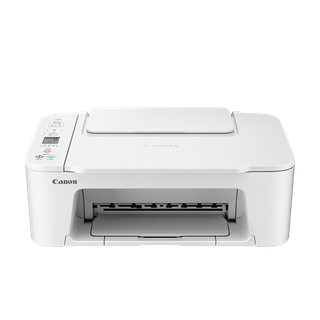
Canon PIXMA TS3720 / TS3722 series
TS3720 maintenance: numbered panel controls and FINE-cartridge limits
Canon’s TS3700 manual includes TS3720, TS3722, TS3725 and TS3729 and uses a compact operation panel rather than the touchscreen found on the TR8620 family. Its maintenance menu is exposed through numbered Setup functions, and its print-quality workflow relies on a nozzle-check pattern before cleaning. This makes the sequence especially important: the black and color buttons start a maintenance operation, so owners should read the displayed number and identify the requested task before pressing one.
The TS3700 is a FINE-cartridge printer, and Canon’s ink page lists PG-275/PG-275XL black and CL-276/CL-276XL color supplies. That differs from the refillable GI-bottle system in G-series models. For faint color or streaks, check cartridge level, installation and protective tape before escalating to repeated cleaning. Canon warns that cleaning consumes ink and sets a threshold before deep cleaning; those instructions are for this named TS family, not a brand-wide cleaning policy.
Establish the family and the button-menu behavior
Canon’s TS3700 manual identifies the supported TS3720 family variants and lists operation-panel entries for Nozzle Check, Cleaning and Deep Cleaning. The maintenance menu uses a Setup button sequence that displays a number on the LCD, and the Black or Color button confirms particular actions. Do not press buttons from memory or copy a sequence from TR4700 or TR8600, whose screens and menus differ. If your panel or display does not match the described TS3700 controls, stop and verify the exact product name and manual.
Check cartridge state before cleaning
Canon’s TS3700 print-quality troubleshooting asks owners to check estimated ink levels and confirm the FINE cartridges are properly installed. For a new cartridge, inspect that orange protective tape has been removed and that the cartridge clicks into position. Use the official ink-number page to match PG-275 black and CL-276 color, in standard or XL capacity. A wrong cartridge, low color, or tape left over can produce missing color that a maintenance cycle will not fix.
Print a nozzle check from the supported utility
Canon’s TS3700 driver manual places Nozzle Check in the Canon IJ Printer Assistant Tool. Load the specified plain paper in the rear tray, print the pattern, then compare for missing lines or blank color sections. When the pattern is normal, exit the check and investigate the print settings, media and source file. When it is defective, use the manual’s Cleaning procedure. Keep the pattern for comparison; a photograph of a failed page may not reveal which nozzle channel is missing.
Use the panel sequence once and allow the cycle to finish
Canon describes TS3700 Cleaning as pressing Setup until “2” appears, then pressing Black or Color. The printer takes about a minute and should not receive other commands until the ON lamp stops flashing. Once complete, print another nozzle pattern. Do not start successive cycles while the first is running or power the printer off mid-clean; these actions interrupt the condition the manual expects and spend additional cartridge ink.
Reserve deep cleaning and cartridge replacement
Canon’s TS3700 guide gives this exact sequence: after two standard Cleaning operations fail, use Deep Cleaning from Setup until “3” appears, then press Black or Color. Wait for the ON lamp to stop flashing; deep cleaning takes about one to two minutes. Print a nozzle check. If still defective, turn the printer off and repeat Deep Cleaning after 24 hours. If that does not fix the pattern, replace the FINE cartridge; if it still fails afterward, contact Canon for repair. Deep Cleaning uses more ink than standard Cleaning. Do not rinse or wipe the cartridge.
Close the loop with a controlled test
After an adjustment or cartridge change, print a new nozzle check and one small test image or document. Compare the same color region and line pattern to the baseline. If the pattern recovers but a particular application still prints poorly, inspect its media and quality settings rather than cleaning again. If the same nozzle sections remain missing, provide Canon support the exact TS3720 variant, cartridge codes, pattern sheets and number of clean cycles. This record gives service a clear stopping point without overusing ink.
The manufacturer lists both standard and XL capacity versions for the black and color cartridge codes, but the part number must still match the TS3700 family. If the pattern is normal after replacing a low cartridge, stop maintenance and print a normal test sheet. If the same channels remain absent after Canon’s prescribed sequence, preserve the pattern and seek support rather than repeating deep cleaning.