What is recorded for RS27T5200SR/AA
Samsung RS27T5200SR/AA — Cooling system: All-Around Cooling.
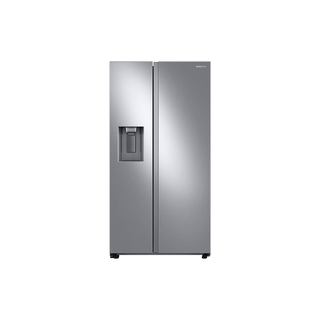
Samsung RS27T5200SR/AA
Refrigerator · US market · 44 owner topics
Covers RS27T5200SR/AA and the manufacturer-listed models in this family.
Specifications & model details
Samsung RS27T5200SR/AA — Cooling system: All-Around Cooling.
Read the control labels and indicators, then check whether actual compartment temperatures respond to a single adjustment.
Category & symptom guidance
Start by looking at the control panel and recording the words, symbols, and numbers it currently shows. A number may represent a target, a level, or a status; its meaning depends on the refrigerator. Do not assume that a higher number always means colder. Check the owner’s manual for your exact model to identify each control and indicator. If the manual is missing, search the manufacturer’s support site using the model number from the rating label. Official GE refrigerator resources explain that controls and features vary across models, so examples for one refrigerator should not be treated as instructions for another.
Write down the current display and settings before touching them. Note any illuminated indicators, whether the refrigerator and freezer compartments are being used normally, and whether either door has been open for a long time. This record lets you see what actually changed and makes it easier to restore a previous setting if an adjustment has an unwanted effect. A display value alone does not tell you the temperature of the food or air inside.
A control setting is a requested operating target, not a thermometer reading. Place an appliance thermometer in the refrigerator and another in the freezer, following the thermometer maker’s placement directions. Record the readings and compare them with the control display without assuming the two should match numerically. The FDA recommends keeping the refrigerator at or below 40°F and the freezer at 0°F; use thermometer readings to assess those food-safety targets.
Take readings in more than one location when you suspect uneven cooling. A reading near a door shelf may differ from one farther inside because doors open and close and air distribution varies. Note the location and time for every result. A single warm reading just after loading groceries or prolonged door opening may not describe stable operation, so observe again after conditions have settled.
If measurements show a need to adjust, use the exact manual to identify the relevant control and change only that one setting. Record the old and new values. Avoid changing refrigerator and freezer controls together: if temperatures shift, you would not know which adjustment caused it. Give the appliance time to respond under ordinary use, then repeat thermometer readings in the same locations. The amount of time needed varies with the refrigerator, its load, and how often doors open, so use the manual’s guidance rather than a universal waiting interval.
If the measured temperature moves in the intended direction but remains outside the food-safety target, make the next adjustment only after recording the new result and consulting model instructions. If readings move the wrong way or vary sharply, restore the documented setting if the manual allows and seek model-specific help. Keep perishable food protected while measurements are outside safe limits.
An illuminated symbol does not by itself identify a failure. Some indicators show that a feature or operating mode is active; others may report a condition needing attention. Read the exact manual’s indicator chart and compare the display with the actual temperatures. If the panel says a mode is active and temperatures remain within safe targets, that observation supports a mode-status explanation, but the manual still determines what the symbol means.
If an indicator is described by the manual as an alert, or measured temperatures are unsafe, treat that as a separate issue from an ordinary setting adjustment. Record the exact symbol or message and the thermometer readings before contacting support. Do not infer a fault from an unfamiliar icon, and do not dismiss an alert solely because the refrigerator seems cool to the touch.
Door opening, warm groceries, and how the refrigerator is loaded can affect temperature observations. A door shelf is exposed to more room air during normal access than a protected interior location, while blocked vents can interfere with circulation. Note recent door opening and whether containers are crowding air outlets before interpreting a reading. Avoid rearranging everything while testing a setting; changing the layout at the same time obscures the cause of a temperature change.
Use the same thermometer locations and ordinary access pattern for repeat checks. If one area remains warm while another is within target, keep sensitive food in the reliably cold area only if its measured temperature is appropriate, and consult the manual or manufacturer support about circulation and placement. Do not rely on touch, displayed setpoints, or a brief reading as proof that food is safely chilled.
The control value is a setpoint or level rather than a direct temperature measurement.
The indicator may describe operating status rather than a fault.
There is a food-safety concern that cannot be resolved by interpreting the display alone.
Not necessarily. It may be a target or level. Confirm its meaning in the exact model manual and check actual temperature with an appliance thermometer.
No. Change one documented setting at a time and compare thermometer readings so you can tell which adjustment affected the result.
These sources support the shared guide. Exact model specifications and matched family procedures have their own sources above.
Owner guidance by Specs & Parts, drafted with GPT-6 Luna. Sources and scope.
Recorded model facts
| Specification | Recorded value | Evidence |
|---|---|---|
| Cooling system | All-Around Cooling | ManufacturerSamsung — RS27T5200SR V7 specification sheet Exact-model manufacturer resource; RS27T5200SR_V7.pdf, pages 1–2; visible specification table and dimension drawings Official V7 sheet. Overall dimensions include hinges, handles, doors and dispenser; separate installation requirements still apply. Observed Oct 26, 2026 |