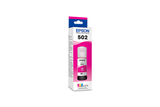
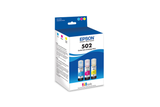
Potential replacements. Compatibility is not guaranteed. Confirm the complete model, suffix, serial/version, diagram position and current part number with the seller or manufacturer before ordering. Seller links open their listings for current price, stock and returns.
Epson 502, Black and Color Ink Bottles, C/M/Y/K 4-Pack
Part number T502120-BCS
Fit unconfirmed · check the full model, suffix and version.
Source & checks before ordering
Why it is shown: The printer manufacturer explicitly associates this exact consumable SKU with the named model. Confirm current regional supply and firmware requirements before purchase.
Fit unconfirmed · check the full model, suffix and version.
Source & checks before ordering
Why it is shown: The printer manufacturer explicitly associates this exact consumable SKU with the named model. Confirm current regional supply and firmware requirements before purchase.
Fit unconfirmed · check the full model, suffix and version.
Source & checks before ordering
Why it is shown: The printer manufacturer explicitly associates this exact consumable SKU with the named model. Confirm current regional supply and firmware requirements before purchase.
Fit unconfirmed · check the full model, suffix and version.
Source & checks before ordering
Why it is shown: The printer manufacturer explicitly associates this exact consumable SKU with the named model. Confirm current regional supply and firmware requirements before purchase.
Fit unconfirmed · check the full model, suffix and version.
Source & checks before ordering
Why it is shown: The printer manufacturer explicitly associates this exact consumable SKU with the named model. Confirm current regional supply and firmware requirements before purchase.
Fit unconfirmed · check the full model, suffix and version.
Source & checks before ordering
Why it is shown: The printer manufacturer explicitly associates this exact consumable SKU with the named model. Confirm current regional supply and firmware requirements before purchase.
How these suggestions are reviewed · Seller links are unpaid. Specs & Parts does not sell these parts or guarantee fit, performance, or a repair outcome.
Epson maintenance box and cartridge parts vary by model
Epson manuals distinguish ink cartridges, ink bottles and maintenance boxes. Before buying a supply or service part, use the complete printer model and its supplies page; an EcoTank refill bottle is not a substitute for a cartridge and maintenance-box compatibility is not established by brand alone.
Epson C11CL40204 is listed under ENERGY STAR partner Epson America, Inc.. Search support by the retail brand and full product code. The partner name helps distinguish the certification record from a similarly named product; it is not a declaration of the current warranty provider.
Epson C11CL40204 is recorded as Ink Jet (IJ). For missing colors or broken lines, start with an internal print-quality/nozzle-check page before choosing the manufacturer’s cleaning level. Check the actual cartridge or tank arrangement before buying ink; a marking-technology label does not specify the refill system.
Use the source-listed product name as well as the code
The source records associate Epson C11CL40204 with ET-4955. Keep both names in the support lookup. A certification model number and a retail product name can differ; the original source establishes this relationship, while the matching manufacturer document establishes procedure applicability.
Verify official supplies and repair part numbers for the complete printer model before ordering.
Owner guide: Parts & components
Category & symptom guidance
Parts & components
3 minute read · Shared guidance for printers & imaging
Match the supply or part to exact model code
Use the manufacturer supply page for the full printer model and region. Confirm the official cartridge, bottle, toner, drum, maintenance box, waste container, printhead, or tray part number. A brand’s supply family is not enough: different models can use similar-looking components with different chips, capacity, or fit. Keep the printer model and supply code separate in purchase notes.
For a repair part, identify whether it is user replaceable or service-only. Do not buy an internal board based on a symptom forum.
Understand what each consumable does
Ink cartridges or refill bottles supply ink; printheads place ink on the page; maintenance boxes collect waste from ink servicing. In laser printers, toner forms the image, while a drum or imaging unit may be a separate component. Some devices combine consumables into one cartridge and others separate them. Read the exact manual before deciding what a message means.
Page-yield estimates depend on test coverage and usage. Dense documents and photographs can use supplies faster. Do not compare yield numbers without noting the stated test method.
Check return terms and storage
Before ordering, confirm whether opened consumables can be returned, whether the product is genuine or compatible, and whether its region matches the printer. Verify expiration or storage directions on ink and toner packaging. Keep supplies sealed until needed. Ink and toner can be affected by heat, moisture, or mishandling; follow the label and manual.
For an internal part, ask the authorized supplier to confirm compatibility using the serial range and revision. Similar product-family names do not establish fit.
Use diagnosis before replacement
A poor nozzle pattern, streak, jam, or scan line may arise from different components. Run the model’s test page and follow the official troubleshooting chart. Ask service to identify the evidence for a proposed printhead, drum, fuser, or roller replacement. Keep the old part number and repair invoice if work is performed.
Check warranty before purchasing a costly printhead or internal assembly. Unauthorized repair may affect coverage under the written terms. Do not dismantle a toner cartridge or touch a drum to inspect it.
Handle supplies using their specific packaging rules
Toner can release fine powder if damaged, an imaging drum can be light-sensitive, and ink can leak when tilted. Follow package and manual directions when unpacking, installing, or returning each supply. Keep children and pets away. Do not vacuum toner with an ordinary household vacuum unless the manufacturer explicitly approves that method. Follow the supplier’s cleanup guidance for spills.
Avoid mixing regional supplies
A cartridge or toner sold for one country may not be accepted by a printer configured for another region. Check the manufacturer’s regional support page and supply code before opening the package. If the printer was imported, contact support with the complete model and country of purchase. Do not remove a chip or defeat a region check.
Before disposing of a replaced item, check whether the manufacturer requests it for warranty inspection or recycling. Keep it bagged and labeled until support confirms.
General background sources
These sources support the shared guide. Exact model specifications and matched family procedures have their own sources above.
Owner guidance by Specs & Parts, drafted with GPT-6 Luna. Sources and scope.
Earlier part references
These historical identifiers are separate from the reviewed suggestions above. Their original records have not been renewed for current shopping. Recheck any supersession or fit restrictions with the manufacturer.
Source-listed part or accessory
T502120-BCS
Epson 502, Black and Color Ink Bottles, C/M/Y/K 4-Pack
The printer manufacturer explicitly associates this exact consumable SKU with the named model. Confirm current regional supply and firmware requirements before purchase.
The printer manufacturer explicitly associates this exact consumable SKU with the named model. Confirm current regional supply and firmware requirements before purchase.
The printer manufacturer explicitly associates this exact consumable SKU with the named model. Confirm current regional supply and firmware requirements before purchase.
The printer manufacturer explicitly associates this exact consumable SKU with the named model. Confirm current regional supply and firmware requirements before purchase.
The printer manufacturer explicitly associates this exact consumable SKU with the named model. Confirm current regional supply and firmware requirements before purchase.
The printer manufacturer explicitly associates this exact consumable SKU with the named model. Confirm current regional supply and firmware requirements before purchase.