What is recorded for MRF29D3AST
Midea MRF29D3AST — Connected functionality: Yes; Product type: Bottom Freezer.
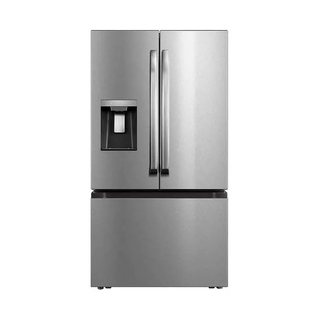
Midea MRF29D3AST
Refrigerator · US market · 45 owner topics
Specifications for MRF29D3AST with owner checks for this product design. Use the matching manual for control sequences and replacement parts.
Specifications & model details
Midea MRF29D3AST — Connected functionality: Yes; Product type: Bottom Freezer.
Midea MRF29D3AST lists connected capability as Yes. Match the manufacturer’s supported app and onboarding instructions to this product and market. Do not perform a factory reset simply to retry network pairing.
Check whether a refrigerator’s connected features fit your model, home network, account, and privacy preferences. Understand what can stop working when connectivity drops.
Category & symptom guidance
A connected feature is useful only if your specific refrigerator supports it. Start with the full model number from the rating label or purchase records, then check that model’s manual and manufacturer support page. Product-family names and similar-looking control panels do not establish that two models have the same Wi-Fi hardware or features. Record the feature you want—such as status alerts, remote temperature viewing, or service support—and confirm it is listed for your model.
Separate a listed feature from a promise that it will work forever. App names, account requirements, supported phone software, and service availability can change. Manufacturer support information is the place to confirm current requirements. If the feature is absent from the model documentation, treat it as unsupported unless the manufacturer confirms otherwise.
Pairing has several distinct parts: the refrigerator must support the feature, the home router must provide a compatible connection, and the app must associate the appliance with the correct account. A phone showing the refrigerator in an app does not by itself prove the appliance remains connected to the router. Likewise, a router listing a device does not prove remote service is active. Follow only the instructions supplied for the model and app version; menu names and setup sequences differ.
Use your own trusted network and official app source. Avoid sharing account credentials with a technician or stranger who offers to connect the appliance. If the setup flow asks for access you do not understand, pause and check the manufacturer’s privacy and support information before granting it.
A refrigerator’s basic cooling should not depend on an app connection unless the manufacturer explicitly documents otherwise. Connectivity loss can remove remote alerts, status checks, or service features while the refrigerator continues its ordinary local operation. Do not use an app status screen as a substitute for checking food temperature with an appliance thermometer; the FDA advises keeping a refrigerator at or below 40°F and a freezer at 0°F.
When an alert disappears or the app says offline, identify whether the internet, router, account, or appliance connection changed. Check cooling locally and use the thermometer for temperature evidence. Restore connectivity using the manual’s steps, but do not repeatedly reset settings if you have not recorded the current network and account details.
Connected appliances may send device status and account-linked information to support services. The exact data, retention, and sharing terms are controlled by the manufacturer’s current privacy notice, not by the refrigerator’s marketing description. Review those terms before enabling remote access, especially in a shared household or rental property. Decide whose account owns the appliance and how access will be removed if that person moves away.
Use a unique password and available account protections. Keep the purchase documentation and model number with household records, but do not post account codes or network credentials publicly. If you sell or give away the refrigerator, remove it from your account and follow the manufacturer’s transfer or reset instructions so the next owner can set up their own access.
A connected feature can outlive its usefulness if an app is discontinued, phone software changes, or a manufacturer ends remote service. Support pages may identify current compatibility, but they cannot guarantee indefinite availability. Keep the manual and a record of any useful local settings so that loss of an app does not leave you dependent on remote viewing for ordinary operation.
If connectivity is unreliable, compare the practical value of each feature with the time spent maintaining accounts and network access. For important food protection, a thermometer and direct inspection provide independent evidence. For repairs, retain model information and use the manufacturer’s support channel; an app connection alone does not confirm a fault or authorize a repair.
The feature may not be included, even if another refrigerator in the same product family has it.
Network access may be working while account pairing, permissions, or remote service is not.
Remote monitoring is unavailable; the app status alone does not establish a cooling problem.
Ordinary cooling generally operates locally, but confirm the manual for your exact model. Connectivity loss can disable remote features and alerts.
No. Use an appliance thermometer to check food-storage temperatures; FDA guidance is 40°F or below for the refrigerator and 0°F for the freezer.
These sources support the shared guide. Exact model specifications and matched family procedures have their own sources above.
Owner guidance by Specs & Parts, drafted with GPT-6 Luna. Sources and scope.
Recorded model facts
| Specification | Recorded value | Evidence |
|---|---|---|
| Connected functionality | Yes | CertificationENERGY STAR — Refrigerators refrigerators.csv; row 3740; ENERGY STAR ID 2406424 Certification dataset declaration; check manufacturer installation documents for fit and clearances. Observed Nov 04, 2026 |
| Product type | Bottom Freezer | CertificationENERGY STAR — Refrigerators refrigerators.csv; row 3740; ENERGY STAR ID 2406424 Certification dataset declaration; check manufacturer installation documents for fit and clearances. Observed Nov 04, 2026 |