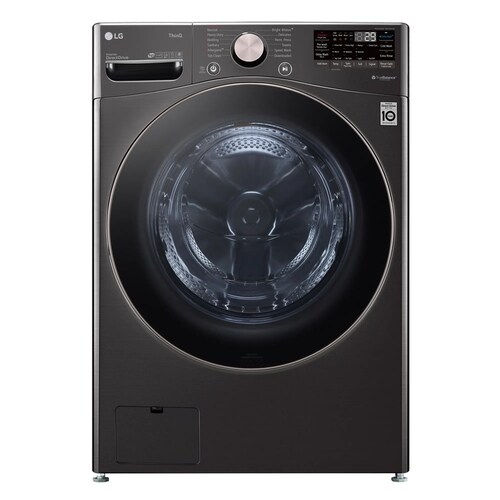
LG WM4000HWA / WM4000HBA front-load washers
Separate a WM4000 no-spin symptom from load and drain behavior
On the LG WM4000HWA/HBA, a load that comes out wet may have failed to reach spin, may have retained water, or may have been slowed by load balance or control state. Those outcomes need different checks. Before rerunning the cycle, note whether the drum turned during wash, whether water remains, and whether an error or Control Lock indicator appeared.
The WM4000 manual documents Spin Only as a separate operation, which helps compare a standalone spin with the original cycle. Use only that exact manual sequence. Keep the diagnosis observational: an unbalanced load, poor drain, locked controls, or a continuing fault can produce similar owner-visible results.
Describe the wet-load pattern
Check whether the clothes are uniformly wet, heavy items are still saturated, or the load is merely damp. Note if the washer finished the display countdown, paused, displayed UE/OE or another code, or stopped before final spin. A single bulky item, tangled bedding, or a mixed load can distribute unevenly; LG’s vibration guidance recommends redistributing the load rather than repeatedly forcing a high spin.
Look for water remaining in the bottom of the drum. If water is present, resolve the drain branch first: a washer may not proceed to spin while water remains. Record the water level and any OE code, and use the WM4000 manual’s drain/filter directions only if the condition is safe and owner-accessible.
- Record the code, water level, load type, and whether the drum moved during the cycle.
Check load balance and washer stability
Pause only if the control permits and the door can safely be opened. Spread tangled laundry around the drum and avoid testing with one heavy absorbent item alone. For a bulky item, use the cycle and load advice in the WM4000 manual rather than selecting a guessed spin speed. LG explains that tangled or uneven loads and a washer that rocks can contribute to excessive vibration and interrupted operation.
Check whether the cabinet rocks diagonally on the floor and whether all feet appear to contact it. If the washer was recently installed, check the installation record for shipping-bolt removal; do not crawl behind a heavy installed washer or remove bolts yourself if access is unsafe. Record whether vibration is limited to high spin or occurs during wash as well.
- Describe load balance and rocking rather than attributing the symptom to a suspension part.
Use the documented standalone spin
The WM4000 manual provides Spin Only as a separate function. Turn the power on without choosing a wash cycle, hold Spin for three seconds, then press Start/Pause. Observe whether the unit drains, accelerates into spin, and completes. If the Control Lock indicator is on, the manual says it can be toggled by holding Rinse+Spin for three seconds after powering on; do not use the Steam key sequence found on other LG models.
A normal standalone spin shows the washer can perform that operation under the current conditions, but it does not prove the original wash cycle is fault-free. If it does not drain or spin, note exactly where it stops and preserve any code. Avoid multiple retries if the drum is banging, the washer walks, or a leak appears.
- Use one supervised test and capture the result; stop for severe movement or leakage.
Interpret the result without guessing a part
If a balanced light load spins normally but a bulky load does not, report the load difference; load handling may be central to the complaint. If water remains in both the original cycle and Spin Only, report a drain symptom and check the accessible filter/hose branch. If the display ignores commands while locked, resolve the lock state from the exact manual before judging the motor behavior.
If an empty or balanced load repeatedly fails to spin after draining, or a code returns, arrange LG service. Do not bypass the door lock, reach into the drum while it moves, or open a cabinet panel. A technician needs the error, cycle, water level, and test result to distinguish control, drainage, and mechanical possibilities.
- Send the service team the comparison between the original cycle and Spin Only.
Prevent a misleading repeat test
Before a second load, remove items that are obviously tangled or overloaded and select an appropriate documented cycle. Do not change temperature, spin level, and load size simultaneously; then you will not know what affected the result. Use the control panel’s available options only as described in the WM4000 manual and specification sheet.
Keep a simple note of the load, cycle, options, completion display, and final moisture. If the symptom follows a certain fabric or item, that pattern is useful. If it occurs with several balanced loads, share that too. Clear observations can prevent the service visit from starting with a guess based on “clothes are wet.”
- Change one load condition at a time and preserve the previous test result.
Common questions
Is wet clothing proof that the washer did not spin?
It is a clue, but retained water, load imbalance, a selected cycle, or a control state can affect the outcome. Check for water and compare once with the documented Spin Only operation.
The washer stops when it shakes. What should I do?
Pause and redistribute the load if safe, then note whether the cabinet rocks and whether the load is bulky or tangled. Severe movement or repeated failure needs service.