Appliance & electronics support
Find your model numberAbout our sources
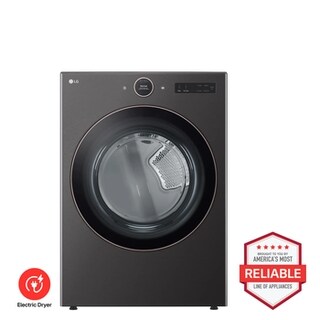
LG DLEX6500B Electric Dryer Brought to You by Americas Most Reliable Line of Appliances - Front View
Photo: DLEX6500B. Photo source
Manufacturer sources

LG DLEX6500B

Controls & settings

Clothes dryer · US market · 47 owner topics

LG DLEX6500 / DLGX6501 front-load dryer family

Covers DLEX6500B and the manufacturer-listed models in this family.

LG DLEX6500 / DLGX6501 front-load dryer family

Set the 6500 dial and options for the garment in the drum

The DLEX6500/DLGX6501 has a digital dial with LCD and touch controls, 23 cycles and 11 options. The sheet lists AI Sensor Dry, TurboSteam, SteamFresh, Steam Sanitary, Energy Saver, Control Lock and ThinQ Wi-Fi. The matching manual’s cycle guide determines which options pair with each program.

Select a cycle first, then add only compatible options. The DLEX and DLGX versions share many controls but have distinct utility requirements. Use exact model support for installation and supply questions.

  1. Choose a charted cycle before selecting options.
  2. Keep steam programs for dry compatible garments; don’t pair steam with Energy Saver.
  3. Check the Control Lock indicator if controls appear disabled.

Choose by fabric and load

Normal covers everyday washable loads; Towels and Heavy Duty suit heavier items; Delicates is for garments whose labels allow gentle drying; Bedding is for compatible bulky pieces. The family sheet also lists AI Dry, Quick Dry, Timed Dry, Perm Press, Air Dry and specialty cycles. The manual chart—not a cycle name alone—sets allowed dry levels and options.

AI Sensor Dry adjusts the estimate as moisture is measured. For tiny loads, use the charted Manual Dry option because sensor contact can be inconsistent. Sort fabrics first; choosing an aggressive temperature for a mixed load can overdry light pieces before heavy ones are done.

Use Energy Saver and steam for different jobs

Energy Saver is enabled by default on Normal. LG says it dries at lower temperatures and takes longer; the opening can feel cool. If you choose it, allow for the longer cycle and check the manual before changing dry level.

SteamFresh and Steam Sanitary are intended for dry clothing and have material exclusions. The manual says Steam and Energy Saver cannot run together. Use steam for the listed treatment, not as a wet-load drying program.

Check Control Lock before assuming panel failure

Control Lock disables controls. If the panel beeps without changing settings, check the lock indicator. The 6500 manual gives a menu-based process through Options, the dial, and OK to select or turn off Control Lock. Follow the exact on-screen sequence in that manual; do not substitute a button hold from another LG dryer.

Control Lock is not a reset and does not clear a cycle fault. If the lock indicator is off and controls still do not respond, note the display and contact LG support rather than trying undocumented combinations.

Use ThinQ as a convenience, not a cycle authority

The 6500 sheet lists Wi-Fi and ThinQ, along with Smart Diagnosis and remote functions. Register the exact dryer in the app and follow its setup prompts. A connection problem affects connected features; the front panel remains the place to select a compatible cycle.

If a paired washer suggests a cycle, check the garments and care labels against the dryer’s chart before accepting. The connected suggestion cannot override load restrictions or option compatibility.

Interpret changing time and steam condensation

A changing estimate can reflect AI Sensor Dry recalculating for moisture. Energy Saver also lengthens Normal. Steam can produce condensation inside the door, and visible steam may be limited. These behaviors differ from repeated error codes, a cycle that stops, or water escaping the appliance.

For an uncertain result, change one factor at a time: cycle, load sort, then dry level. Check FlowSense if drying is slow. Use the matching manual troubleshooting steps if the dryer remains cold or shows a code.

Normal runs longer with Energy Saver.

Lower-temperature drying extends the cycle by design.

Keep the option for energy savings or select another charted setting for the load.

Steam and Energy Saver cannot be selected together.

The manual lists them as incompatible options.

Choose the treatment that fits the dry garment and care label.

Panel beeps but ignores selections.

Control Lock may be enabled.

Check the indicator and follow the 6500 manual’s menu path.

Common questions

Can SteamFresh dry wet laundry?

No. The manual describes steam programs for dry clothing; use a drying cycle for wet items.

Is changing time a fault?

Not by itself. Sensor Dry can recalculate and Energy Saver extends Normal.

Specifications & model details

DLEX6500B: model-specific checks

Use the recorded energy source

LG DLEX6500B is listed as Electric with Vented venting. Record power-on, tumbling and heat as three separate observations. Start a slow-drying check with the selected program, load and owner-accessible lint path. The supply rating and any burner or heating-circuit diagnosis require the original requirements for this model.

More background: Controls & settings

Category & symptom guidance

Controls & settings

Understand the control layout

Start with the panel diagram in the owner manual for the full model number. A dial may select a cycle while touch keys alter dryness, temperature, or options; a displayed setting can change when a cycle is chosen. Do not assume a key does the same job across brands or even across product families. Read the panel labels and the manual’s control table before relying on an unfamiliar option.

Some dryers offer sensor cycles that estimate dryness from the load and timed cycles that run for a selected duration. An option may be unavailable with certain cycles, or the display may indicate a default that differs from the last load. LG’s DLEX4000/DLGX4001 family sheet lists particular options and controls, but those names and combinations apply only to that family.

  1. Identify the selected cycle first, then note which settings the panel permits changing.
  2. Use the cycle/option table to determine whether an option applies to the current program.
  3. After changing a setting, confirm the display reflects the intended choice before starting.

When controls appear locked

A control lock or child lock can prevent button input while leaving the display powered. The lock icon or message is a clue, but the unlocking gesture is model-specific. Find the exact control-lock section in the manual and follow its stated key or menu sequence; do not try combinations copied from a video for another dryer. If the panel is unresponsive without a lock indication, note whether the display is lit, whether the cycle is running, and whether any error appears.

If a setting is locked out only for one selected cycle, that may be a normal restriction rather than a fault. Change to a cycle whose manual permits the desired option, or use the recommended program for the fabric. If the lock indication remains after the documented release procedure, stop repeated button attempts and contact support with the model and display behavior.

  1. Check the screen for a lock symbol or status message.
  2. Use only the unlock procedure printed for the exact model.
  3. If controls remain unresponsive, record the display and active cycle before seeking help.

Wi-Fi and remote controls

A Wi-Fi label or app listing does not guarantee that every dryer supports remote start, every region, or every app feature. Check the manual and current manufacturer support information for the exact model. Setup generally depends on an account, a compatible home network, permissions, and the dryer being registered in the app; prompts can vary. Follow the app’s own pairing instructions and avoid sharing account credentials.

Some models require a local action before remote operation can be enabled, and safety or door state may block remote start. Use the appliance’s display and manual to understand its conditions. If the app cannot find the unit, verify the model supports the feature, the phone is using the required network band or setup method stated by the app, and the appliance is not already registered to another account. Do not interpret an unavailable app control as a mechanical failure without checking the local panel.

  1. Verify Wi-Fi and remote functions in the exact model’s documentation.
  2. Complete account and network setup using the current app prompts.
  3. Test local operation first and use remote controls only when the appliance indicates readiness.

Use options as adjustments, not substitutes

Options such as wrinkle care, damp-dry signal, energy saving, steam, or static reduction change a particular part of a cycle and may be incompatible with other choices. Check the manual for what the option does and whether it applies to your fabric. A damp alert is useful when items should remain slightly moist for ironing; it is not a claim that every garment has the same moisture level. Steam features need the required water supply or accessory arrangement described by the maker.

If the result is too damp, too hot, or more wrinkled than expected, change one setting at a time and compare similar loads. Avoid increasing heat to overcome a clogged vent or overloaded drum. Keep a short note of cycle, load size, and options when troubleshooting; it can reveal whether the issue follows a setting or all programs.

  1. Choose options based on garment care labels and the manual’s cycle restrictions.
  2. Change one variable per comparable load so results are interpretable.
  3. For poor drying, inspect the lint filter and permitted airflow checks before selecting stronger heat.

What to do with what you find

A lock icon appears and buttons do not respond.

A documented control lock may be active.

Follow the exact model’s unlock directions and confirm the icon clears.

An option is unavailable on one cycle but works on another.

The cycle may restrict that setting by design.

Check the manual’s compatibility table and select a suitable cycle.

The app offers no remote start or cannot locate the dryer.

Feature eligibility, setup, or account/network conditions may differ.

Verify exact model support and app setup steps before troubleshooting the appliance hardware.

Have these details ready

  • Complete model number
  • Photo or transcription of display and selected cycle
  • Exact app error text, if relevant

Common questions

Can I use another LG dryer’s button combination to unlock this one?

No. Use the control-lock directions for the complete model number; panel behavior varies by family.

Why is a setting grayed out?

The active cycle may not allow it, or a prerequisite may be unmet. Check the manual’s cycle and option table.

General background sources

These sources support the shared guide. Exact model specifications and matched family procedures have their own sources above.

  1. gscs-b2c.lge.com/downloadFile?fileId=2yGdcTa7P2CJgWmTA
  2. www.lg.com/us/support/products/documents/DLEX4000_%20DLGX4001_%20Spec%20Sheet.pdf
  3. www.lg.com/us/support/product/lg-DLEX4000W.ABWETUS?tab=1
  4. www.energy.gov/cmei/buildings/consumer-clothes-dryers

Owner guidance by Specs & Parts, drafted with GPT-6 Luna. Sources and scope.

Sources for DLEX6500B

Suggest a correction