Appliance & electronics support
Find your model numberAbout our sources
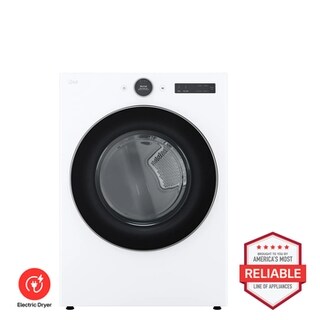
LG DLEX5500W Electric Dryer Brought to You by Americas Most Reliable Line of Appliances - Front View
Photo: DLEX5500W. Photo source
Manufacturer sources

LG DLEX5500W

Not heating

Clothes dryer · US market · 47 owner topics

LG DLEX5500 / DLGX5501 front-load dryer family

Covers DLEX5500W and the manufacturer-listed models in this family.

LG DLEX5500 / DLGX5501 front-load dryer family

Check cycle, supply and airflow when a 5500 dryer will not heat

DLEX5500 is the electric model; DLGX5501 is gas. LG lists 120/240 V, 60 Hz, 26 A for DLEX and 120 V, 60 Hz, 11.5 A for DLGX. The LCD digital dial, Sensor Dry and FlowSense are shared family features, but the heat supply is not.

Normal has Energy Saver selected by default. The matching manual says it lowers drying temperature, increases cycle time, and can feel cool at the beginning. Check that setting and the exhaust indication before calling a cool start a failure.

  1. Check the displayed cycle and Energy Saver before another test.
  2. Clean the lint screen and inspect the visible vent path.
  3. Keep DLEX electrical and DLGX gas checks separate.

Check Energy Saver and steam selection

On Normal, inspect the Energy Saver option on the LCD. The manual describes a lower-temperature start and longer cycle; compare a later part of the cycle rather than judging the first moments. The Steam and Energy Saver options cannot be used together, so a rejected selection can be normal menu behavior.

SteamFresh and Steam Sanitary are for dry clothing, with exclusions in the cycle chart. A steam cycle is not a test for whether ordinary wet laundry can dry. Choose a compatible cycle for the load and care label.

A change in load size or cycle can also change perceived warmth: a partially filled drum moves differently from a dense load. Make one comparison with a familiar, compatible load rather than repeating several different settings at once.

Use the correct supply check

For DLEX5500, check that the plug is seated and the household breaker has not tripped. If it trips again, stop and call an electrician. Do not open the terminal cover or probe a live circuit. The rating is distinct from the DLGX gas rating.

For DLGX5501, check only the visible external shutoff if safely accessible. Do not loosen a gas connection or move the dryer. The manual suggests checking whether other gas appliances work. A gas odor means stop using the appliance and contact the gas utility or emergency service.

Read FlowSense before repeating a cycle

The manual associates FlowSense with an exhaust route that is too long, has too many turns, or is restricted. Clean the lint screen and inspect the visible transition duct for a kink; check the outside vent hood for a blockage. The sheet allows four-way venting on electric and three-way on gas, but installation diagrams still govern the route.

After clearing a restriction, the system may take multiple consecutive cycles to reassess and the indicator can remain for two hours after a cycle. If active after five cycles, call service. A FlowSense warning points to exhaust inspection; it does not prove a failed heating part.

Use the family control menu safely

This family uses an LCD dial and Options menu. The manual’s Control Lock route is Options, select Control Lock with the dial, press OK, select Off, and press OK. Use this exact sequence only when the display and controls match the 5500 family.

Control Lock is not a factory reset. If a code appears, use the matching troubleshooting table. Do not hold undocumented combinations or remove panels. Repeated breaker trips, a gas smell, or a cold drum after the documented checks needs qualified help.

  1. Use the matching manual’s Control Lock menu path; do not use a factory reset for a locked panel.
Normal starts cool with Energy Saver selected.

The manual describes lower-temperature drying and a cool opening phase.

Check later cycle behavior and choose a charted alternative if needed.

FlowSense stays lit after the screen is clean.

A restriction may be in the duct, turns or exterior termination.

Inspect visible sections and arrange professional vent service for concealed runs.

DLEX trips the breaker or DLGX smells of gas.

The issue has reached a household supply safety boundary.

Stop use and call a qualified electrician or gas utility.

Common questions

Why is Normal cool at first?

Energy Saver is enabled by default and the manual says it lowers temperature; check the full documented cycle behavior.

Can the electric rating apply to DLGX?

No. The sheet lists different electric and gas supply ratings for these models.

Specifications & model details

DLEX5500W: model-specific checks

Use the recorded energy source

LG DLEX5500W is listed as Electric with Vented venting. Record power-on, tumbling and heat as three separate observations. Start a slow-drying check with the selected program, load and owner-accessible lint path. The supply rating and any burner or heating-circuit diagnosis require the original requirements for this model.

Recorded model facts

Model details relevant to this topic

SpecificationRecorded valueEvidence
Dryer capacity7.4 cu ft
Manufacturer
7.4 cu. ft. Smart Front Load Electric Dryer - DLEX5500W

Individual LG USA PDP: page title and main product heading identify DLEX5500W. Exact specification values are cross-checked against the linked family sheet; see documents and fact contexts.

Official LG US product page visibly names DLEX5500W; family specification sheet DLEX5500_ / DLGX5501_ LG Pro Builder Specification Sheet lists the same literal model code. Available Colors and Capacity & Matching Washer table, p. 1; Summary/Power Source and dimensions tables; sheet family header DLEX5500_ / DLGX5501_. Supporting manufacturer sheet: https://www.lg.com/us/business/download/resources/CT00021979/DLEX5500_DLGX5501_LG_Pro_Builder_Spec_Sheet07022024%5B20240703_001120%5D.pdf

Observed Oct 27, 2026
Dryer configurationFront Load Dryer
Manufacturer
7.4 cu. ft. Smart Front Load Electric Dryer - DLEX5500W

Individual LG USA PDP: page title and main product heading identify DLEX5500W. Exact specification values are cross-checked against the linked family sheet; see documents and fact contexts.

Official LG US product page visibly names DLEX5500W; family specification sheet DLEX5500_ / DLGX5501_ LG Pro Builder Specification Sheet lists the same literal model code. Available Colors and Capacity & Matching Washer table, p. 1; Summary/Power Source and dimensions tables; sheet family header DLEX5500_ / DLGX5501_. Supporting manufacturer sheet: https://www.lg.com/us/business/download/resources/CT00021979/DLEX5500_DLGX5501_LG_Pro_Builder_Spec_Sheet07022024%5B20240703_001120%5D.pdf

Observed Oct 27, 2026
Exact listed model codeDLEX5500W
Manufacturer
7.4 cu. ft. Smart Front Load Electric Dryer - DLEX5500W

Individual LG USA PDP: page title and main product heading identify DLEX5500W. Exact specification values are cross-checked against the linked family sheet; see documents and fact contexts.

Exact model identity, confirmed on individual US PDP and matching family sheet model/UPC row. Supporting manufacturer sheet: https://www.lg.com/us/business/download/resources/CT00021979/DLEX5500_DLGX5501_LG_Pro_Builder_Spec_Sheet07022024%5B20240703_001120%5D.pdf

Observed Oct 27, 2026
Manufacturer-listed colorWhite
Manufacturer
7.4 cu. ft. Smart Front Load Electric Dryer - DLEX5500W

Individual LG USA PDP: page title and main product heading identify DLEX5500W. Exact specification values are cross-checked against the linked family sheet; see documents and fact contexts.

Official LG US product page visibly names DLEX5500W; family specification sheet DLEX5500_ / DLGX5501_ LG Pro Builder Specification Sheet lists the same literal model code. Family specification lists this color suffix. Supporting manufacturer sheet: https://www.lg.com/us/business/download/resources/CT00021979/DLEX5500_DLGX5501_LG_Pro_Builder_Spec_Sheet07022024%5B20240703_001120%5D.pdf

Observed Oct 27, 2026
More background: Dryer not heating

Category & symptom guidance

Dryer not heating

Confirm the symptom

Check whether the drum turns and the cycle progresses. If the dryer does not start or the drum does not turn, it is a no-start problem rather than a clear no-heat complaint. If it tumbles but clothes remain damp, note whether they are cool throughout, partly warm, or simply taking longer than usual. Avoid judging by a single lightweight garment or a small load, because sensor cycles and fabric mixes can change how warmth and cycle time feel.

Confirm the selected cycle and temperature are intended to heat. Air-only or low-temperature options may be deliberate. Check the control display for a lock or alert and consult the exact model's owner information for the option selected. Do not use an undocumented control combination to force heat or clear a message.

  1. Use a normal compatible load rather than a single item for the observation.
  2. Record cycle, temperature selection, elapsed result, and whether the drum turns.
  3. Stop if you notice smoke, burning odor, or a gas smell.

Check the design before the vent

A vented electric dryer and a vented gas dryer both need clear airflow, but they use different heating systems. For either, clean the lint screen and inspect the accessible exhaust duct and outside termination for crushing or blockage. A clogged route can lengthen drying and can create a serious heat hazard. Do not run the dryer with the duct disconnected to test it.

A condenser or heat-pump dryer may not have an outdoor exhaust duct. Instead, check its indicated water container and owner-serviceable filters or exchanger access as described for that exact design. Do not search for a vent that the installation does not use, and do not pry open a fixed heat-exchanger cover.

Electric vented branch

If an electric dryer runs but produces no heat, a partially available household supply can be one possible cause: the motor and controls may operate even when the heating supply is interrupted. Observe the home's breaker without opening the service panel. If it is tripped, follow the panel's ordinary reset directions once; if it trips again, leave the dryer off and contact an electrician or appliance service provider. Do not test voltage, remove covers, or inspect internal wiring.

Check that the dryer is connected to the supply intended for its exact model and that no recent move changed the connection. A wrong outlet, damaged cord, or installation mismatch needs professional correction. If the breaker remains set and the issue persists after accessible airflow cleaning, the cause may be an internal heating or control fault requiring diagnosis.

Gas vented branch

If a gas dryer tumbles without heat, do not open the cabinet or adjust gas fittings. Note whether the home has had a gas interruption or the dryer was recently moved, and whether other gas appliances appear affected when used normally. If you smell gas, do not operate switches or continue troubleshooting; leave the area and contact the gas utility or emergency service from a safe location.

If there is no gas odor but the dryer remains cold, verify only that the cycle calls for heat and the accessible exhaust path is clear. A gas supply issue, ignition system fault, or control issue cannot be distinguished safely by watching repeated cycles. Arrange service and report the gas model, whether the drum turns, the selected cycle, and any recent work.

Use airflow indicators carefully

A duct or filter warning, where fitted, is a reason to inspect the owner-accessible airflow path; it does not prove that the heater has failed. Clean the lint screen, reseat it, and inspect the vent route or design-specific filters. If the warning persists or clothes remain cool after those checks, stop repeating full cycles and arrange a diagnosis.

For the LG DLEX4000/DLGX4001 family, the specification sheet lists FlowSense duct-clogging and lint-filter indicators and distinguishes electric from gas versions. Those statements apply to that family only. Other models may use different alerts or no such indicator. Capture the exact message and consult the matching manual rather than interpreting a symbol from a different model.

Decide when diagnosis is needed

If the drum runs, the chosen cycle should heat, and owner-accessible cleaning does not restore warmth, an internal fault becomes more plausible. Before arranging service, note the model and serial label, fuel type, exact cycle, whether any warmth appears, alert text, breaker behavior, and the outcome of the airflow check. This helps distinguish a supply or installation problem from a fault inside the dryer.

Keep purchase documentation and the written warranty available, then ask the service provider what the diagnostic visit includes and whether parts and labor are quoted separately. Do not assume a specification sheet or product age determines warranty coverage. If the appliance is under warranty, use the process stated in its actual warranty terms.

What to do with what you find

The chosen cycle is air-only or the load is unsuitable for sensor assessment.

The test does not establish a heating failure.

Try a compatible ordinary load and a heat cycle specified for the fabric.

The screen is clean but a vented model has a crushed duct or blocked outlet.

Restricted exhaust may be affecting drying and needs correction.

Keep the dryer off until the route is clear.

An electric dryer tumbles, the breaker has tripped, or power changed after a move.

Supply or installation may be involved.

Reset only as directed once; if it trips again or the connection is uncertain, arrange electrical service.

A gas odor is present.

A possible gas leak requires immediate response.

Leave the area and contact the gas utility or emergency service safely.

The cycle should heat, airflow is maintained, but the drum remains cold.

An internal heating or control issue may need diagnosis.

Stop repeated test cycles and provide model, fuel type, symptom, and alert details to service.

Have these details ready

  • Complete model number and whether gas or electric.
  • Whether drum turns and whether any warmth occurs.
  • Cycle and temperature selected, load type, and displayed alert.
  • Condition of the owner-cleaned filter and applicable airflow route.
  • Any recent move, utility interruption, or breaker trip.

Common questions

Can I tell whether a gas dryer igniter or electric heater failed by looking inside?

No. Internal gas and electrical diagnosis requires service. Record the safe observations and arrange a diagnosis.

Does a clean lint screen rule out airflow trouble?

No. On a vented dryer, the full exhaust route and outdoor outlet also matter. Condenser and heat-pump designs have different owner-serviceable airflow components.

General background sources

These sources support the shared guide. Exact model specifications and matched family procedures have their own sources above.

  1. gscs-b2c.lge.com/downloadFile?fileId=2yGdcTa7P2CJgWmTA
  2. www.lg.com/us/support/products/documents/DLEX4000_%20DLGX4001_%20Spec%20Sheet.pdf
  3. www.energy.gov/cmei/buildings/consumer-clothes-dryers
  4. www.energy.gov/sites/prod/files/2022-08/energy-saver-guide-2022.pdf
  5. www.cpsc.gov/Safety-Education/Safety-Guides/Home-Fire-Electronics-and-Electrical/Overheated-Clothes-Dryers-Can-Cause-Fires
  6. consumer.ftc.gov/articles/warranties
  7. www.ftc.gov/business-guidance/resources/businesspersons-guide-federal-warranty-law
  8. www.lg.com/us/support/product/lg-DLEX4000W.ABWETUS?tab=1

Owner guidance by Specs & Parts, drafted with GPT-6 Luna. Sources and scope.

Sources for DLEX5500W

Suggest a correction