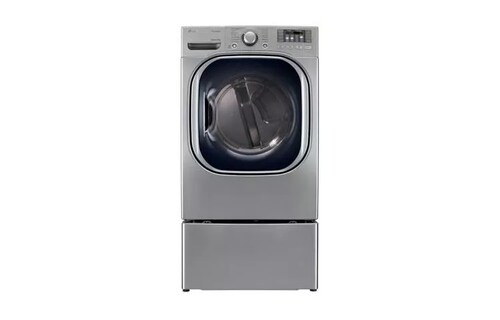
LG DLEX4070 / DLGX4071 front-load SteamDryer family
Check no-heat symptoms on DLEX4070/DLGX4071
The DLEX4070/DLGX4071 is an older 7.4 cu. ft. SteamDryer family with 14 programs, Sensor Dry and FlowSense. DLEX is electric; DLGX is gas. The sheet lists 240 V, 30 A for electric and 120 V, 15 A for gas. Start with the cycle, supply and vent checks that the 4070 manual provides.
The 4070 owner manual includes an Energy Saver option on Normal. It states that a cool beginning can be normal while Energy Saver is selected. This instruction is tied to this manual and should not be carried over to other LG families unless their own documentation says so.
- Identify the exact DLEX/DLGX model before checking power or gas.
- Check Energy Saver, filter and external vent path.
- Stop for repeated breaker trips, gas odor or persistent no heat after owner checks.
Check Normal and Energy Saver
If Normal begins cool, look for Energy Saver. The 4070 manual says the option can reduce energy use and feel cool at the beginning. Compare later cycle behavior after checking the exact option state; do not conclude a failed heating system from the first cool airflow.
Choose a compatible program from the 4070 chart. SteamFresh and SteamSanitary are for dry garments, not wet wash. Check the garment label and cycle exclusions before using them.
A cycle that tumbles and a cycle that does not start are different symptoms. For this no-heat check, note whether the drum continues to turn and whether warmth changes after the opening phase. That distinction helps LG support choose the relevant troubleshooting path.
Check the correct household supply
For DLEX4070, check that the plug is seated and the household breaker has not tripped. The rating is 240 V, 30 A. If the breaker trips again or the connection looks damaged, stop and use a qualified electrician. Do not open the terminal cover or test live wiring.
For DLGX4071, the rating is 120 V, 15 A plus a gas supply. The manual advises checking the visible gas shutoff and whether other gas appliances work. Do not move the dryer or touch the connector. A gas odor means stop using it and contact the gas utility.
Read FlowSense and clean the screen
The 4070 has FlowSense duct-clogging indication. Clean the lint filter before each load and inspect the visible transition duct for crushing. Check that the outside hood is unobstructed. The manual describes restricted exhaust as a cause of poor drying and warns against continued use with severe restriction.
If FlowSense persists after clearing a visible restriction, have the household duct checked. Do not insert tools through the vent or install a booster fan. A restriction alert indicates airflow trouble; it does not identify an internal heating failure.
Stop if supply warning signs appear
A repeated breaker trip on DLEX or gas odor on DLGX is not a reason for another test cycle. Stop use and contact the appropriate qualified help. The 4070 manual’s owner checks do not include opening the dryer, adjusting gas pressure or replacing internal parts.
If the supply appears normal and the dryer remains cold after the Energy Saver and vent checks, record the exact display code and contact LG support. Include model code and whether the drum turns, whether any heat appears later, and FlowSense status.
The 4070 manual describes this as expected at cycle start.
Check the option and assess later operation before reporting no heat.
The manual links the alert to restricted exhaust.
Clean the filter and arrange vent inspection if the visible route is clear.
This is a household supply safety issue.
Stop and contact a qualified electrician or gas utility.
Common questions
Does cool air at start mean the heater failed?
Not necessarily. On Normal with Energy Saver selected, the 4070 manual says the start can feel cool.
Can I use the electric power rating for DLGX?
No. DLEX is listed at 240 V, 30 A; DLGX uses 120 V, 15 A and gas.