Use this model’s marking technology
HP 8J9K7F is recorded as Electro-photographic (EP). Separate a device-generated test from a computer job, and match the consumable system before following a replacement or print-quality procedure.
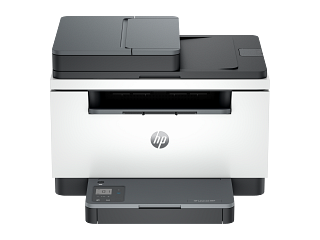
HP 8J9K7F
Source model name: HP LaserJet MFP M235sdw
Imaging product · US market · 40 owner topics
Guidance for HP printers & imaging. Check the feature and control descriptions against your model.
Specifications & model details
HP 8J9K7F is recorded as Electro-photographic (EP). Separate a device-generated test from a computer job, and match the consumable system before following a replacement or print-quality procedure.
Compare exact model and bundle, delivered cost, supplies, seller, and return terms.
Category & symptom guidance
Record the full model code, print technology, scanner/feeder functions, paper trays, supply starter set, included cable, and warranty. A bundle may include extra ink or toner, a tray, or a service plan; compare the same contents when checking offers. A shortened listing may hide a regional variant or different consumable system.
Save the product page and date. Confirm whether it is new, open-box, refurbished, or used and who sells and fulfills the order.
Add tax, shipping, delivery, setup, required cable, extra tray, replacement supplies, and old-device pickup. Check whether the printer includes a USB cable; many packages do not. For wireless use, include setup requirements but do not buy an unnecessary network adapter if the printer already supports Wi-Fi.
If the offer includes a subscription or service plan, separate its recurring cost from the printer price. The FTC recommends comparing total cost and reading deal conditions.
Check the return period, restocking fee, return shipping, and whether opened ink or toner can be returned. Verify the seller’s process for transit damage and dead-on-arrival equipment. Sale or clearance items may have different conditions. If the printer is needed by a deadline, confirm stock and delivery estimate.
Keep the carton until the printer prints, scans, and connects as expected. Photograph any damage before unpacking further and follow the seller’s reporting process.
Match the price to page volume, color mix, duplex, scanner, feeder, and network needs. A low-cost device may lack automatic duplex or a feeder; a more expensive model may include functions that go unused. Consider official supply costs and yields under comparable assumptions instead of focusing only on initial price.
Save warranty terms and driver support information alongside the offer. A cheap model without required scan software or supplies in your region may not be a practical purchase.
Some printers include setup cartridges or bottles with a stated initial yield; compare the included amount and supply code, not just the number of items in the box. Check whether a low-price offer depends on an ink subscription, toner plan, or recurring shipment. Read cancellation, page allowance, overage, and return terms before enrolling. If the printer is for occasional use, estimate whether a subscription fits your actual page volume. A subscription plan and retail supplies should be compared using the same expected pages and time period.
Before checkout, verify that included supplies are genuine setup units and whether their stated yield is lower than standard replacements. Check the exact supply codes and current retail availability. The printer’s low introductory price should be compared with normal replacement costs over the same period.
Keep the invoice and bundle description in case the seller’s product page changes after purchase.
If a bundle includes a service plan, compare its term and coverage with the basic written warranty before counting it as added value.
These sources support the shared guide. Exact model specifications and matched family procedures have their own sources above.
Owner guidance by Specs & Parts, drafted with GPT-6 Luna. Sources and scope.
Recorded model facts
| Specification | Recorded value | Evidence |
|---|---|---|
| Declared print speed | 28 ipm or mppm | CertificationENERGY STAR — Printers & imaging printers.csv; row 2543; ENERGY STAR ID 3423276 Certification dataset declaration; check manufacturer installation documents for fit and clearances. Observed Oct 31, 2026 |
| Automatic duplex output | Yes | CertificationENERGY STAR — Printers & imaging printers.csv; row 2543; ENERGY STAR ID 3423276 Certification dataset declaration; check manufacturer installation documents for fit and clearances. Observed Oct 31, 2026 |
| Default sleep delay | 1 min | CertificationENERGY STAR — Printers & imaging printers.csv; row 2543; ENERGY STAR ID 3423276 Certification dataset declaration; check manufacturer installation documents for fit and clearances. Observed Oct 31, 2026 |
| Page format class | Standard | CertificationENERGY STAR — Printers & imaging printers.csv; row 2543; ENERGY STAR ID 3423276 Certification dataset declaration; check manufacturer installation documents for fit and clearances. Observed Oct 31, 2026 |
| Marking technology | Electro-photographic (EP) | CertificationENERGY STAR — Printers & imaging printers.csv; row 2543; ENERGY STAR ID 3423276 Certification dataset declaration; check manufacturer installation documents for fit and clearances. Observed Oct 31, 2026 |
| Product type | Multifunction Devices (MFD) | CertificationENERGY STAR — Printers & imaging printers.csv; row 2543; ENERGY STAR ID 3423276 Certification dataset declaration; check manufacturer installation documents for fit and clearances. Observed Oct 31, 2026 |
8J9K7F has 7 recorded specification fields. Compare the fields that matter for your space and use, then resolve gaps with the original documents. These are catalog candidates; fit, availability, and successor relationships have not been established.