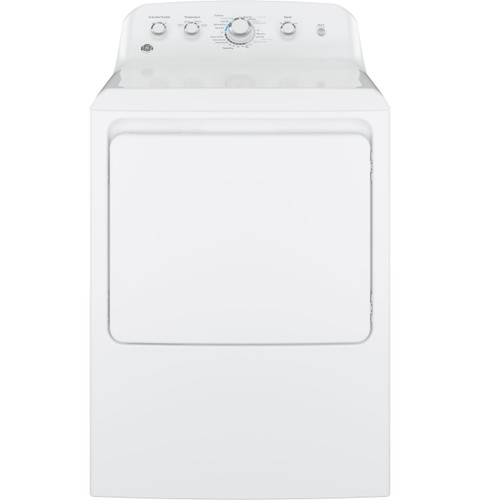
The GTD42 control design differs from GFD55’s smart front-load platform. If an indicator or control behavior is unfamiliar, record what appears and compare it with the GTD42EASJWW manual. Do not assume this model has GFD55 Vent Sensing or apply another family’s code table. Model-specific documentation governs.
Do not apply smart-dryer indicators to GTD42
The GTD42 control design differs from GFD55’s smart front-load platform. If an indicator or control behavior is unfamiliar, record what appears and compare it with the GTD42EASJWW manual. Do not assume this model has GFD55 Vent Sensing or apply another family’s code table.
GE GTD42EASJWW is the exact code in this catalog record. This topic should be evaluated for that code and dryers category. The original source record is linked below; unrecorded settings, dates and compatibility remain unknown.
Use the display and airflow indicators to narrow what to check, then decide whether the message needs service.
Owner guide: Error codes & indicators
Category & symptom guidance
Error codes & indicators
3 minute read · Shared guidance for clothes dryers
Capture the message before clearing it
Photograph the full display, including letters, numbers, and any symbol. Note whether it appeared at power-up, after Start, during tumbling, or at the end of a cycle. A message that appears only during one load may point to that load’s dampness, blockage, or setting; one that returns immediately with an empty drum deserves a different response. Do not infer a failed part from a code alone: codes and indicator meanings vary by model and revision.
If the display alternates between a code and remaining time, record both. Also note whether the drum turns, heat is present, and the cycle pauses or completes. These details make a support conversation more useful than a code copied without context.
Separate airflow indicators from fault codes
Some LG front-load dryers in the DLEX4000/DLGX4001 family have a FlowSense duct-clogging indicator. Treat that as an airflow warning, not a diagnosis of a particular internal component. Clean the lint screen and inspect the accessible exhaust path for crushing, kinks, or an obvious obstruction. The warning may relate to the installed duct run, so a clean screen alone does not settle it.
A vented dryer moves moist air outdoors. A condenser or heat-pump dryer has a different moisture-removal path; do not apply outdoor-duct advice to those designs without checking their own instructions. LG’s DLEX4000/DLGX4001 specification sheet identifies vented models.
Try only the low-risk owner checks
With the dryer stopped and cool, remove lint from the screen and make sure it is seated as designed. For a vented model, look along the visible duct for a flattened section or a flap that cannot move freely; do not reach into the appliance or dismantle the duct connection. Run a small, ordinary load only after correcting a visible restriction, and observe whether the same warning returns.
For a condenser or heat-pump unit, consult its own filter and heat-exchanger care steps instead of searching for an exhaust vent. For a gas dryer, a gas-supply message or interrupted heating is not a reason to adjust a valve or burner.
Use model-specific code lookup
Find the complete model identifier on the appliance label and use the matching owner manual or manufacturer support page. Search the exact displayed code in that model’s troubleshooting section. Similar-looking codes can have different meanings across product families, and a feature listed on a related model does not establish that yours has it. LG’s DLEX4000/DLGX4001 manual and LG product support page are appropriate starting points for those exact models.
If the manual’s step is an owner check, follow its wording. If it directs service, or the code is absent from the exact manual, send the model, serial information requested by support, a display photo, and the conditions when it occurred.
Choose a sensible next step
A one-time alert that clears after a clearly identified owner correction can be monitored on the next normal load. A repeating code, stopped cycle, or warning accompanied by no heat or unusual operation merits manufacturer guidance. If a message suggests overheating, stop using the dryer until the cause is addressed. For a safety recall question, search the exact model and serial range in the official recall database; a general alert is not proof that a particular unit is included.
Keep the photo and a short event timeline. That evidence helps distinguish an airflow problem from a control, sensor, or supply issue without guessing at repairs.
What to do with what you find
FlowSense or duct-clogging indicator appears.
The dryer is flagging airflow restriction, not naming a failed part.
Clean the lint screen, inspect the visible vent run if vented, and consult the exact manual if it persists.
Code returns immediately or interrupts the cycle.
The issue is repeatable and may need model-specific diagnosis.
Save the display photo and contact manufacturer support with the model and operating conditions.
Have these details ready
Full display photo including symbols
Exact model identifier
When the code appears and whether the drum turns or heats
Recent vent, installation, or load changes
Common questions
Does a duct indicator prove the dryer itself is defective?
No. It indicates a possible airflow restriction; the vent path and installation can contribute.
Can I use a code list from a similar dryer?
Use the exact model manual or support page. Codes are not safely interchangeable across families.
General background sources
These sources support the shared guide. Exact model specifications and matched family procedures have their own sources above.