What is recorded for GDF550PGRBB
GE GDF550PGRBB — Sabbath mode availability: Sabbath mode: Yes.
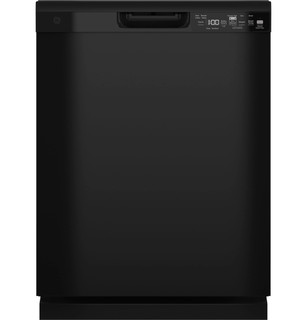
GE GDF550PGRBB
Dishwasher · US market · 49 owner topics
Covers GDF550PGRBB and the manufacturer-listed models in this family.
Specifications & model details
GE GDF550PGRBB — Sabbath mode availability: Sabbath mode: Yes.
GE GDF550PGRBB records Sabbath mode: Yes. An optional/accessory-qualified entry is not proof that the mode is already installed or active on your unit.
Choose options for the load and drying result you want, then account for their effects on cycle length and energy. Mode names and availability depend on the exact dishwasher.
Category & symptom guidance
Read each option’s panel label and decide what problem it should solve: baked-on soil, a lightly soiled partial load, one-rack washing, bottle interiors, or wetter dishes at cycle end. A feature name alone does not guarantee the same action across brands or model years. Confirm the option is available for the selected cycle; some machines disable combinations, and an option light can indicate selection without promising a particular wash result.
For GE models in the GE manual for its covered model families, AutoSense adjusts wash based on detected soil, Heavy is intended for heavily soiled cookware, and Normal is described for a typical full load. That manual lists Light/China and Rinse only on some models. Its Rinse cycle is for a partial load awaiting a later wash and uses no detergent; do not assume another brand labels or operates a rinse program the same way.
For dried-on food, use a stronger wash or an extra prewash only when your machine offers it and the load needs it. On the cited GE family, Steam adds a prewash intended to help with dried soil, while Wash Temp Boost raises wash temperature and can extend the cycle. The manual’s timings apply to that family only. For a lightly soiled small load, a short cycle may suit the soil level, but check its detergent placement instructions because short programs can leave a single-dose packet partly undissolved.
A half-load or zone option is useful only if dishes occupy the rack or zone it targets. The GE manual describes Upper or Lower Wash Zones as targeting one rack; it cautions that the option should be used when dishes are in only one rack. If you spread items across both racks, select a full-load program instead of expecting the zone feature to clean both. Keep plates and utensils clear of spray arms and the detergent dispenser.
Dishwasher drying approaches vary. A machine may use a heated final stage, retain heat and let moisture condense on cooler surfaces, use a fan, or open its door automatically. Check your exact model’s manual before expecting a door to open or a fan to run after the wash. Plastic, recessed mug bases, and crowded loads often retain droplets more than glass or angled dishes, so placement and material can matter as much as the selected dry option.
For the GE manual family, Dry Boost Normal is described as raising final-rinse temperature on hidden-heater models and using a fan; the manual says that fan may continue after the cycle. Dry Boost Off allows natural air drying, and the cited manual advises opening the door to speed it. Bosch’s support guidance explains that drying results depend on the machine’s system and load; do not transfer a Bosch drying recommendation as a control instruction for another brand.
A sanitize option generally raises rinse conditions, may lengthen the program, and can be dependent on incoming water temperature and uninterrupted operation. Read the exact model’s description and check whether the cycle offers the option. On GE's GD*640–670 / PD*705–795 owner manual, the Sanitized indicator appears only when the selected option’s requirements were met; an interruption or water that is too cool can prevent that indicator. An unlit indicator does not identify the cause by itself, and it should not be treated as a universal code across brands.
Do not select a high-temperature option automatically for every load. Consider the dish material and care instructions, and use the option when its intended result matters. A certified residential dishwasher is not a substitute for equipment and procedures required in a licensed food establishment; the cited GE manual makes that limitation explicit for its family.
Options can make a cycle longer because heating, extra washing, drying, or sensing takes time. Compare the program label and estimated remaining time only within your own dishwasher; sensor adjustments and water conditions can change the actual duration. The Department of Energy’s efficiency guidance explains that efficient dishwashers use less water and energy than hand washing under typical full-load comparisons, and that energy labels help compare models. Those comparisons do not predict the result of every partial load or every added option.
Avoid choosing a cycle solely by its shortest displayed time if the dishes are heavily soiled or the program’s instructions require a different detergent placement. Conversely, a high-heat or extended dry feature may be unnecessary for a lightly soiled load where air drying is acceptable. Record which option you selected and whether the result improved; changing one choice at a time makes it easier to learn how your model behaves.
Extra wash intensity may address the load’s soil, with additional time or heat.
A targeted wash zone may match the actual load arrangement.
Heating, extra washing, drying, or sensor adjustments can add time. Check the exact model’s option notes; published times may exclude options and vary with incoming water temperature.
It indicates that the dishwasher met the cycle’s stated sanitizing conditions, where that model provides such an indicator. It is not a universal guarantee of sterility or a substitute for commercial food-service procedures.
These sources support the shared guide. Exact model specifications and matched family procedures have their own sources above.
Owner guidance by Specs & Parts, drafted with GPT-6 Luna. Sources and scope.
Recorded model facts
| Specification | Recorded value | Evidence |
|---|---|---|
| Sabbath mode availability | Sabbath mode: Yes | ManufacturerGE — GDF550PGRBB Exact-model manufacturer resource; specification fields Exact manufacturer specification field Spec_FEATURES_Sabbath Mode. Optional modes may require the accessory stated by the source. Observed Oct 26, 2026 |