What is recorded for PSB42YSNSS
GE Profile PSB42YSNSS — Features Configuration: Side-by-Side.
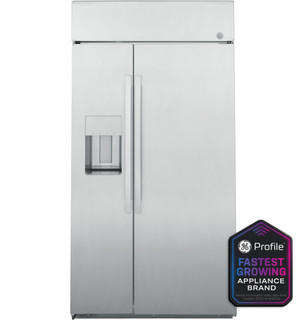
GE Profile PSB42YSNSS
Refrigerator · US market · 45 owner topics
Specifications for PSB42YSNSS with owner checks for this product design. Use the matching manual for control sequences and replacement parts.
Specifications & model details
GE Profile PSB42YSNSS — Features Configuration: Side-by-Side.
Confirm whether a lock indicator is disabling panel input, then use the exact model instructions to restore access safely.
Category & symptom guidance
Look for a lock symbol, message, or other indicator on the control panel and compare it with the exact model manual. A lock feature may prevent accidental changes, including changes by children, while leaving cooling operation unaffected. Feature names and indicators vary, so do not infer that a blank or unresponsive panel means the lock is active. Check whether the interior light or other ordinary signs of power are present, while recognizing that these observations do not prove the cooling temperature is safe.
Record the indicator and any display message before touching the controls. If no lock status is shown, consult the manual’s troubleshooting section for an unresponsive panel rather than trying random combinations. A control lock is an access setting, not a repair for a power or cooling problem.
The method for enabling or disabling a control lock is model-specific. Find the official manual by the complete model number and follow only its stated procedure. Do not assume that holding a particular button for a particular time works across refrigerators; an unsupported sequence may activate a different function or change a setting. GE’s support resources likewise cover many refrigerator models, so select instructions that match the appliance rather than a generic example.
If the manual does not clearly identify the toggle, contact manufacturer support with the model number and a description of the indicator. Avoid repeating guessed inputs. Once access is restored, confirm that the other settings remain as intended and check actual temperatures with thermometers.
A lock can help prevent children from changing settings or activating controls. If the panel is locked intentionally, consider whether restoring access is appropriate for the household. Use the manual’s normal toggle and explain the control to anyone who relies on it. Do not bypass wiring, remove covers, or modify the panel to defeat the lock; those actions can create hazards and interfere with appliance operation.
If a child has changed settings before the lock was enabled, check the current displayed values against your notes and measure compartment temperatures. A lock only prevents certain inputs; it does not guarantee that the refrigerator is at a safe temperature. Keep the actual food storage decision tied to thermometer readings.
Before cleaning, read the manual for any recommended panel-care instructions and whether a lock function is available to prevent unintended touches. Use a soft cloth appropriate to the manufacturer’s directions; do not spray liquid directly into seams or controls. A damp cloth can register a touch on some panels, so avoid pressing multiple areas while wiping. Do not remove the panel or use tools to reach behind it.
If cleaning leaves an indicator or message changed, compare it with the documented display meanings and record what happened. Restore the intended setting only through the manual’s instructions. If the panel remains unresponsive after it is dry and the lock status is understood, contact support rather than opening the control housing.
A lock indicator paired with an otherwise active display suggests controls may be intentionally restricted. A completely dark panel, missing interior light, or absent signs of operation calls for a different check: verify that the appliance’s ordinary power supply appears available, using only safe, accessible observations. Neither a lit display nor a lock symbol proves that food is cold enough. Use an appliance thermometer to assess refrigerator and freezer conditions.
If the panel remains dark or temperatures are unsafe, do not keep trying lock toggles. Protect perishable food, record what is visible, and contact manufacturer support or a qualified service provider. Provide the model number and whether the issue affects the display alone or the appliance’s other functions as well.
The controls may be intentionally restricted by the lock feature.
The available evidence does not establish that control lock is the cause.
The lock explains access restriction but does not address the food-safety condition.
No. The toggle varies by model. Follow the exact official manual or ask manufacturer support using the model number.
No. It indicates a control status only when the manual says so; use thermometers to verify temperatures.
These sources support the shared guide. Exact model specifications and matched family procedures have their own sources above.
Owner guidance by Specs & Parts, drafted with GPT-6 Luna. Sources and scope.
Recorded model facts
| Specification | Recorded value | Evidence |
|---|---|---|
| Features Configuration | Side-by-Side | ManufacturerGE Appliances and LG current manufacturer product records Exact primary manufacturer SKU PSB42YSNSS; https://www.geappliances.com/appliance/GE-Profile-42-Smart-Built-In-Side-by-Side-Refrigerator-with-Dispenser-PSB42YSNSS Manufacturer storefront primary SKU PSB42YSNSS; exact source field: spec_features_configuration Primary source: https://www.geappliances.com/appliance/GE-Profile-42-Smart-Built-In-Side-by-Side-Refrigerator-with-Dispenser-PSB42YSNSS Observed Oct 30, 2026 |