What is recorded for PFE28KYNFS
GE Profile PFE28KYNFS — Sabbath mode availability: Sabbath mode: Optional; Features Configuration: French Door,Bottom Freezer.
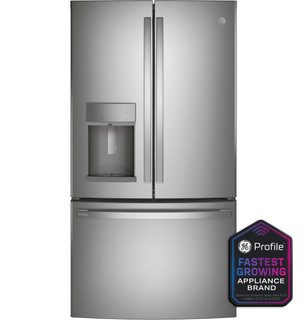
GE Profile PFE28KYNFS
Refrigerator · US market · 45 owner topics
Covers PFE28KYNFS and the manufacturer-listed models in this family.
Specifications & model details
GE Profile PFE28KYNFS — Sabbath mode availability: Sabbath mode: Optional; Features Configuration: French Door,Bottom Freezer.
GE Profile PFE28KYNFS records Sabbath mode: Optional. An optional/accessory-qualified entry is not proof that the mode is already installed or active on your unit.
Identify an active mode from the exact manual and verify its effect through compartment temperatures before relying on stored food.
Category & symptom guidance
A special-mode indicator can change which controls respond or how the refrigerator operates. The same icon or feature name is not guaranteed across brands or models. Record the exact displayed words or symbol and look it up in the owner’s manual for the complete model number. Manufacturer support pages cover multiple refrigerators; an example for one model should not be treated as a universal feature description.
Do not assume a mode is active simply because the panel looks different, or assume every refrigerator includes vacation, demonstration, Sabbath, or rapid-cooling options. If the manual does not identify the indicator, contact manufacturer support with a photo and model number. Keep the current setting documented before attempting an exit procedure.
The visible name of a mode does not establish that food is being held safely. Measure refrigerator and freezer temperatures with appliance thermometers. FDA recommendations are a refrigerator at or below 40°F and a freezer at 0°F. If readings exceed those targets, protect perishable food immediately, even if the display indicates a mode that sounds normal or energy-saving.
A mode may affect one compartment differently from another, or may change only certain functions; the manual determines the intended behavior. Record readings by location and time. If food was held above recommended temperatures, use food-safety guidance to decide what to discard or move; do not rely on a mode label, smell, or appearance as assurance.
Some models provide an away or vacation feature, but its effect on compartments and ice or water functions depends on the appliance. Before leaving food inside, read the exact manual to learn what remains cooled and whether the freezer continues operating. Measure temperatures rather than assuming that a vacation label means normal food storage. Remove perishable contents if the instructions or measured conditions do not support safe storage.
On returning, read the manual before changing the mode and check temperatures in both compartments. If measurements are outside target, protect food and follow food-safety guidance. Do not use another model’s instructions to exit the feature; a control that looks similar may have a different purpose.
Demonstration settings can affect operation differently across products, and a display may remain lit without normal cooling. Sabbath-related settings may change display, lighting, or control behavior according to the model. Do not infer the mode’s effect from the name alone. Check the manual’s description and compare actual temperatures with safe targets before storing food or assuming cooling is active.
If the refrigerator is in a demonstration state or temperatures are unsafe, move perishable food to a reliably cold location and use only the model’s documented procedure to exit. If the procedure is unclear, get support rather than trying combinations. Preserve the displayed message and temperature readings; they help support identify the state without risking additional setting changes.
A rapid-cooling or similar feature may temporarily alter operation after loading, but its name, duration, and affected compartments vary. The manual explains when it is intended and how it ends. Do not assume that a feature makes warm food safe immediately or that it can compensate for a refrigerator that persistently measures above 40°F. Keep the door closed and monitor with a thermometer.
After use, check temperatures in the same locations and confirm whether the feature remains active. If the mode is not identified in the manual or readings remain outside target, protect the food and contact manufacturer support. Record the mode indicator, start time if known, temperature readings, and what changed; this is more useful than repeatedly toggling features.
The feature appears active without current evidence of unsafe storage temperatures.
Food storage may not be safe under the current operating condition.
The mode and its effect cannot be reliably inferred from the icon alone.
No. Its effect varies by model. Check the manual and verify refrigerator and freezer temperatures with thermometers.
No. Use measured temperatures and food-safety guidance; a mode name does not confirm safe conditions.
These sources support the shared guide. Exact model specifications and matched family procedures have their own sources above.
Owner guidance by Specs & Parts, drafted with GPT-6 Luna. Sources and scope.
Recorded model facts
| Specification | Recorded value | Evidence |
|---|---|---|
| Features Configuration | French Door,Bottom Freezer | ManufacturerGE Appliances and LG current manufacturer product records Exact primary manufacturer SKU PFE28KYNFS; https://www.geappliances.com/appliance/GE-Profile-ENERGY-STAR-27-7-Cu-Ft-Fingerprint-Resistant-French-Door-Refrigerator-with-Hands-Free-AutoFill-PFE28KYNFS Manufacturer storefront primary SKU PFE28KYNFS; exact source field: spec_features_configuration Primary source: https://www.geappliances.com/appliance/GE-Profile-ENERGY-STAR-27-7-Cu-Ft-Fingerprint-Resistant-French-Door-Refrigerator-with-Hands-Free-AutoFill-PFE28KYNFS Observed Oct 30, 2026 |
| Sabbath mode availability | Sabbath mode: Optional | ManufacturerGE — PFE28KYNFS Exact-model manufacturer resource; specification fields Exact manufacturer specification field Spec_FEATURES_Sabbath Mode. Optional modes may require the accessory stated by the source. Observed Oct 26, 2026 |