Potential replacements. Compatibility is not guaranteed. Confirm the complete model, suffix, serial/version, diagram position and current part number with the seller or manufacturer before ordering. Seller links open their listings for current price, stock and returns.
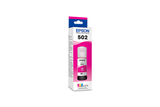
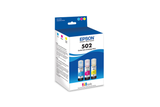
Epson 502, Black and Color Ink Bottles, C/M/Y/K 4-Pack
Part number T502120-BCS
Fit unconfirmed · check the full model, suffix and version.
Source & checks before ordering
Why it is shown: The printer manufacturer explicitly associates this exact consumable SKU with the named model. Confirm current regional supply and firmware requirements before purchase.
Fit unconfirmed · check the full model, suffix and version.
Source & checks before ordering
Why it is shown: The printer manufacturer explicitly associates this exact consumable SKU with the named model. Confirm current regional supply and firmware requirements before purchase.
Fit unconfirmed · check the full model, suffix and version.
Source & checks before ordering
Why it is shown: The printer manufacturer explicitly associates this exact consumable SKU with the named model. Confirm current regional supply and firmware requirements before purchase.
Fit unconfirmed · check the full model, suffix and version.
Source & checks before ordering
Why it is shown: The printer manufacturer explicitly associates this exact consumable SKU with the named model. Confirm current regional supply and firmware requirements before purchase.
Fit unconfirmed · check the full model, suffix and version.
Source & checks before ordering
Why it is shown: The printer manufacturer explicitly associates this exact consumable SKU with the named model. Confirm current regional supply and firmware requirements before purchase.
Fit unconfirmed · check the full model, suffix and version.
Source & checks before ordering
Why it is shown: The printer manufacturer explicitly associates this exact consumable SKU with the named model. Confirm current regional supply and firmware requirements before purchase.
How these suggestions are reviewed · Seller links are unpaid. Specs & Parts does not sell these parts or guarantee fit, performance, or a repair outcome.
Guidance for Epson printers & imaging. Check the feature and control descriptions against your model.
Specifications & model details
C11CL42201: model-specific checks
Use both product and source names
Epson C11CL42201 is listed under ENERGY STAR partner Epson America, Inc.. Search support by the retail brand and full product code. The partner name helps distinguish the certification record from a similarly named product; it is not a declaration of the current warranty provider.
Epson C11CL42201 is recorded as Ink Jet (IJ). For missing colors or broken lines, start with an internal print-quality/nozzle-check page before choosing the manufacturer’s cleaning level. Check the actual cartridge or tank arrangement before buying ink; a marking-technology label does not specify the refill system.
Confirm the diagnosis, owner-service scope, exact part, and required test before replacing printer components.
Owner guide: Component replacement planning
Category & symptom guidance
Component replacement planning
3 minute read · Shared guidance for printers & imaging
Confirm the part is meant for owner replacement
Owner manuals distinguish replaceable supplies from internal service components. A cartridge, toner, drum, waste box, or tray may be user replaceable if the manual says so; printheads, fusers, boards, rollers, and scanner assemblies may require service. Do not infer safety from an online parts listing. Printers can contain hot fusers, moving carriages, fine toner, and electrical components.
Use the exact model manual for removal and installation. If it says to contact service, stop and follow that direction. Never force a latch or pull a carriage by hand.
Verify diagnosis before ordering
Print the manufacturer’s test pattern or status page and follow the model’s troubleshooting chart. A missing ink color, repeating laser mark, paper-feed sound, and scanner line point to different checks. Ask the service provider which test supports the proposed part and whether a cleaning or alignment step should happen first.
Confirm the part code, revision, regional compatibility, and whether the replacement requires calibration or firmware. A part that fits physically may still be incompatible with the printer’s electronics.
Prepare a safe replacement area
For a user-approved supply change, turn the printer off or leave it on only as the manual directs. Protect the work surface from ink or toner, keep children and pets away, and have the correct replacement ready before removing the old supply. Follow the package guidance on seals, orientation, light exposure, and contact surfaces.
Do not touch inkjet nozzles, laser drum surfaces, fuser parts, or exposed electrical contacts unless the manual identifies the area as safe. Dispose of the old supply through the manufacturer’s or local program.
Test the replacement and keep the record
After installation, close all covers and allow the printer to recognize the part. Run the model’s prescribed alignment, status page, or quality test only when prompted. Compare with the saved page or defect description. If the warning remains, do not repeatedly remove and reinsert the supply; contact support with the exact message and part number.
Keep the receipt, packaging, supply code, and date installed. For service work, request the replaced component number and labor warranty.
After replacement, test the affected path
A replacement should be followed by the test that justified it. After a tray or pickup roller change, feed plain paper from that tray and confirm alignment. After a scanner part is serviced, scan a page from the glass and feeder. After a user-replaceable toner or ink supply, print the panel status or quality page and confirm the warning clears. Do not run a cleaning or calibration sequence that the manual does not request.
If the message remains, record it and stop replacing parts. Some counters require a manufacturer-specified reset after a service kit, while other models detect the part automatically. Follow the exact manual or technician instruction; an incorrect counter reset can hide a maintenance condition without repairing the mechanism.
Keep removed parts only if the service provider allows it. Some supplies are returnable for recycling, while a failed internal assembly may be needed for warranty review. Ask before discarding anything and record the serial or part code from the replacement package.
General background sources
These sources support the shared guide. Exact model specifications and matched family procedures have their own sources above.
Owner guidance by Specs & Parts, drafted with GPT-6 Luna. Sources and scope.
Earlier part references
These historical identifiers are separate from the reviewed suggestions above. Their original records have not been renewed for current shopping. Recheck any supersession or fit restrictions with the manufacturer.
Source-listed part or accessory
T502120-BCS
Epson 502, Black and Color Ink Bottles, C/M/Y/K 4-Pack
The printer manufacturer explicitly associates this exact consumable SKU with the named model. Confirm current regional supply and firmware requirements before purchase.
The printer manufacturer explicitly associates this exact consumable SKU with the named model. Confirm current regional supply and firmware requirements before purchase.
The printer manufacturer explicitly associates this exact consumable SKU with the named model. Confirm current regional supply and firmware requirements before purchase.
The printer manufacturer explicitly associates this exact consumable SKU with the named model. Confirm current regional supply and firmware requirements before purchase.
The printer manufacturer explicitly associates this exact consumable SKU with the named model. Confirm current regional supply and firmware requirements before purchase.
The printer manufacturer explicitly associates this exact consumable SKU with the named model. Confirm current regional supply and firmware requirements before purchase.