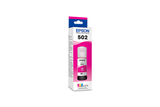
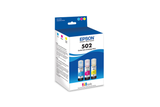
Potential replacements. Compatibility is not guaranteed. Confirm the complete model, suffix, serial/version, diagram position and current part number with the seller or manufacturer before ordering. Seller links open their listings for current price, stock and returns.
Epson 502, Black and Color Ink Bottles, C/M/Y/K 4-Pack
Part number T502120-BCS
Fit unconfirmed · check the full model, suffix and version.
Source & checks before ordering
Why it is shown: The printer manufacturer explicitly associates this exact consumable SKU with the named model. Confirm current regional supply and firmware requirements before purchase.
Fit unconfirmed · check the full model, suffix and version.
Source & checks before ordering
Why it is shown: The printer manufacturer explicitly associates this exact consumable SKU with the named model. Confirm current regional supply and firmware requirements before purchase.
Fit unconfirmed · check the full model, suffix and version.
Source & checks before ordering
Why it is shown: The printer manufacturer explicitly associates this exact consumable SKU with the named model. Confirm current regional supply and firmware requirements before purchase.
Fit unconfirmed · check the full model, suffix and version.
Source & checks before ordering
Why it is shown: The printer manufacturer explicitly associates this exact consumable SKU with the named model. Confirm current regional supply and firmware requirements before purchase.
Fit unconfirmed · check the full model, suffix and version.
Source & checks before ordering
Why it is shown: The printer manufacturer explicitly associates this exact consumable SKU with the named model. Confirm current regional supply and firmware requirements before purchase.
Fit unconfirmed · check the full model, suffix and version.
Source & checks before ordering
Why it is shown: The printer manufacturer explicitly associates this exact consumable SKU with the named model. Confirm current regional supply and firmware requirements before purchase.
How these suggestions are reviewed · Seller links are unpaid. Specs & Parts does not sell these parts or guarantee fit, performance, or a repair outcome.
Epson’s ink-bottle documentation gives product-specific ink information and yield caveats. Match the bottle number to the printer manual and fill-port design; the fact that a printer is Epson or EcoTank does not prove bottle interchangeability across generations. Keep the bottle label until the refill is complete.
Epson C11CL41205 is recorded as Ink Jet (IJ). For missing colors or broken lines, start with an internal print-quality/nozzle-check page before choosing the manufacturer’s cleaning level. Check the actual cartridge or tank arrangement before buying ink; a marking-technology label does not specify the refill system.
Identify the official supply code and yield by print technology, then store ink, toner, drums, and maintenance parts as labeled.
Owner guide: Filters & consumables
Category & symptom guidance
Filters & consumables
3 minute read · Shared guidance for printers & imaging
Identify each supply the model actually uses
Use the official supply list for the complete printer model and sales region. Record the code for each ink cartridge, refill bottle, toner, drum, maintenance box, waste container, printhead, and paper tray. A family name does not establish that two printers use the same component. Check whether the model combines toner and drum or treats them as separate units; a replacement prompt may refer to only one.
For multifunction printers, scanner accessories and print supplies are listed separately. Do not order a “printer kit” from a marketplace title without matching the manufacturer part code.
Ink cartridges and refill tanks have different supply practices
Cartridge inkjets use model-specific cartridges that may contain one color or multiple colors. Refillable tank printers use bottles and reservoirs with model-specific ink. Check the label for ink type and bottle code; color and pigment formulations are not automatically interchangeable. Tank systems may use keyed bottles or a setup process. Follow the manual and do not pour loose ink into a tank that is not designed for refill.
Some inkjet models use a separate maintenance box to collect servicing waste. It is not a print cartridge and must be replaced according to the model’s status prompt.
Laser supplies can include several components
Laser printers may have toner plus a separate drum or imaging unit, waste container, transfer belt, or maintenance kit. Check the official supply list and panel message before replacing anything. Toner yield and drum life are separate measures when the parts are separate. A low toner prompt does not necessarily mean the drum is at end of life.
Keep toner sealed and handle the drum by its housing, following package instructions. Do not touch its active surface or disassemble a cartridge.
Interpret page yields as estimates
Official page yield is measured using a defined test pattern and coverage. A sparse text page and a color photo consume supplies differently. Compare black and color yields separately and record the test standard when the manufacturer provides it. A stated yield is not guaranteed for each household. For tank printers, volume of included ink does not directly compare with cartridge yield without a common page profile.
Use the model’s status page or app to track supply levels and estimated pages. Treat it as an indicator, not an exact count of remaining usable prints.
Store supplies as labeled
Keep cartridges, bottles, toner, and paper in original packaging until use. Follow the printed temperature, orientation, seal, and expiration guidance. Keep ink from freezing or overheating and toner away from moisture. Store supplies with the printer model code so regional or family variants are not mixed.
Before ordering, check return rules for opened supplies and whether a subscription or plan applies. Save the receipt and the package label in case the printer rejects an item or the package arrives damaged.
For each installed supply, write down the model code, official supply code, purchase date, and page count if available. This separates inventory planning from guesswork about how many pages remain. Use the manufacturer’s return or recycling program for used cartridges and bottles rather than mixing them with ordinary household waste.
General background sources
These sources support the shared guide. Exact model specifications and matched family procedures have their own sources above.
Owner guidance by Specs & Parts, drafted with GPT-6 Luna. Sources and scope.
Earlier part references
These historical identifiers are separate from the reviewed suggestions above. Their original records have not been renewed for current shopping. Recheck any supersession or fit restrictions with the manufacturer.
Source-listed part or accessory
T502120-BCS
Epson 502, Black and Color Ink Bottles, C/M/Y/K 4-Pack
The printer manufacturer explicitly associates this exact consumable SKU with the named model. Confirm current regional supply and firmware requirements before purchase.
The printer manufacturer explicitly associates this exact consumable SKU with the named model. Confirm current regional supply and firmware requirements before purchase.
The printer manufacturer explicitly associates this exact consumable SKU with the named model. Confirm current regional supply and firmware requirements before purchase.
The printer manufacturer explicitly associates this exact consumable SKU with the named model. Confirm current regional supply and firmware requirements before purchase.
The printer manufacturer explicitly associates this exact consumable SKU with the named model. Confirm current regional supply and firmware requirements before purchase.
The printer manufacturer explicitly associates this exact consumable SKU with the named model. Confirm current regional supply and firmware requirements before purchase.