What is recorded for K10571
Canon K10571 — Network capability: Yes; Product type: Multifunction Devices (MFD).
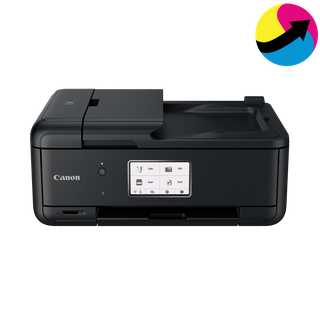
Canon K10571
Source model names: TR8620a, TR8622a
Imaging product · US market · 41 owner topics
Covers K10571 and the manufacturer-listed models in this family.
Specifications & model details
Canon K10571 — Network capability: Yes; Product type: Multifunction Devices (MFD).
Choose the printer, network, queue, or app reset that matches the fault and preserve settings before clearing them.
Category & symptom guidance
A printer may offer a job cancel, network reset, factory reset, app reset, or print-system reset on the computer. These have different effects. Canceling clears a stuck job; network reset removes saved Wi-Fi details; factory reset may erase network, account, tray, and security settings. Use the model manual to identify the correct action for the observed problem.
If only one computer cannot print, start with that computer’s queue and driver rather than erasing the printer setup for every user. If the control panel itself is frozen, use the manufacturer’s restart procedure before considering a full reset.
Before resetting wireless setup, record the network name, connection type, printer IP or hostname if used, and which computers or phones print to it. You will need the router credentials and possibly administrator access to reconnect. A network reset can remove an Ethernet reservation or Wi-Fi Direct pairing as well as the home network.
Do not write the password in a public support ticket. Keep credentials in a secure password manager and enter them only through the printer’s official setup flow or manufacturer app.
A factory reset may be appropriate when the printer configuration is corrupted, the administrator directs it, or manufacturer support asks for it. Before proceeding, check whether the reset clears fax numbers, scan destinations, address books, access controls, or custom paper sizes. Export or photograph settings first if the model allows.
A reset does not repair a clogged ink path, damaged roller, exhausted toner, or unsupported driver. If a printer-generated test page is poor, use the model’s maintenance route. If the page is clean but computer jobs fail, investigate software and connectivity.
After a reset, reconnect the printer to one network or computer path, then reinstall the official driver or app if required. Add other computers only after the first test succeeds. Confirm the printer name, tray settings, duplex defaults, scan destination, and security settings. Print a simple page and scan one document on multifunction units.
Record which settings were restored and which remain unavailable. If the original issue returns, stop repeating resets and provide support with the sequence and result.
After the printer reset, reconnect the network or USB path before changing advanced preferences. Restore paper size, default tray, duplex, color, and scan destination one group at a time. Print a short test job after each major change. If the machine is shared, verify that user accounts or secure-print settings are restored according to the owner’s policy. A factory-default printer may expose open network or administrator settings that were previously restricted.
For a network printer, verify the queue points to the restored address after setup. For a USB printer, reconnect the cable only after the host driver is ready. Scan one page to confirm the scanner application survived the reset on a multifunction unit.
These sources support the shared guide. Exact model specifications and matched family procedures have their own sources above.
Owner guidance by Specs & Parts, drafted with GPT-6 Luna. Sources and scope.
Recorded model facts
| Specification | Recorded value | Evidence |
|---|---|---|
| Network capability | Yes | ManufacturerCanon TR8600 series — Network communication Cannot Find Printer on Network: Wi-Fi and Wired LAN sections; TR8600 manual cover explicitly names TR8620/TR8620a/TR8622/TR8622a. Canon TR8600 manual names the retail models associated with K10525/K10571 in the ENERGY STAR records. This establishes network capability; wireless and wired LAN cannot be used at the same time. Reviewed against the original Canon manual. Observed Oct 27, 2026 |
| Product type | Multifunction Devices (MFD) | CertificationENERGY STAR — Printers & imaging printers.csv; row 413; ENERGY STAR ID 2384216 Certification dataset declaration; check manufacturer installation documents for fit and clearances. Observed Nov 02, 2026 |