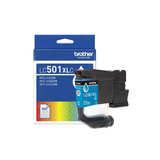
Potential replacements. Compatibility is not guaranteed. Confirm the complete model, suffix, serial/version, diagram position and current part number with the seller or manufacturer before ordering. Seller links open their listings for current price, stock and returns.
Brother Genuine LC501XLCS High Yield Cyan Ink Cartridge
Part number LC501XLCS
Fit unconfirmed · check the full model, suffix and version.
Source & checks before ordering
Why it is shown: The printer manufacturer explicitly associates this exact consumable SKU with the named model. Confirm current regional supply and firmware requirements before purchase.
How these suggestions are reviewed · Seller links are unpaid. Specs & Parts does not sell these parts or guarantee fit, performance, or a repair outcome.
Guidance for Brother printers & imaging. Check the feature and control descriptions against your model.
Specifications & model details
MFC-J1410DW: model-specific checks
Use both product and source names
Brother MFC-J1410DW is listed under ENERGY STAR partner Brother Industries, Ltd.. Search support by the retail brand and full product code. The partner name helps distinguish the certification record from a similarly named product; it is not a declaration of the current warranty provider.
Brother MFC-J1410DW is recorded as Ink Jet (IJ). For missing colors or broken lines, start with an internal print-quality/nozzle-check page before choosing the manufacturer’s cleaning level. Check the actual cartridge or tank arrangement before buying ink; a marking-technology label does not specify the refill system.
Check driver, scanner, mobile, network, and regional supply support independently.
Owner guide: Compatibility & substitutions
Category & symptom guidance
Compatibility & substitutions
3 minute read · Shared guidance for printers & imaging
Check the operating system and driver
Confirm the manufacturer lists the printer and its functions for the computer’s operating system and version. A generic driver may support basic printing but omit scanner, duplex, paper-source, color, or maintenance options. Multifunction features may need a separate scanning package. Do not assume that a driver for an older model in the same family supports the current unit.
Use the manufacturer’s official download page and preserve the package version. If the computer is managed, ask IT before installing software or changing security permissions.
Verify mobile and network printing features
AirPrint, Mopria, manufacturer apps, Wi-Fi Direct, and cloud printing are different paths. Check the printer manual and phone platform support for the exact feature you intend to use. A printer may support local network printing without supporting a manufacturer cloud service, or it may require account setup for a mobile feature.
Confirm that phone and printer are on a network that permits local discovery. Guest networks and client isolation can prevent devices from seeing each other. Test a local page before attributing a failure to internet service.
Check scan support separately from print support
Printer recognition does not guarantee that scanning is supported through the same app or connection. Check scanner driver, TWAIN/WIA or platform support where applicable, and the manufacturer’s scan utility. For network scan-to-folder or email, verify server and security requirements in the exact manual. A print driver may not install scan destinations or address books.
Test a flatbed scan and ADF scan separately. If the printer prints but no scan application can find it, investigate scan permissions, app version, network address, or firewall.
Confirm supplies and accessories by region
Consumable codes and wireless features can vary by sales region. If the printer was imported, check the manufacturer’s regional support page and ask whether locally sold cartridges, toner, or firmware are compatible. Do not rely on an online cross-reference that omits the complete model suffix.
Before purchase, provide the seller with printer model, host OS, connection, scan requirement, and official supply code. Ask for specific confirmation rather than a broad claim that the devices “work together.”
Check security and account requirements
A printer may require a cloud account, administrator credential, or current encryption method for mobile and remote features. Confirm the manufacturer still supports those functions on your OS and region. For workplace devices, follow IT policy for certificates, secure-print release, address books, and network shares. A home router’s guest network may block device discovery even while internet access works.
If the printer can print locally but a cloud service fails, separate the local path from account sign-in and service availability. Record the exact feature and app version. Do not enter credentials into a third-party setup site or share passwords in screenshots.
For phones and tablets, confirm both the operating system’s print service and the printer’s supported wireless method. Test one page from the native photo or document app and one from the manufacturer app only if both are needed.
General background sources
These sources support the shared guide. Exact model specifications and matched family procedures have their own sources above.
Owner guidance by Specs & Parts, drafted with GPT-6 Luna. Sources and scope.
Earlier part references
These historical identifiers are separate from the reviewed suggestions above. Their original records have not been renewed for current shopping. Recheck any supersession or fit restrictions with the manufacturer.
Source-listed part or accessory
LC501XLCS
Brother Genuine LC501XLCS High Yield Cyan Ink Cartridge
The printer manufacturer explicitly associates this exact consumable SKU with the named model. Confirm current regional supply and firmware requirements before purchase.