Potential replacements. Compatibility is not guaranteed. Confirm the complete model, suffix, serial/version, diagram position and current part number with the seller or manufacturer before ordering. Seller links open their listings for current price, stock and returns.
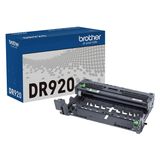
Brother DR920 Drum Unit with Approx. 45,000-Page Yield
Part number DR920
Fit unconfirmed · check the full model, suffix and version.
Source & checks before ordering
Why it is shown: The printer manufacturer explicitly associates this exact consumable SKU with the named model. Confirm current regional supply and firmware requirements before purchase.
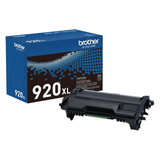
Brother Genuine TN920 Standard-yield Black Toner Cartridge
Part number TN920
Fit unconfirmed · check the full model, suffix and version.
Source & checks before ordering
Why it is shown: The printer manufacturer explicitly associates this exact consumable SKU with the named model. Confirm current regional supply and firmware requirements before purchase.
Brother Genuine TN920XXL Super High Yield Black Toner Cartridge
Part number TN920XXL
Fit unconfirmed · check the full model, suffix and version.
Source & checks before ordering
Why it is shown: The printer manufacturer explicitly associates this exact consumable SKU with the named model. Confirm current regional supply and firmware requirements before purchase.
How these suggestions are reviewed · Seller links are unpaid. Specs & Parts does not sell these parts or guarantee fit, performance, or a repair outcome.
Guidance for Brother printers & imaging. Check the feature and control descriptions against your model.
Specifications & model details
HL-L5210DWT: model-specific checks
Use this model’s marking technology
Brother HL-L5210DWT is recorded as Electro-photographic (EP). Separate a device-generated test from a computer job, and match the consumable system before following a replacement or print-quality procedure.
Match the panel prompt to the exact part code and use the model-specific replacement sequence.
Owner guide: Consumable replacement
Category & symptom guidance
Consumable replacement
3 minute read · Shared guidance for printers & imaging
Read the prompt and identify the exact item
Photograph the complete control-panel prompt and match it to the manual’s supply list. It may name a color cartridge, ink tank, toner, drum, waste box, or maintenance kit. Do not replace several parts because a generic supply indicator is low. For an app alert, verify it refers to the same physical printer and current queue.
Check the remaining-supply status and whether the printer can continue the current job. Follow any stop or replace instruction from the exact model rather than clearing the message through an undocumented menu.
Prepare the correct replacement before opening the printer
Match the full part code and region to the printer. Confirm whether the component is owner replaceable and whether a tool, glove, or waste bag is specified. Place the sealed supply on a stable surface and protect nearby paper from ink or toner. Do not open the printer until you have read the model’s replacement sequence; some parts must be installed in a particular order or orientation.
For a shared office printer, record the installed part code and date so supply use can be tracked.
Inkjet replacement depends on cartridge or tank design
For cartridge inkjets, remove seals and install the cartridge only as shown; do not touch electrical contacts or nozzles. For refillable tanks, use the model-matched bottle, follow the fill marks, and close the tank cap. Do not overfill or force a bottle into an incompatible inlet. Some models require recognition, priming, or alignment afterward; follow the display prompt and allow it to finish.
A separate maintenance box collects ink used during cleaning. Replacing it does not refill the ink tanks or fix a blocked nozzle.
Laser replacement separates toner and imaging parts
For laser printers, determine whether the message names toner, drum, or another kit. Replace the named component only. Follow the package’s orientation and protective seal instructions; avoid touching the drum or fuser. Some toner units are combined with the drum, while others are separate. Use the model diagram to identify how parts fit together without forcing latches.
If spilled toner is visible, use the manufacturer’s cleanup instructions. Do not use a household vacuum unless the manufacturer explicitly states it is suitable.
Verify and dispose of the old supply responsibly
After the printer recognizes the replacement, close all covers and wait for the ready state. Print a status or quality page if the manual recommends it. If the warning remains, record it and the new part code; do not repeatedly remove and reinstall the supply. A printer may require a documented counter reset for a maintenance kit, but not every supply uses one.
Seal the used item for return or recycling according to the manufacturer program. Keep the new package and receipt until the printer completes its test.
Before starting, check whether the printer needs to be on or off for the replacement and whether a door must remain open for carriage access. The sequence varies by design. Read every step first, keep small seals and protective caps away from the paper path, and never force a supply past a latch.
General background sources
These sources support the shared guide. Exact model specifications and matched family procedures have their own sources above.
Owner guidance by Specs & Parts, drafted with GPT-6 Luna. Sources and scope.
Earlier part references
These historical identifiers are separate from the reviewed suggestions above. Their original records have not been renewed for current shopping. Recheck any supersession or fit restrictions with the manufacturer.
Source-listed part or accessory
DR920
Brother DR920 Drum Unit with Approx. 45,000-Page Yield
The printer manufacturer explicitly associates this exact consumable SKU with the named model. Confirm current regional supply and firmware requirements before purchase.
Brother Genuine TN920 Standard-yield Black Toner Cartridge
The printer manufacturer explicitly associates this exact consumable SKU with the named model. Confirm current regional supply and firmware requirements before purchase.
Brother Genuine TN920XXL Super High Yield Black Toner Cartridge
The printer manufacturer explicitly associates this exact consumable SKU with the named model. Confirm current regional supply and firmware requirements before purchase.